







Question: Matlab assingment. Help! Using the MATLAB command questdlg, make your dialogue box as follows: Matrix analysis What do you want? Fundamental space Extract the column
Matlab assingment. Help!
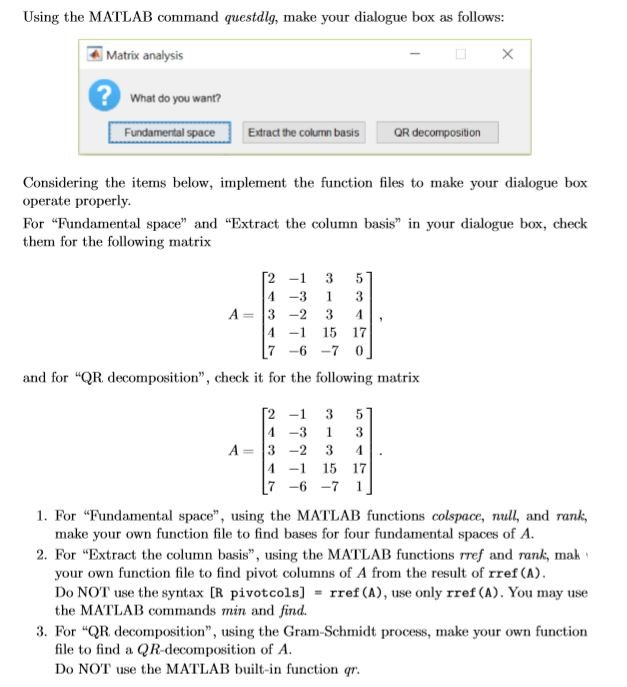
Using the MATLAB command questdlg, make your dialogue box as follows: Matrix analysis What do you want? Fundamental space Extract the column basis Considering the items below, implement the function files to make your dialogue box operate properly. For "Fundamental space" and "Extract the column basis in your dialogue box, check them for the following matrix 2 -1 35 4 -3 1 3 A-:13-2341, -1 15 17 7-6-7 0 and for "QR decomposition", check it for the following matrix 2 -1 3 5 4 -3 1 3 -1 15 17 . For "Pundamental space", using the MATLAB functions colspace, null, and rank, make your own function file to find bases for four fundamental spaces of A 2. For "Extract the column basis", using the MATLAB functions rref and rank, mak your own function file to find pivot columns of A from the result of rref (A) Do NOT use the syntax [R pivot cols] # rref (A), use only rref (A). You may use the MATLAB commands min and finod. 3. For "QRdecomposition", using the Gram-Schmidt process, make your own function file to find a QR-decomposition of A Do NOT use the MATLAB built-in function qr Using the MATLAB command questdlg, make your dialogue box as follows: Matrix analysis What do you want? Fundamental space Extract the column basis Considering the items below, implement the function files to make your dialogue box operate properly. For "Fundamental space" and "Extract the column basis in your dialogue box, check them for the following matrix 2 -1 35 4 -3 1 3 A-:13-2341, -1 15 17 7-6-7 0 and for "QR decomposition", check it for the following matrix 2 -1 3 5 4 -3 1 3 -1 15 17 . For "Pundamental space", using the MATLAB functions colspace, null, and rank, make your own function file to find bases for four fundamental spaces of A 2. For "Extract the column basis", using the MATLAB functions rref and rank, mak your own function file to find pivot columns of A from the result of rref (A) Do NOT use the syntax [R pivot cols] # rref (A), use only rref (A). You may use the MATLAB commands min and finod. 3. For "QRdecomposition", using the Gram-Schmidt process, make your own function file to find a QR-decomposition of A Do NOT use the MATLAB built-in function qr
Step by Step Solution
There are 3 Steps involved in it

Get step-by-step solutions from verified subject matter experts
 Study Help