







Question: MATLAB Create a live script that will have a seperate section (think section break) for each of these problems. Include your name, class, date, and

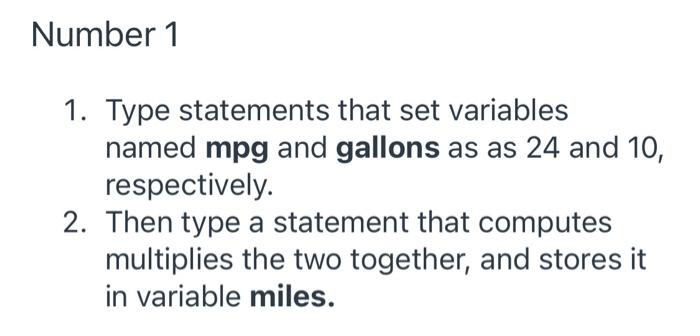
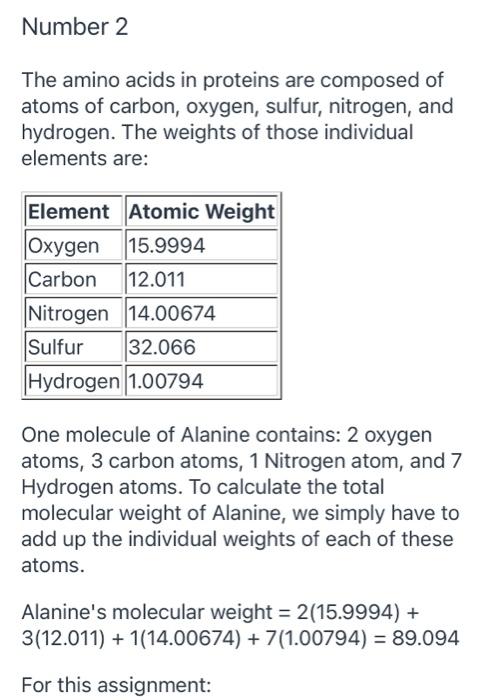
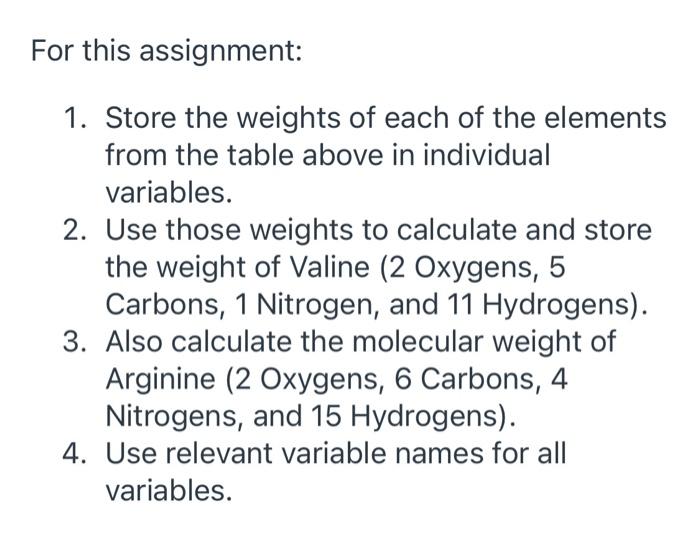
Create a live script that will have a seperate section (think section break) for each of these problems. Include your name, class, date, and assignment number (Week 2: Assignment 1) at the top. Do not hide the echo on any statements. Save the MLX file as a PDF, and upload the PDF file. Number 1 1. Type statements that set variables named mpg and gallons as as 24 and 10, respectively. 2. Then type a statement that computes multiplies the two together, and stores it in variable miles. Number 2 The amino acids in proteins are composed of atoms of carbon, oxygen, sulfur, nitrogen, and hydrogen. The weights of those individual elements are: Element Atomic Weight Oxygen 15.9994 Carbon 12.011 Nitrogen 14.00674 Sulfur 32.066 Hydrogen 1.00794 One molecule of Alanine contains: 2 oxygen atoms, 3 carbon atoms, 1 Nitrogen atom, and 7 Hydrogen atoms. To calculate the total molecular weight of Alanine, we simply have to add up the individual weights of each of these atoms. Alanine's molecular weight = 2(15.9994) + 3(12.011) + 1(14.00674) +7(1.00794) = 89.094 For this assignment: For this assignment: 1. Store the weights of each of the elements from the table above in individual variables. 2. Use those weights to calculate and store the weight of Valine (2 Oxygens, 5 Carbons, 1 Nitrogen, and 11 Hydrogens). 3. Also calculate the molecular weight of Arginine (2 Oxygens, 6 Carbons, 4 Nitrogens, and 15 Hydrogens). 4. Use relevant variable names for all variables
Step by Step Solution
There are 3 Steps involved in it

Get step-by-step solutions from verified subject matter experts
 Study Help