







Question: MATLAB First (20%) write a function named calcRoomArea that 1. Takes as input the length and width of a room 2. Returns two outputs area
MATLAB
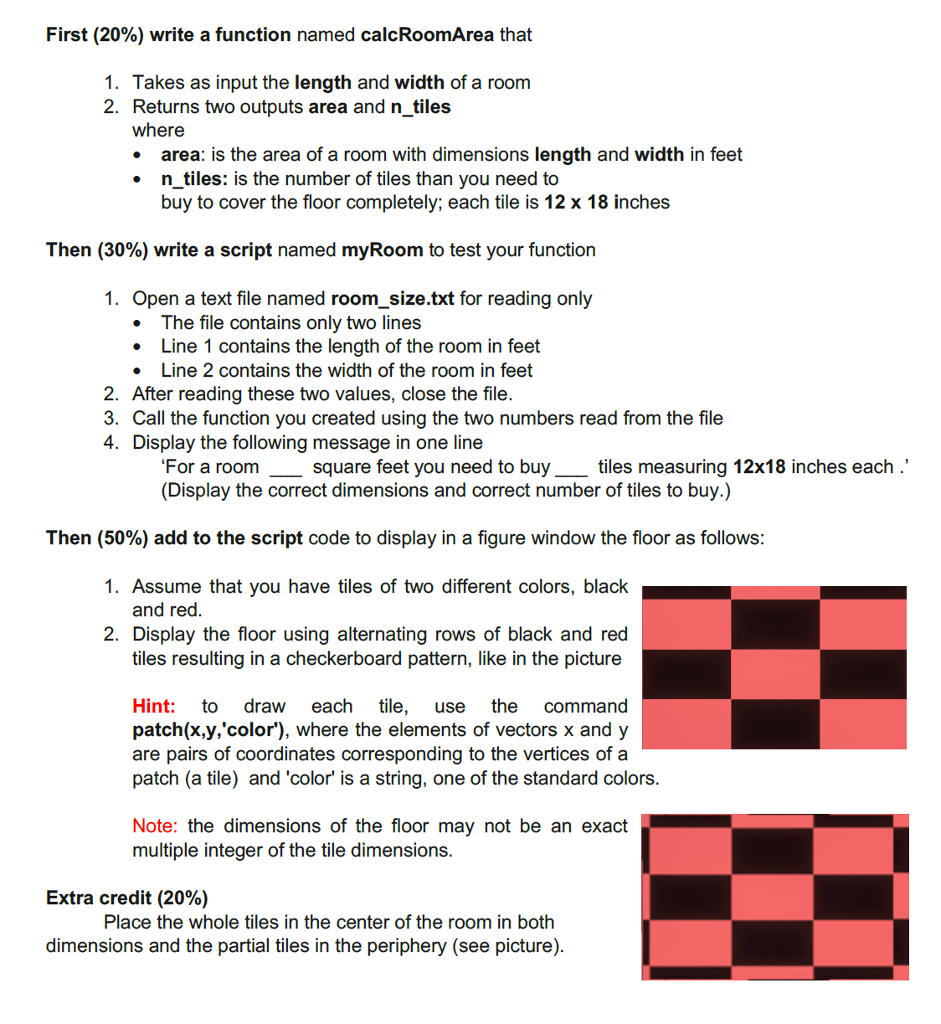
First (20%) write a function named calcRoomArea that 1. Takes as input the length and width of a room 2. Returns two outputs area and n tiles where area: is the area of a room with dimensions length and width in feet n tiles: is the number of tiles than you need to buy to cover the floor completely; each tile is 12 x 18 inches Then (30%) write a script named myRoom to test your function 1. Open a text file named room_size.txt for reading only * The file contains only two lines Line 1 contains the length of the room in feet Line 2 contains the width of the room in feet 2. After reading these two values, close the file 3. Call the function you created using the two numbers read from the file 4. Display the following message in one line For a room (Display the correct dimensions and correct number of tiles to buy.) square feet you need to buytiles measuring 12x18 inches each" Then (50%) add to the script code to display in a figure window the floor as follows 1. Assume that you have tiles of two different colors, black and red 2. Display the floor using alternating rows of black and red tiles resulting in a checkerboard pattern, like in the picture Hint: to draw each tile, use the command patch(x,y,'color'), where the elements of vectors x andy are pairs of coordinates corresponding to the vertices of a patch (a tile) and 'color' is a string, one of the standard colors Note: the dimensions of the floor may not be an exact multiple integer of the tile dimensions Extra credit (20%) Place the whole tiles in the center of the room in both dimensions and the partial tiles in the periphery (see picture)
Step by Step Solution
There are 3 Steps involved in it

Get step-by-step solutions from verified subject matter experts
 Study Help