







Question: matlab function x define your function * Describe breifly what this function is for. & x and y : locations of a moving particle in
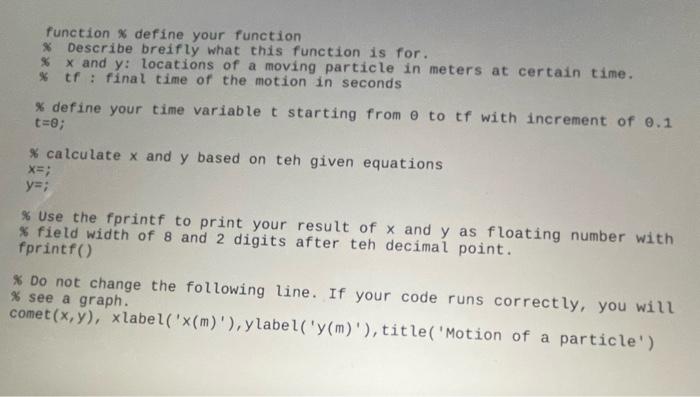
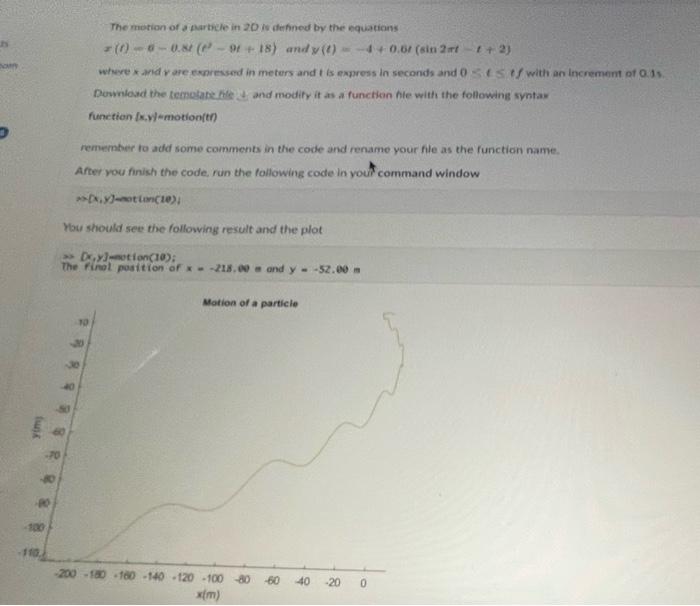
function x define your function * Describe breifly what this function is for. \& x and y : locations of a moving particle in meters at certain time. * tf : final time of the motion in seconds \% define your time variable t starting from to tf with increment of 0.1 t=; \% calculate x and y based on teh given equations x=; y=; \% Use the fprintf to print your result of x and y as floating number with fprint width of 8 and 2 digits after teh decimal point. * Do not change the following line. If your code runs correctly, you will * see a graph. The motion of a parbcle in 20 is defned by the equations x(t)0.8t(t29t+18)andy(t)=4+0.6t(sin2tt+2) where x and y are expressed in meters and t is express in seconds and 0=iff with an incrememt of 0.1s s. Downiovd the temolate file it and modity it as a functhan hie with the following synta: function (x,y) emotion(t) rememter to add some comments in the code and rename your file as the function name. After you finish the code, run the following code in your command window mi(x,y]-atin(1e); You should see the following result and the plot a) [;,y]-not i on (10) The finet position of x=218, 09= and y=52.00m
Step by Step Solution
There are 3 Steps involved in it

Get step-by-step solutions from verified subject matter experts
 Study Help