







Question: Matlab Fundamentals Homework. Chapter 11: Increasing Automation with Programming Constructs This problem illustrates a particularly useful calculation style using a f or loop. Study it
Matlab Fundamentals Homework. Chapter 11: Increasing Automation with Programming Constructs
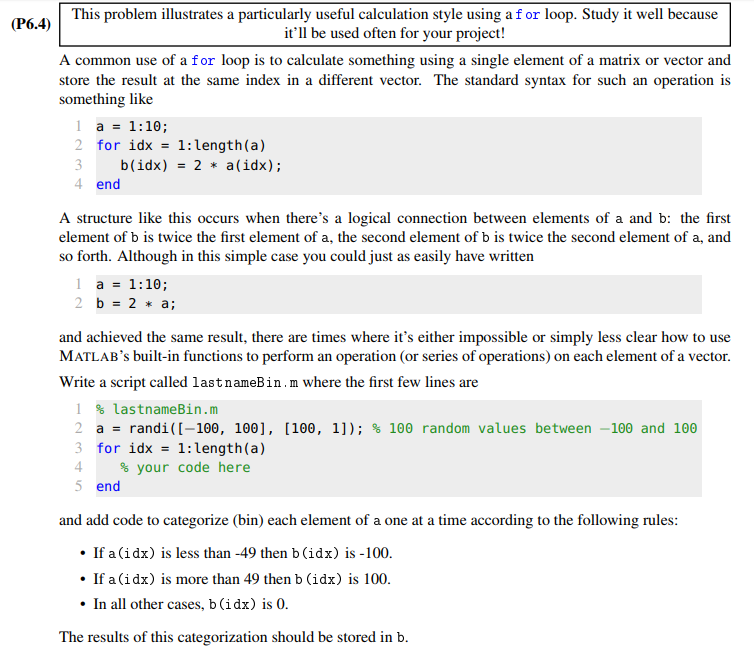
This problem illustrates a particularly useful calculation style using a f or loop. Study it well because it'll be used often for your project! A common use of a for loop is to calculate something using a single element of a matrix or vector and store the result at the same index in a different vector. The standard syntax for such an operation is (P6.4) something like l a1:10; 2 for idx - 1:length (a) 3 b(idx)2a(idx); 4 end A structure like this occurs when there's a logical connection between elements of a and b: the first element of b is twice the first element of a, the second element of b is twice the second element of a, and so forth. Although in this simple case you could just as easily have written l a 1:10; and achieved the same result, there are times where it's either impossible or simply less clear how to use MATLAB's built-in functions to perform an operation (or series of operations) on each element of a vector Write a script called lastnameBin.m where the first few lines are 1 %lastnameBin.m a rand (-100, 100], [100, 11); % 100 random values between-100 and 100 3 for idx= 1:length(a) 4 5 end % your code here and add code to categorize (bin) each element of a one at a time according to the following rules .If a (idx) is less than -49 then b (idx) is -100 .If a (idx) is more than 49 then b (idx) is 100 .In all other cases, b (idx) is 0 The results of this categorization should be stored in b
Step by Step Solution
There are 3 Steps involved in it

Get step-by-step solutions from verified subject matter experts
 Study Help