







Question: MATLAB. having trouble finding the max and min then how to add it to the graph? %the goal of this assignment is to find the
MATLAB. having trouble finding the max and min then how to add it to the graph?
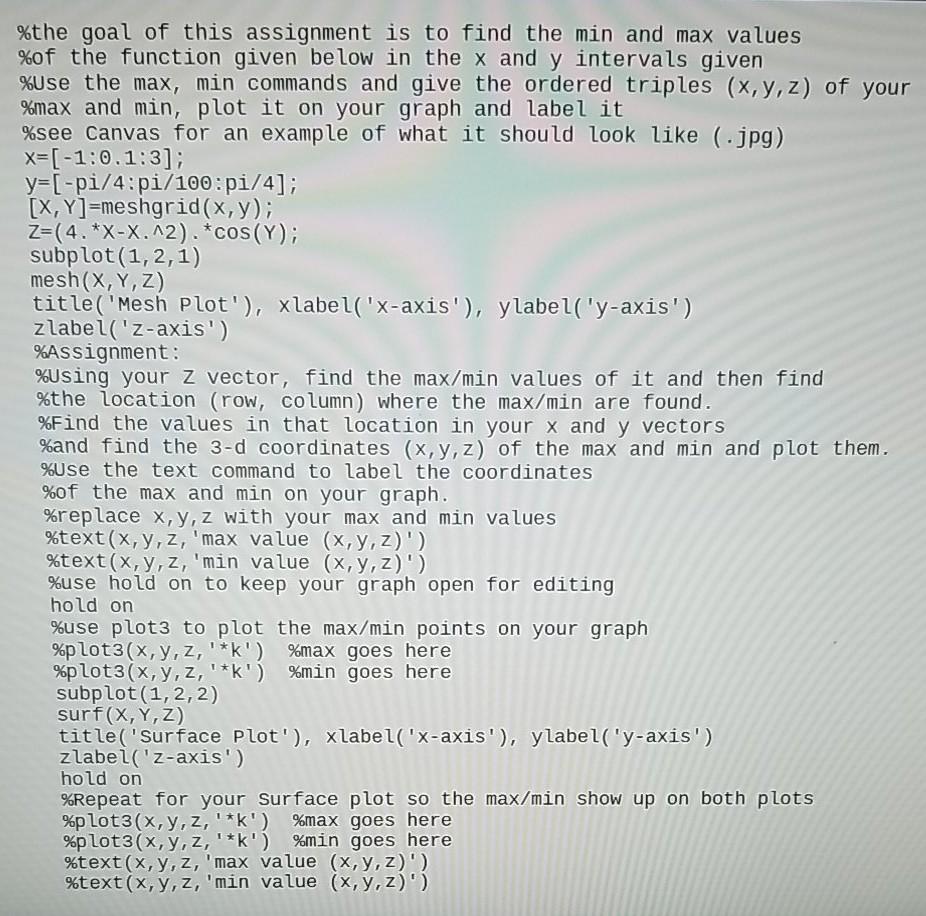
%the goal of this assignment is to find the min and max values %of the function given below in the x and y intervals given %Use the max, min commands and give the ordered triples (x,y,z) of your %max and min, plot it on your graph and label it %see Canvas for an example of what it should look like (.jpg) X=[-1.0.1:3]; y=[-pi/4:pi/100:pi/4]; [X,Y]=meshgrid(x,y); Z=(4.*X-X. ^2). *cos(Y); subplot(1,2,1) mesh(X,Y,Z) title("Mesh Plot'), xlabel('x-axis'), ylabel('y-axis') zlabel('z-axis') %Assignment: %using your z vector, find the max/min values of it and then find %the location (row, column) where the max/min are found. %Find the values in that location in your x and y vectors %and find the 3-d coordinates (x, y, z) of the max and min and plot them. %Use the text command to label the coordinates %of the max and min on your graph. %replace x,y,z with your max and min values %text(x,y,z, 'max value (x,y,z)') %text(x,y,z, 'min value (x, y, z)') %use hold on to keep your graph open for editing hold on %use plot3 to plot the max/min points on your graph %plot3(x,y,z,'*') %max goes here %plot3(x,y,z,'*k') %min goes here subplot(1,2,2) surf(X,Y,Z) title('Surface Plot'), xlabel('x-axis'), ylabel('y-axis) zlabel('z-axis') hold on %Repeat for your surface plot so the max/min show up on both plots %plot3(x,y,z,'*k') %max goes here %plot3(x,y,z,'*') %min goes here %text(x,y,z, 'max value (x, y, z)') %text(x,y,z, 'min value (x,y,z)')
Step by Step Solution
There are 3 Steps involved in it

Get step-by-step solutions from verified subject matter experts
 Study Help