



Question: MATLAB help please :( A biomedical research company has collected a number of blood donor candidates' information, including name, blood type, Rh factor, and blood
MATLAB help please :(
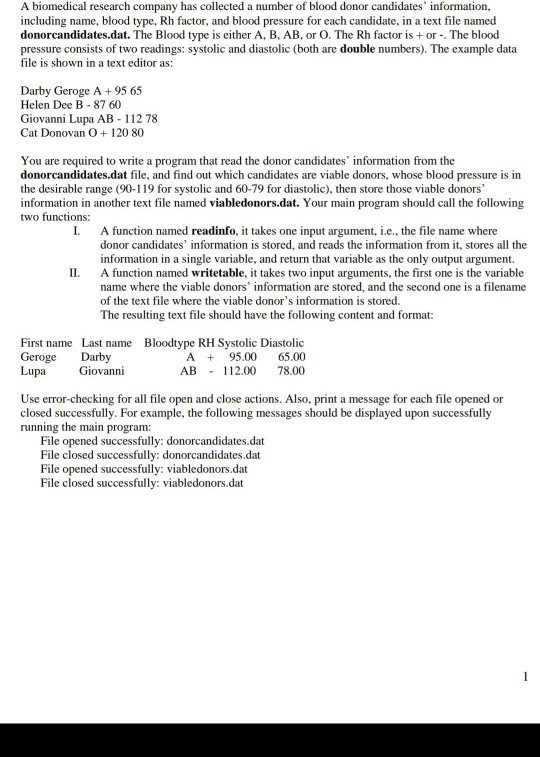
A biomedical research company has collected a number of blood donor candidates' information, including name, blood type, Rh factor, and blood pressure for each candidate, in a text file named donorcandidates.dat. The Blood type is either A, B, AB, or O. The Rh factor is +or-. The blood pressure consists of two readings: systolic and diastolic (both are double numbers). The example data file is shown in a text editor as: Darby Geroge A +95 65 Helen Dee B-87 60 Giovanni Lupa AB 112 78 Cat Donovan O 120 80 hat read the donor candidates information from thoe You are required to write a program t donorcandidates.dat file, and find out which candidates are viable donors, whose blood pressure is in the desirable range (90-119 for systolic and 60-79 for diastolic), then store those viable donors information in another text file named viabledonors.dat. two functions: Your main program should call the following I. A function named readinfo, i takes one input argument, i.e., the file name where donor candidates' information is stored, and reads the information from it, stores all the information in a single variable, and return that variable as the only output argument. I A function named writetable, it takes two input arguments, the first one is the variable name where the viable donors' information are stored, and the second one is a filename of the text file where the viable donor's information is stored. The resulting text file should have the following content and format: First name Last name Geroge Darby Lupa Giovanni Bloodtype RH Systolic Diastolic A 95.00 65.00 AB112.00 78.00 Also, print a message for each file opened or Use error-checking for all file open and cl closed successfully. For example, the following messages should be displayed upon successfully running the main program: ose actions. File opened successfully: donorcandidates.dat File closed successfully: donorcandidates.dat File opened successfully: viabledonors.dat File closed successfully: viabledonors.dat
Step by Step Solution
There are 3 Steps involved in it

Get step-by-step solutions from verified subject matter experts