







Question: MATLAB HELP PLEASE!!@ produce a matlab code using **ONLY** commands FROM the LIST please. ^^*** indexing, max, min, sum, mean, norm, linspace, colon operator (:),
MATLAB HELP PLEASE!!@
produce a matlab code using **ONLY** commands FROM the LIST please.
^^***
indexing, max, min, sum, mean, norm, linspace, colon operator (:), array operations,
matrix operations, inv, transpose ('), poly, roots, polyval, conv, deconv, close,
plot, xlabel, ylabel, grid, legend, input, function, @, load, save,
xlsread, xlswrite, if, else, elseif, end, round, rem, mod, ceil,
floor, fix, for, continue, break
^^***>>>
Matlab question below:::::
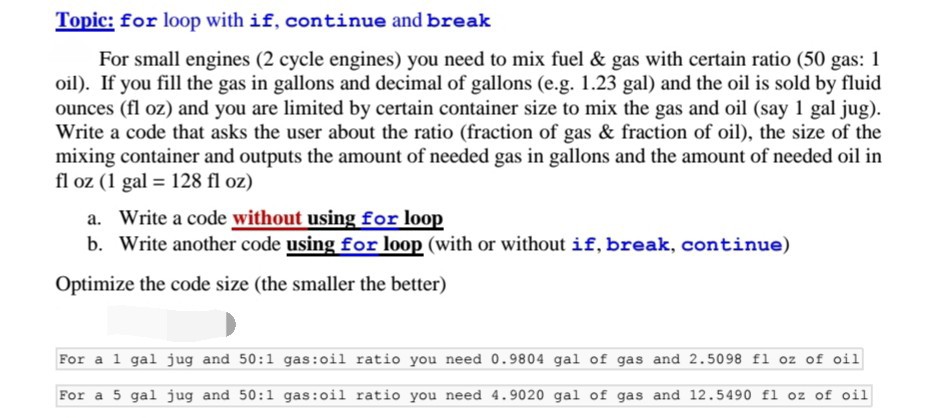
For small engines (2 cycle engines) you need to mix fuel & gas with certain ratio (50 gas: 1
oil). If you fill the gas in gallons and decimal of gallons (e.g. 1.23 gal) and the oil is sold by fluid
ounces (fl oz) and you are limited by certain container size to mix the gas and oil (say 1 gal jug).
Write a code in matlab that asks the user about the ratio (fraction of gas & fraction of oil), the size of the
mixing container and outputs the amount of needed gas in gallons and the amount of needed oil in
fl oz (1 gal = 128 fl oz)
a. Write a code without using for loop
b. Write another code using for loop (with or without if, break, continue)
Optimize the code size (the smaller the better)
%Sample outputs:
%For a 1 gal jug and 50:1 gas:oil ratio you %need 0.9804 gal of gas and 2.5098 fl oz %of oil
%For a 5 gal jug and 50:1 gas:oil ratio you %need 4.9020 gal of gas and 12.5490 fl oz %of oil
SEE PICTURES BELOW FOR ACTUAL DETAILED QUESTION. MATLAB CODING
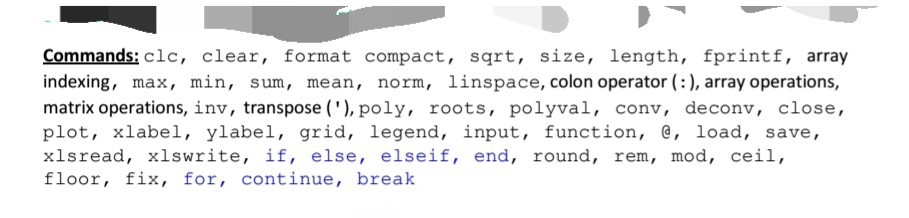
Commands: clc, clear, format compact, sqrt, size, length, fprintf, array indexing, max, min, sum, mean, norm, linspace, colon operator (), array operations, matrix operations, inv, transpose ("),poly, roots, polyval, conv, deconv, close, plot, xlabel, ylabel, grid, legend, input, function, e, load, save, xlsread, xlswrite, if, else, elseif, end, round, rem, mod, cei1, floor, fix, for, continue, break
Step by Step Solution
There are 3 Steps involved in it

Get step-by-step solutions from verified subject matter experts
 Study Help