







Question: MATLAB. if it is easier to write, the input myFunction can be replaced with the with an euqation like y = sin(x), so that you
MATLAB.
if it is easier to write, the input myFunction can be replaced with the with an euqation like y = sin(x), so that you do not need to call another function.
Please do not use any tools not included in the basic student MATLAB package.
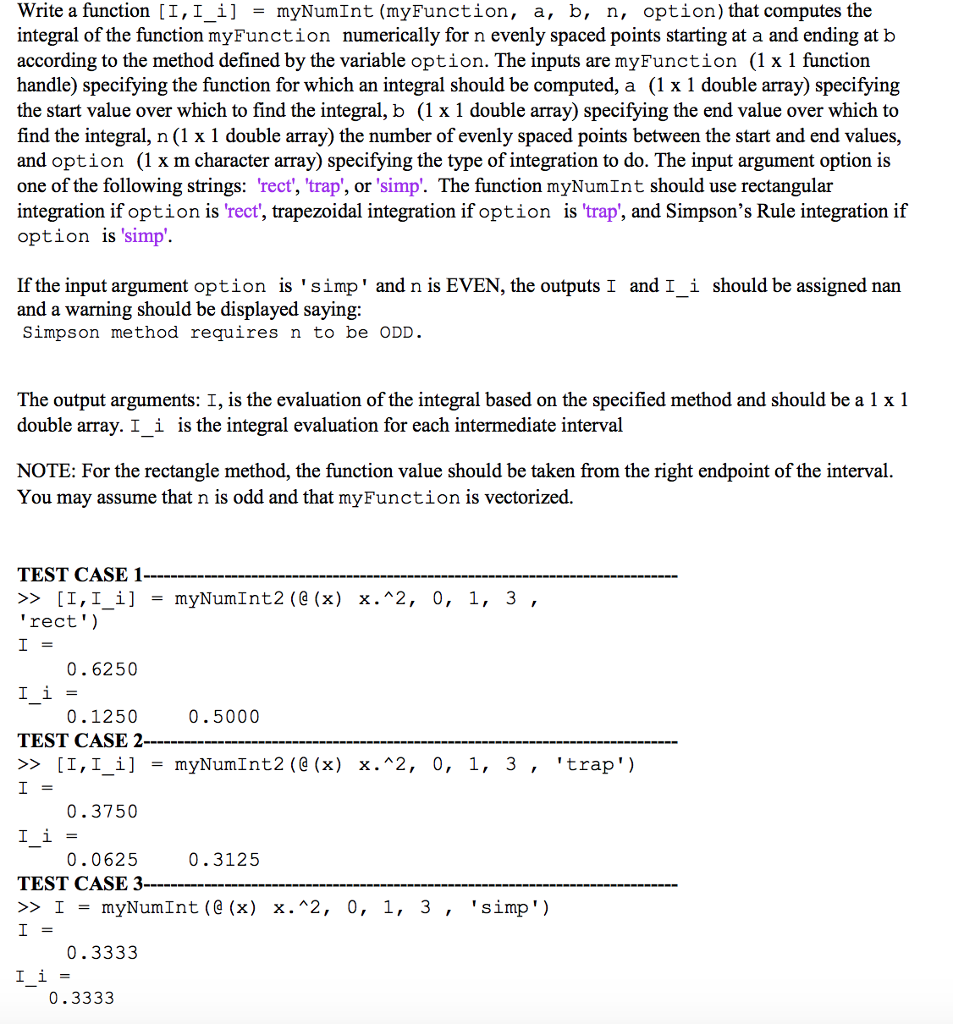
Write a function [1,1j = myNumInt (myFunction, a, b, n, option) that computes the integral of the function myFunction numerically for n evenly spaced points starting at a and ending at b according to the method defined by the variable option. The inputs are myFunction (1 x 1 function handle) specifying the function for which an integral should be computed, a (1 x 1 double array) specifying the start value over which to find the integral, b (1 x 1 double array) specifying the end value over which to find the integral, n (1 x 1 double array) the number of evenly spaced points between the start and end values, and option (1 x m character array) specifying the type of integration to do. The input argument option is one of the following strings: 'rect', 'trap', or simp'. The function myNumInt should use rectangular integration if option is 'rect', trapezoidal integration if option is 'trap', and Simpson's Rule integration if option is 'simp'. - If the input argument option is 'simp' and n is EVEN, the outputs I and I_i should be assigned nan and a warning should be displayed saying: Simpson method requires n to be ODD The output arguments: I, is the evaluation of the integral based on the specified method and should be a 1x 1 double array. I_i is the integral evaluation for each intermediate interval NOTE: For the rectangle method, the function value should be taken from the right endpoint of the interval. You may assume that n is odd and that myFunction is vectorized. TEST CASE 1 >> [1,1_1 ] = rect') myNumInt2(@(x) X."2, 0, 1, 3 0.6250 11= 0.1250 0.5000 TEST CASE 2 >> [1,1! ] = myNum1nt2(@ (x) X."2, 0, 1, 3 , 'trap ') 0.3750 11= 0.3125 0.0625 TEST CASE 3 >> 1 = myNumInt (@ (x) X.^2, 0, 1, 3 , 'simp) 0.3333 0.3333 Write a function [1,1j = myNumInt (myFunction, a, b, n, option) that computes the integral of the function myFunction numerically for n evenly spaced points starting at a and ending at b according to the method defined by the variable option. The inputs are myFunction (1 x 1 function handle) specifying the function for which an integral should be computed, a (1 x 1 double array) specifying the start value over which to find the integral, b (1 x 1 double array) specifying the end value over which to find the integral, n (1 x 1 double array) the number of evenly spaced points between the start and end values, and option (1 x m character array) specifying the type of integration to do. The input argument option is one of the following strings: 'rect', 'trap', or simp'. The function myNumInt should use rectangular integration if option is 'rect', trapezoidal integration if option is 'trap', and Simpson's Rule integration if option is 'simp'. - If the input argument option is 'simp' and n is EVEN, the outputs I and I_i should be assigned nan and a warning should be displayed saying: Simpson method requires n to be ODD The output arguments: I, is the evaluation of the integral based on the specified method and should be a 1x 1 double array. I_i is the integral evaluation for each intermediate interval NOTE: For the rectangle method, the function value should be taken from the right endpoint of the interval. You may assume that n is odd and that myFunction is vectorized. TEST CASE 1 >> [1,1_1 ] = rect') myNumInt2(@(x) X."2, 0, 1, 3 0.6250 11= 0.1250 0.5000 TEST CASE 2 >> [1,1! ] = myNum1nt2(@ (x) X."2, 0, 1, 3 , 'trap ') 0.3750 11= 0.3125 0.0625 TEST CASE 3 >> 1 = myNumInt (@ (x) X.^2, 0, 1, 3 , 'simp) 0.3333 0.3333
Step by Step Solution
There are 3 Steps involved in it

Get step-by-step solutions from verified subject matter experts
 Study Help