







Question: Matlab is needed...The image is just for visuals it doesnt contain any relevant information this is all the info I was given and all the
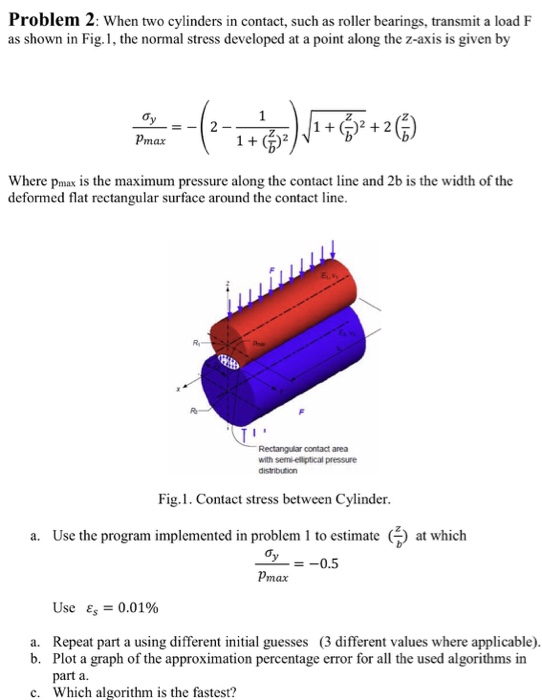 Matlab is needed...The image is just for visuals it doesnt contain any relevant information this is all the info I was given and all the info you need
 This is the implementation that is referred to:
choice = menu('Choose a method','Bisection','False Position','Fixed-Point iteration','Newton','Secant','Modified Secant','MATLAB fzero','Muller','Bairstow','MATLAB roots');
%% Type in your function after @(x)
f=@(x)x^2+x^9-1;
%% Bisection Method
if(choice==1)
a=-10;
b=10; %% bisection interval
tol=1e-10;
fa=f(a);
fb=f(b);
while abs(b-a)>tol
c=(a+b)/2;
fc=f(c);
if fa*fc
b=c;
fb=fc;
elseif fb*fc
a=c;
fa=fc;
else
break
end
end
x=c;
end
%% False Position Method
if (choice==2)
x0 = -6 ;%initial guess
x1 = 5;
tolerance = 0.001;
for i=0:9223372036854775807
if ((f(x1)-f(x0))==0)
fprintf('Error in denominator equals 0! ');
break;
else
x2= x1 - (f(x1)* (x1-x0)/(f(x1)-f(x0))) ;
end
c = f(x2);
absolute_c= abs(c);
if absolute_c
break
end
if f(x0)*c
x1=x2;
continue;
else
x0=x2;
continue;
end
end
x2;
end
%% Fixed Point iteration
if (choice==3)
x = 0.5; %initial guess
Es = 0.1; %tolerance
Ea = 1000; %randomly large relative approximate error
xold = x;
n = 0; %iteration counter
while Ea > Es
x = -f(x)+x;
Ea = abs((x-xold)/x)*100;
xold = x;
n = n + 1;
end
x;
end
%% Newton-Raphson
if (choice==4)
x1 = 0.05; % Initial point
iter = 0;
tol=0.001;
while (1) %our loop handler is 10^-3 %error approximaiton
dif=(f(x1+0.001)-f(x1-0.001))/0.002;
x2=x1-f(x1)/dif;
if (abs(x2-x1)
break;
end
x1=x2;
end
x2;
end
%% Secant Method
if(choice==5)
x0=0;
x1=5; %% Initial values
tol=0.00001;
while (1)
x2=x1-(f(x1)*(x0-x1))/(f(x0)-f(x1));
if (abs(x2-x1)
break;
end
x0=x1;
x1=x2;
end
x2;
end
%% Modified secant method
if(choice==6)
delta=0.0001;
tol=0.000001;
while (1)
x2=x1-delta*f(x1)/(f(x1+delta)-f(x1));
if (abs(x2-x1)
break;
end
x1=x2;
end
x2;
end
%% fzero
if(choice==7)
x = fzero(f,0);
end
%% Muller
if (choice==8)
p0=0;
p1=5;
p2=10;
P(1) = p0;
P(2) = p1;
P(3) = p2; % starting points
delta=0.00001; % tolarance
epsilon=delta;
max1=10000;
y0 = feval(f,p0);
y1 = feval(f,p1);
y2 = feval(f,p2);
for k=1:max1,
h0 = p0 - p2;
h1 = p1 - p2;
c = y2;
e0 = y0 - c;
e1 = y1 - c;
det1 = h0*h1*(h0-h1);
a = (e0*h1 - h0*e1)/det1;
b = (h0^2*e1 - h1^2*e0)/det1;
if b^2 > 4*a*c,
disc = sqrt(b^2 - 4*a*c);
else
disc = 0;
end
if b
z = - 2*c/(b + disc);
p3 = p2 + z;
if abs(p3-p1)
u = p1;
p1 = p0;
p0 = u;
v = y1;
y1 = y0;
y0 = v;
end
if abs(p3-p2) Problem 2 hen two cylinders in contact, such as roller bearings, transmit a load F as shown in Fig. 1, the normal stress developed at a point along the z-axis is given by 1 (b) V max Where pmax is the maximum pressure along the contact line and 2b is the width of the deformed flat rectangular surface around the contact line. Rectangular contact area with semi-ellptical pressure Fig.1. Contact stress between Cylinder. a. Use the program implemented in problem 1 to estimate at which 0.5 pmax Use Es 0.01% a. Repeat part a using different initial guesses (3 different values where applicable). b. Plot a graph of the approximation percentage error for all the used algorithms in part a c. Which algorithm is the fastest? Problem 2 hen two cylinders in contact, such as roller bearings, transmit a load F as shown in Fig. 1, the normal stress developed at a point along the z-axis is given by 1 (b) V max Where pmax is the maximum pressure along the contact line and 2b is the width of the deformed flat rectangular surface around the contact line. Rectangular contact area with semi-ellptical pressure Fig.1. Contact stress between Cylinder. a. Use the program implemented in problem 1 to estimate at which 0.5 pmax Use Es 0.01% a. Repeat part a using different initial guesses (3 different values where applicable). b. Plot a graph of the approximation percentage error for all the used algorithms in part a c. Which algorithm is the fastest
u = p2;
p2 = p1;
p1 = u;
v = y2;
y2 = y1;
y1 = v;
end
p2 = p3;
y2 = feval(f,p2);
P = [P,p2];
err = abs(z);
relerr = err/(abs(p3)+eps);
if (err
end
P(end);
end
%% Bairstow
if(choice==9)
tol=0.000001;
a=[1 0 1];
n=2;
it=1;
while n>2
%Initialise for this loop
u=1; v=1; st=1;
while st>tol
b(1)=a(1)-u; b(2)=a(2)-b(1)*u-v;
for k=3:n
b(k)=a(k)-b(k-1)*u-b(k-2)*v;
end;
c(1)=b(1)-u; c(2)=b(2)-c(1)*u-v;
for k=3:n-1
c(k)=b(k)-c(k-1)*u-c(k-2)*v;
end;
%calculate change in u and v
c1=c(n-1); b1=b(n); cb=c(n-1)*b(n-1);
c2=c(n-2)*c(n-2); bc=b(n-1)*c(n-2);
if n>3, c1=c1*c(n-3); b1=b1*c(n-3);end;
dn=c1-c2;
du=(b1-bc)/dn; dv=(cb-c(n-2)*b(n))/dn;
u=u+du; v=v+dv;
st=norm([du dv]); it=it+1;
end;
[r1,r2,im1,im2]=solveq(u,v,n,a);
rts(n,1:2)=[r1 im1]; rts(n-1,1:2)=[r2 im2];
n=n-2;
a(1:n)=b(1:n);
end;
%Solve last quadratic or linear equation
u=a(1); v=a(2);
[r1,r2,im1,im2]=solveq(u,v,n,a);
rts(n,1:2)=[r1 im1];
if n==2
rts(n-1,1:2)=[r2 im2];
end;
rts(1,1)
end
%% Matlab Roots
if (choice==10)
c=[1,0,-1]; %% Need to be changed for different equations
roots(c)
end
This is the function for solveq if it is not created you will get an error when running the code:
function [r1,r2,im1,im2]=solveq(u,v,n,a);
% Solves x^2 + ux + v = 0 (n 1) or x + a(1) = 0 (n = 1).
%
% Example call: [r1,r2,im1,im2]=solveq(u,v,n,a)
% r1, r2 are real parts of the roots,
% im1, im2 are the imaginary parts of the roots.
% Called by function bairstow.
%
if n==1
r1=-a(1);im1=0; r2=0; im2=0;
else
d=u*u-4*v;
if d
d=-d;
im1=sqrt(d)/2; r1=-u/2; r2=r1; im2=-im1;
elseif d>0
r1=(-u+sqrt(d))/2; im1=0; r2=(-u-sqrt(d))/2; im2=0;
else
r1=-u/2; im1=0; r2=-u/2; im2=0;
end;
end
end
Step by Step Solution
There are 3 Steps involved in it
1 Expert Approved Answer
Step: 1 Unlock

Question Has Been Solved by an Expert!
Get step-by-step solutions from verified subject matter experts
Step: 2 Unlock
Step: 3 Unlock
 Study Help