







Question: [MATLAB] Part 4: User-defined functions (19 points) The Fibonacci sequence is characterized by the set of numbers beginning with F1 1, F2 1, and every
[MATLAB]
![[MATLAB] Part 4: User-defined functions (19 points) The Fibonacci sequence is characterized](https://s3.amazonaws.com/si.experts.images/answers/2024/08/66cded1f59433_61466cded1eb40d5.jpg)
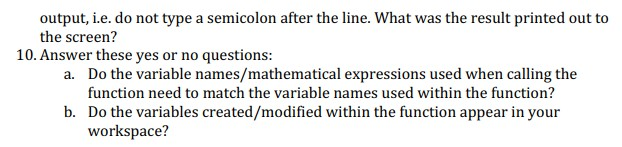
Part 4: User-defined functions (19 points) The Fibonacci sequence is characterized by the set of numbers beginning with F1 1, F2 1, and every following number is the sum of the previous two numbers: F FnFn-1. Create a user-defined function that calculates a sequence similar to the Fibonacci sequence using any two starting numbers F1- a, F2 b, FnFn-2-1 and returns the nth number in the sequence. Before you begin writing your function, take some time to answer these questions. All answers should be written in the appropriate space in the table on the last page What is the name of your function going to be? NOTE: The rules for naming functions are the same as naming scripts and variables in MATLAB Write a short line stating the purpose of your function. What input arguments do you need in order to transfer data into the function? Write out each input argument; its name and description. Think about what data you need from the user in order to perform the appropriate calculations. DO NOT use the input ) function in MATLAB for this part. What output arguments do you need in order to transfer data out of the function? Write out each output argument; its name and description. Think about what information/data the user wants from the calculations. Write down the function definition line for your function using your answers in parts 1, 2, and 3 Complete your function body by translating the following steps into MATLAB code 1. 2. 3. 4. 5. 6. if the nth number is 1 if the nth number is 2 anything else return F1 return Fz for the number of desired terms starting at 3 return FnFn-2 Fn-1 After you finish your function body, what command do you type to complete your function? Run your function using the "Run" button in the Editor ribbon. What error do you get? To properly test your function, you must "call" it from the command window or within a script. To "call" a function, you type the name of the function with the corresponding input arguments. For example, to "call" the sin function, you type sin(x) where sin is the name of the function and x is the input argument. x can be the name of a variable, a number, or a mathematical expression. 7. 8. 9. Call your function from the command line with F3 and F2- 5 to determine the 10th term in the sequence. What command did you type? Do not suppress the
Step by Step Solution
There are 3 Steps involved in it

Get step-by-step solutions from verified subject matter experts
 Study Help