







Question: MATLAB PLEASE ANSWER THIS QUESTION WITHIN 2 HOURS! It is a two part question so please do both parts. PART A) Do not use any
MATLAB
PLEASE ANSWER THIS QUESTION WITHIN 2 HOURS!
It is a two part question so please do both parts.
PART A)
Do not use any built-in MATLAB functions except size(), input(), fprintf() and zeros().
Write a function that will accept a matrix and return a matrix. The function should take the passed matrix and using Gauss Elimination put zeros in the first column of the matrix. The first step is to put the row with the largest absolute value in the first row by swapping using two functions you wrote in a previous homework. Then calculate the factor necessary to multiply the first row by so that when it is added to the second row, the element in row 2 column 1 becomes zero. Use your linear combination function to accomplish this task. Then move down to the next row. Keep looping through the rows until all the elements in column 1, except row 1, are zero.
For example, if the matrix
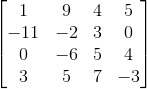
is passed to the function, the function would return
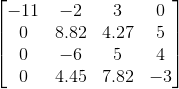
PART B)
Update the function from part A to a function that calculates the determinant of a matrix. You should continue the Gauss Elimination down the diagonal to the last row. Count the number of times you switch rows because each row exchange changes the sign of the determinant. When the matrix is in upper-triangular form, the determinant is the product of the diagonal elements with the proper sign. Your function should accept a square matrix of any size as an argument and return the scalar determinant.
Note: Your function should be written to handle matrices of any size. Test your function with matrices of different sizes for which you know the solution to ensure that your function works correctly.
Use variable names that relate to their function and include comments that explain your program logic. Include all the functions your main function uses as local functions in the same script. We must be able to run your function to determine if it works correctly.
Do not use any built-in MATLAB functions except size(), input(), fprintf() and zeros().
Step by Step Solution
There are 3 Steps involved in it

Get step-by-step solutions from verified subject matter experts
 Study Help