







Question: matlab please Function Name: disguises Inputs 1. (char) An image filename containing the image you will disguise File Outputs 1. An image file named with'_disguised'
 matlab please
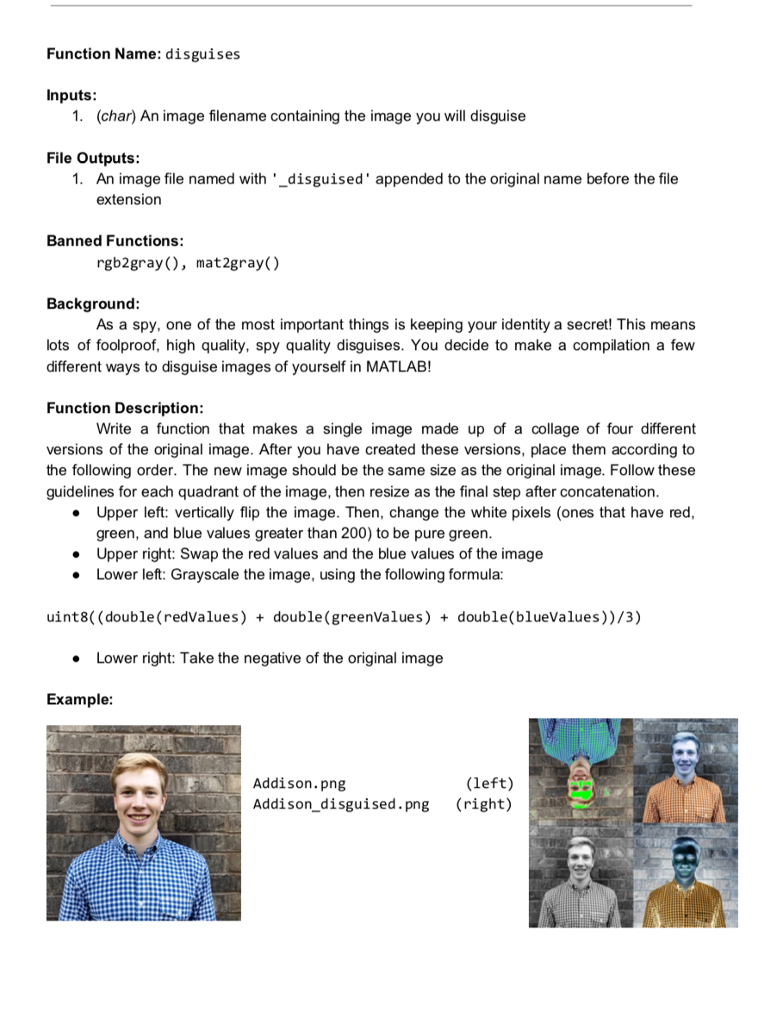
Function Name: disguises Inputs 1. (char) An image filename containing the image you will disguise File Outputs 1. An image file named with'_disguised' appended to the original name before the file extension Banned Functions rgb2gray ), mat2gray() Background As a spy, one of the most important things is keeping your identity a secret! This means lots of foolproof, high quality, spy quality disguises. You decide to make a compilation a few different ways to disguise images of yourself in MATLAB! Function Description Write a function that makes a single image made up of a collage of four different versions of the original image. After you have created these versions, place them according to the following order. The new image should be the same size as the original image. Follow these guidelines for each quadrant of the image, then resize as the final step after concatenation . Upper left: vertically flip the image. Then, change the white pixels (ones that have red, green, and blue values greater than 200) to be pure green Upper right: Swap the red values and the blue values of the image Lower left: Grayscale the image, using the following formula: uint8( (double (redValues) + double(greenValues) + double(blueValues))/3) Lower right: Take the negative of the original image Example (left) Addison.png Addison_disguised.png (right) Function Name: disguises Inputs 1. (char) An image filename containing the image you will disguise File Outputs 1. An image file named with'_disguised' appended to the original name before the file extension Banned Functions rgb2gray ), mat2gray() Background As a spy, one of the most important things is keeping your identity a secret! This means lots of foolproof, high quality, spy quality disguises. You decide to make a compilation a few different ways to disguise images of yourself in MATLAB! Function Description Write a function that makes a single image made up of a collage of four different versions of the original image. After you have created these versions, place them according to the following order. The new image should be the same size as the original image. Follow these guidelines for each quadrant of the image, then resize as the final step after concatenation . Upper left: vertically flip the image. Then, change the white pixels (ones that have red, green, and blue values greater than 200) to be pure green Upper right: Swap the red values and the blue values of the image Lower left: Grayscale the image, using the following formula: uint8( (double (redValues) + double(greenValues) + double(blueValues))/3) Lower right: Take the negative of the original image Example (left) Addison.png Addison_disguised.png (right)
Step by Step Solution
There are 3 Steps involved in it

Get step-by-step solutions from verified subject matter experts
 Study Help