







Question: matlab prgramming language exercise Facercise 2 (4 Points)a - 15 Minutes Cinate a froction that etimates the rate of a rnaction using the folloning evgation:
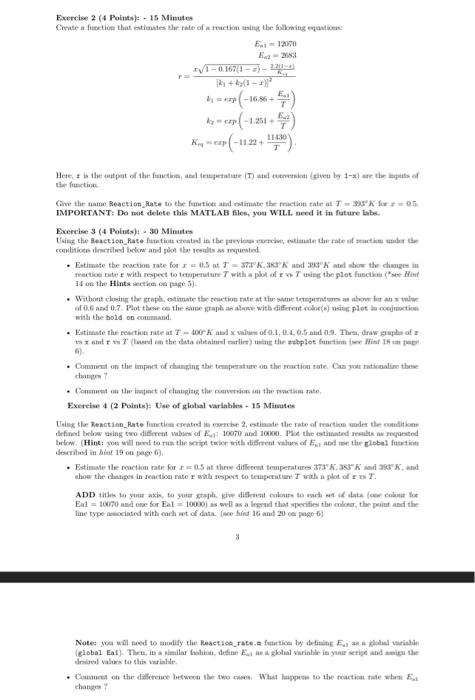
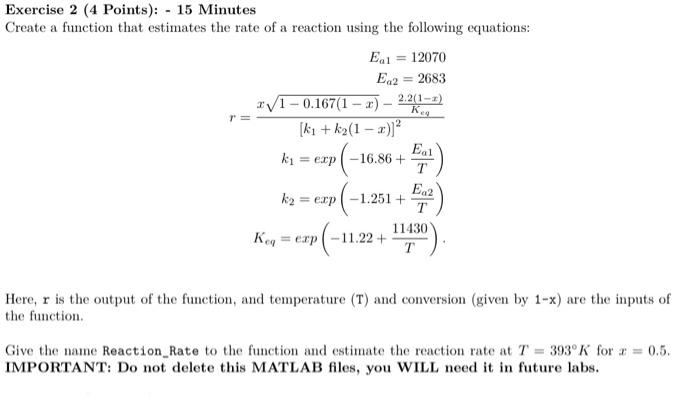

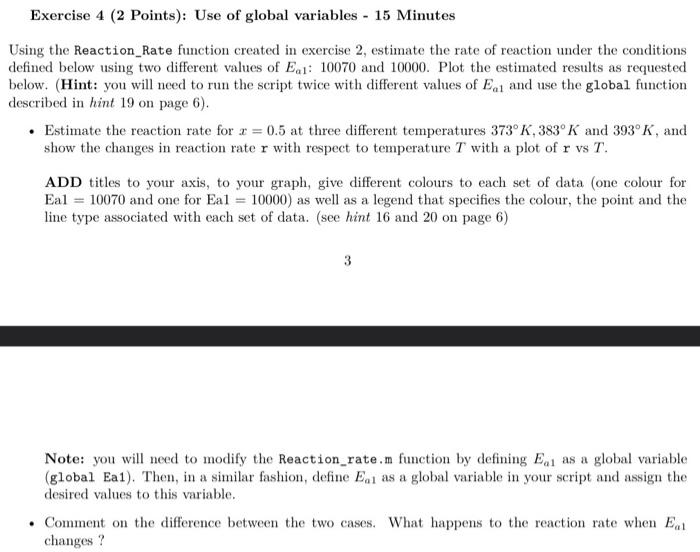
Facercise 2 (4 Points)a - 15 Minutes Cinate a froction that etimates the rate of a rnaction using the folloning evgation: Ees=12070Lw2=viss2r=h1+k2(1x)2r10.167(1x)422118)b1=cop(16.06+TFa1)hy=crg(1.251+TEa)Krq=cop(1122+T11430). then function. IMPOICTANT: Do not delete this MATEAB files, you WTLI. necd it in future labe. Excercise 3 (4 Points)4 = 30 Minutes Hu on the Hints sectice ob page 5). wish the bold on coummand. - Eatimute the reartion nate at T=400h abd x valuen of 0.1,0.4,0.5 and (12. Thra, Araw graphis of x 9) - Comanest on the impoct of changing the temperatuee on the rosction rate. Caa you rationaline these atemern ? Fxereise 4 (2 Pointn): Use of global variables + 15 Minutes Using thr Reaction_Rate function creatrel in escrior 2, ectimate the rate of roartino woder the ounditionn Uiescribed in bind 19 on page 0 ). - Estimate the reaction rate for r=0.5 at three different temperatures $73%,35K sed als" K, and ADD tithe to yutar axik, ta your gioph. give dighout colents to warh not of alats foen colour for Ea1 =10050 and ose for Eal =10000} as wrll as a legrnd that specifies the oolora, the point and the tine type asworiated with marh wt of data. (wev hint 16 and 20 oe page 6) drained valurs to this variahle. changer 7 Exercise 2 (4 Points): - 15 Minutes Create a function that estimates the rate of a reaction using the following equations: Ea1=12070Ea2=2683r=[k1+k2(1x)]2x10.167(1x)Keq2.2(1x)k1=exp(16.86+TEa1)k2=exp(1.251+TEa2)Kcq=exp(11.22+T11430). Here, r is the output of the function, and temperature (T) and conversion (given by 1x ) are the inputs of the function. Give the name Reaction_Rate to the function and estimate the reaction rate at T=393K for x=0.5. IMPORTANT: Do not delete this MATLAB files, you WILL need it in future labs. Exercise 3 (4 Points): - 30 Minutes Using the Reaction_Rate function created in the previous exercise, estimate the rate of reaction under the conditions described below and plot the results as requested. - Estimate the reaction rate for x=0.5 at T=373K,383K and 393K and show the changes in reaction rate r with respect to temperature T with a plot of r vs T using the plot function (*see Hint 14 on the Hints section on page 5). - Without closing the graph, estimate the reaction rate at the same temperatures as above for an x value of 0.6 and 0.7. Plot these on the same graph as above with different color(s) using plot in conjunction with the hold on command. - Estimate the reaction rate at T=400K and x values of 0.1,0.4,0.5 and 0.9. Then, draw graphs of r vs x and r vs T (based on the data obtained earlier) using the subplot function (see Hint 18 on page 6). - Comment on the impact of changing the temperature on the reaction rate. Can you rationalize these changes ? - Comment on the impact of changing the conversion on the reaction rate. Exercise 4 (2 Points): Use of global variables - 15 Minutes Using the Reaction_Rate function created in exercise 2, estimate the rate of reaction under the conditions defined below using two different values of Ea1 : 10070 and 10000. Plot the estimated results as requested below. (Hint: you will need to run the script twice with different values of Ea1 and use the global function described in hint 19 on page 6). - Estimate the reaction rate for x=0.5 at three different temperatures 373K,383K and 393K, and show the changes in reaction rate r with respect to temperature T with a plot of r vs T. ADD titles to your axis, to your graph, give different colours to each set of data (one colour for Ea1 =10070 and one for Ea1 =10000 ) as well as a legend that specifies the colour, the point and the line type associated with each set of data. (see hint 16 and 20 on page 6 ) 3 Note: you will need to modify the Reaction_rate.m function by defining Ea1 as a global variable (global Ea1). Then, in a similar fashion, define Ea1 as a global variable in your script and assign the desired values to this variable. - Comment on the difference between the two cases. What happens to the reaction rate when Ea1 changes
Step by Step Solution
There are 3 Steps involved in it

Get step-by-step solutions from verified subject matter experts
 Study Help