



Question: matlab Problem 1: from 1934 and ending at 2098. starting from 1933 and ending at 2099 plc. a) Using colon operator, create a row vector
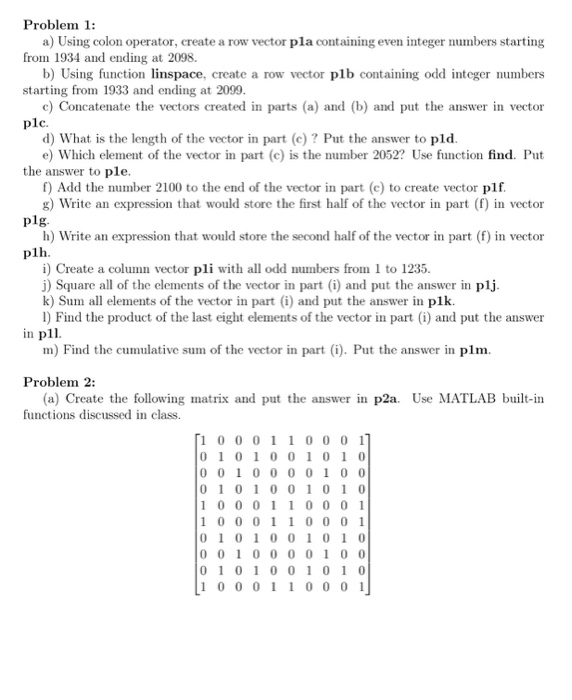
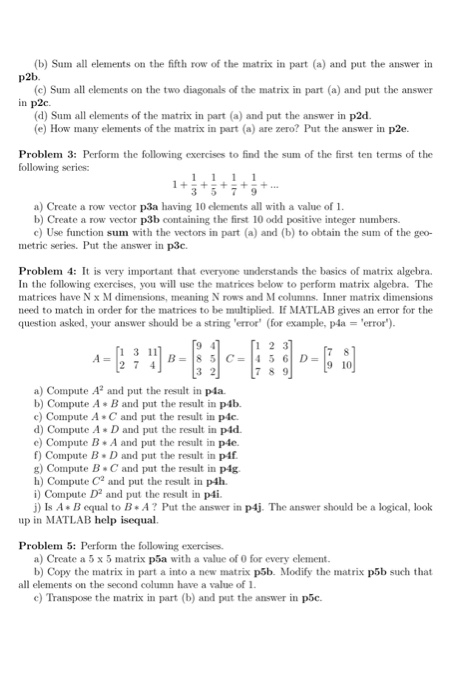
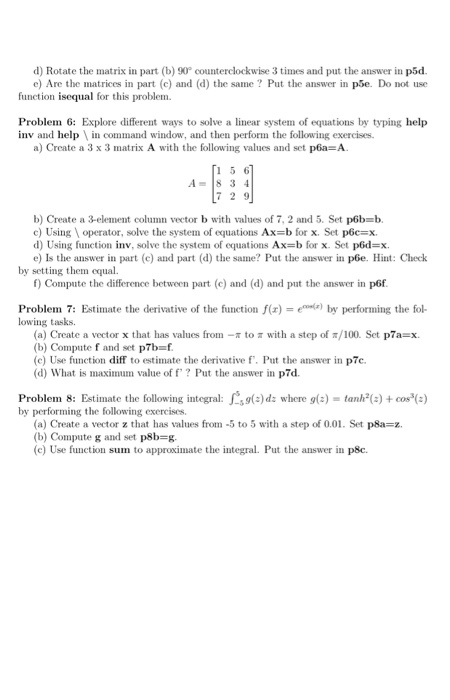
Problem 1: from 1934 and ending at 2098. starting from 1933 and ending at 2099 plc. a) Using colon operator, create a row vector pla containing even integer numbers starting b) Using function linspace, create a row vector plb containing odd integer numbers c) Concatenate the vectors created in parts (a) and b) and put the answer in vector d) What is the length of the vector in part (c) ? Put the answer to pld e) Which element of the vector in part (c) is the number 2052? Use function find. Put the answer to ple. f) Add the number 2100 to the end of the vector in part (c) to create vector plf g) Write an expression that would store the first half of the vector in part (f) in vector plg. h) Write an expression that would store the second half of the vector in part (f) in vector plh i) Create a column vector pli with all odd numbers from 1 to 1235. j) Square all of the elements of the vector in part (i) and put the answer in plj k) Sum all elements of the vector in part (i) and put the answer in plk. l) Find the product of the last eight elements of the vector in part (i) and put the answer in pll m) Find the cumulative sum of the vector in part (i). Put the answer in plm. Problem 2: (a) Create the following matrix and put the answer in p2a. Use MATLAB built-in functions discussed in class. 10 0 011 00 0 1 0 1 01 0 010 1 0 0010 0 0 01 0 0 0 1 0 1 0 0 1 0 1 0 1 0 001 1 0 0 0 1 10 0 01 1 0 0 0 1 0 1 0 1 0 0 1 0 1 0 001 0 0 0 010 0 0 1 01 0 0 1 0 1 0 1 0 0 01 1 0 0 0 1
Step by Step Solution
There are 3 Steps involved in it

Get step-by-step solutions from verified subject matter experts