







Question: Matlab Problem 3T Read in the ClassData.csv file and write out another csv file that has last first,LetterGrade. Must use the functions created in problems
Matlab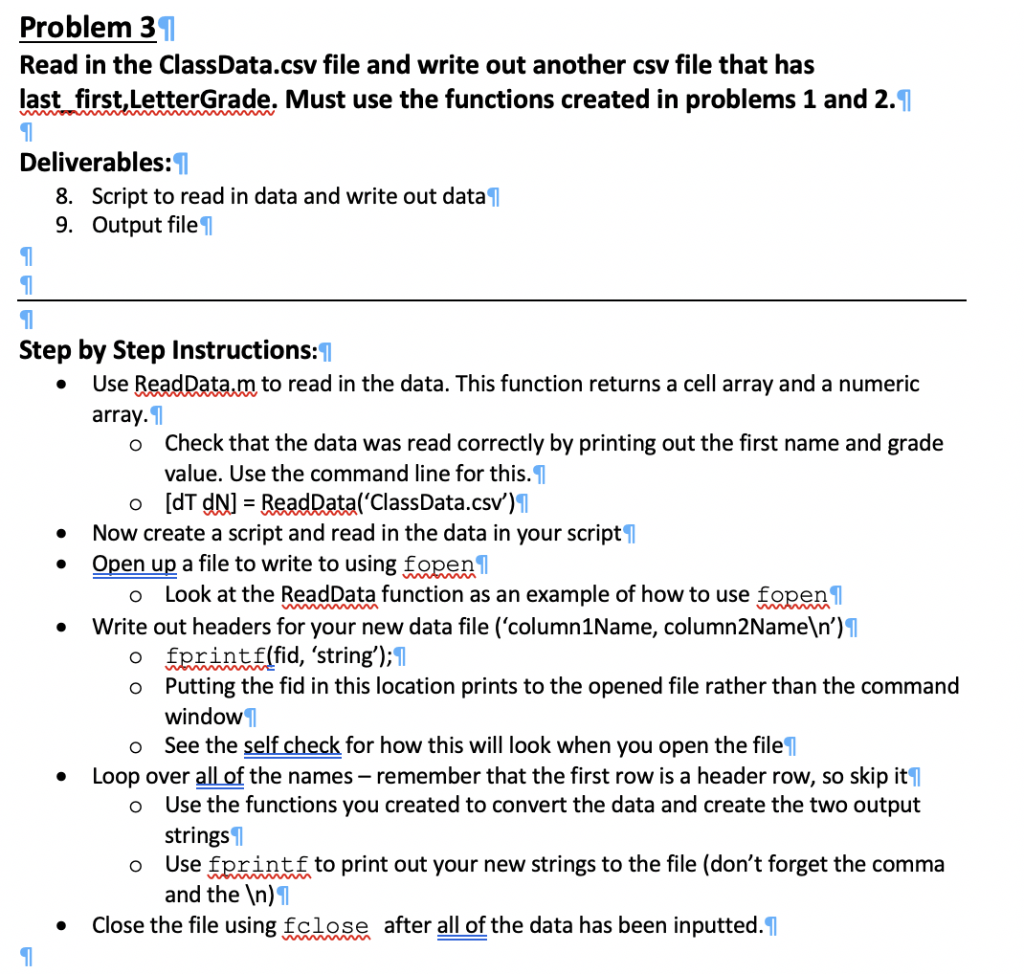
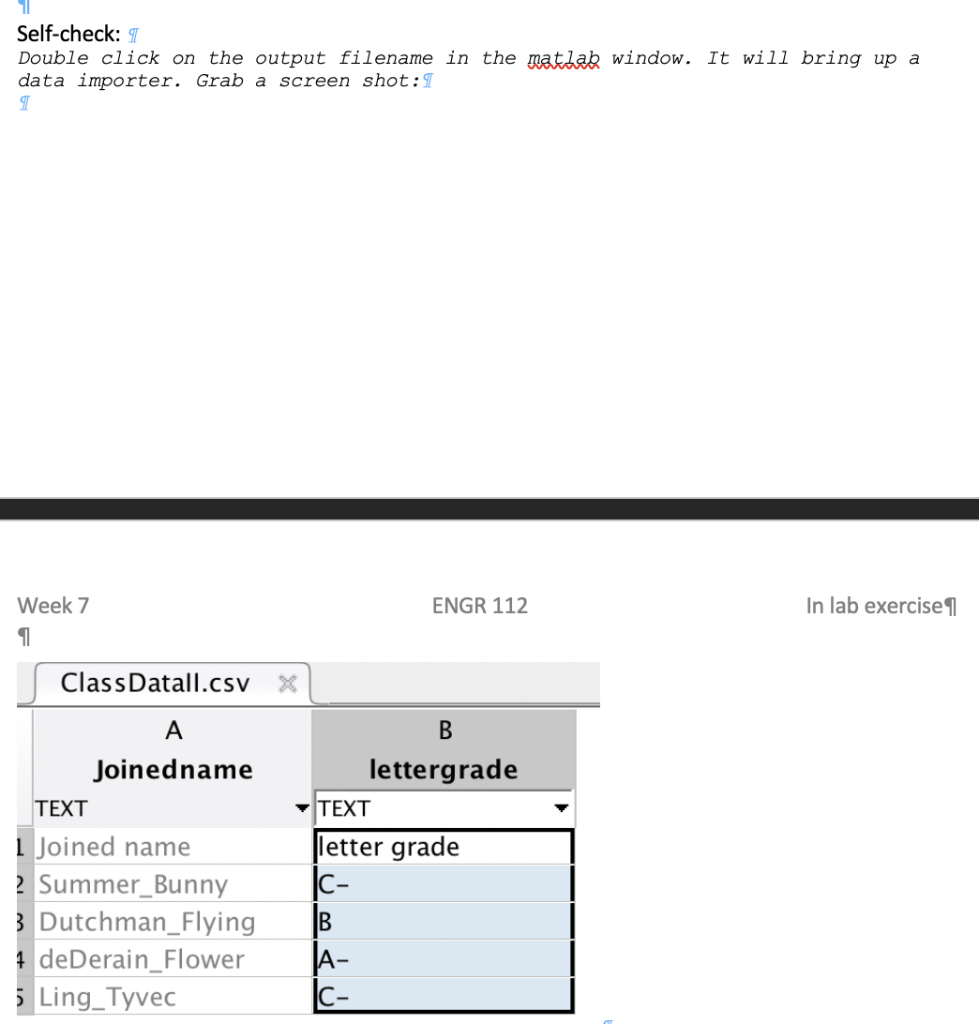
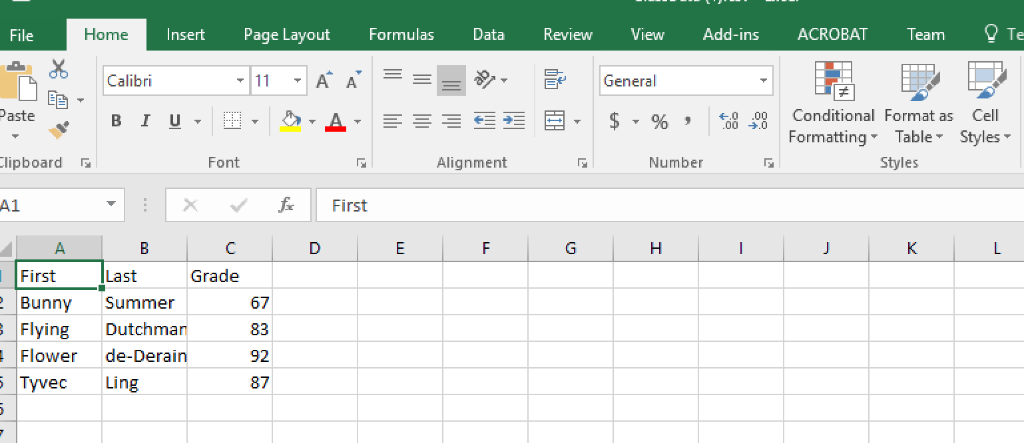
Problem 3T Read in the ClassData.csv file and write out another csv file that has last first,LetterGrade. Must use the functions created in problems 1 and 2. Deliverables:I 8. 9. Script to read in data and write out data T Output file 1 Step by Step Instructions:T Use ReadDatam to read in the data. This function returns a cell array and a numeric array. T Check that the data was read correctly by printing out the first name and grade value. Use the command line for this. [dT dN -ReadData('ClassData.csv) o o Now create a script and read in the data in your script l Open up a file to write to using fopenl o Look at the ReadData function as an example of how to use fopen Write out headers for your new data file ('column1Name, column2Nameln') o fprintf(fid, 'string);l o Putting the fid in this location prints to the opened file rather than the command window o See the self check for how this will look when you open the file o Use the functions you created to convert the data and create the two output o Use fprintf to print out your new strings to the file (don't forget the comma . Loop over all of the names-remember that the first row is a header row, so skip it strings and the )l .Close the file using falese after all of the data has been inputted. Self-check: T Double click on the output filename in the matlab window. It will bring up a data importer. Grab a screen shot: T Week 7 ENGR 112 In lab exercise ClassDatall.csv X Joinedname lettergrade TEXT TEXT 1 Joined name letter grade c- Summer_Bunny Dutchman_FlyingB deDerain_Flower Ling Tyvec A- File Insert Page LayoutFormulas DataReview View Add-ins ACROBATTeamTe Home Calibri A A , Ee General Paste lipboard A1 m A 0 .00Conditional Format as Cell $ , % , s: .08 Conditional Format as . Cell Formatting Table Styles B 1 u 00 .0 Font Alignment Number Styles fFirst First Bunny Summer Flying Dutchmarn Flower de-Derain Tyvec Ling Last Grade 67 83 92 87 Problem 3T Read in the ClassData.csv file and write out another csv file that has last first,LetterGrade. Must use the functions created in problems 1 and 2. Deliverables:I 8. 9. Script to read in data and write out data T Output file 1 Step by Step Instructions:T Use ReadDatam to read in the data. This function returns a cell array and a numeric array. T Check that the data was read correctly by printing out the first name and grade value. Use the command line for this. [dT dN -ReadData('ClassData.csv) o o Now create a script and read in the data in your script l Open up a file to write to using fopenl o Look at the ReadData function as an example of how to use fopen Write out headers for your new data file ('column1Name, column2Nameln') o fprintf(fid, 'string);l o Putting the fid in this location prints to the opened file rather than the command window o See the self check for how this will look when you open the file o Use the functions you created to convert the data and create the two output o Use fprintf to print out your new strings to the file (don't forget the comma . Loop over all of the names-remember that the first row is a header row, so skip it strings and the )l .Close the file using falese after all of the data has been inputted. Self-check: T Double click on the output filename in the matlab window. It will bring up a data importer. Grab a screen shot: T Week 7 ENGR 112 In lab exercise ClassDatall.csv X Joinedname lettergrade TEXT TEXT 1 Joined name letter grade c- Summer_Bunny Dutchman_FlyingB deDerain_Flower Ling Tyvec A- File Insert Page LayoutFormulas DataReview View Add-ins ACROBATTeamTe Home Calibri A A , Ee General Paste lipboard A1 m A 0 .00Conditional Format as Cell $ , % , s: .08 Conditional Format as . Cell Formatting Table Styles B 1 u 00 .0 Font Alignment Number Styles fFirst First Bunny Summer Flying Dutchmarn Flower de-Derain Tyvec Ling Last Grade 67 83 92 87
Step by Step Solution
There are 3 Steps involved in it

Get step-by-step solutions from verified subject matter experts
 Study Help