







Question: MATLAB Project: 3 D Surfaces from File Data Our MATLAB Project is described below. See the CatCourses assignment page for any updates. Write a MATLAB
MATLAB Project: D Surfaces from File Data
Our MATLAB Project is described below. See the CatCourses assignment page for any updates.
Write a MATLAB function called MatlabProject that accepts a filename as an argument. If a second argument is given, it will be a string. The filename can be any valid filename and will refer to a file located in the same folder as the function. The file will contain some plot information, comprising two header lines then a number of data lines which is not known ahead of time. The first header line has the title of the data. The second header line has three labels for the x y and z axes, separated by tab characters. Each data line will contain three numbers, separated by tab characters. Those numbers represent the x y z coordinates of a uniformly spaced grid of data. Though each line of data will have x y and z values in that order, the data lines themselves can be in any order.
If there is a second argument, it should be 'mesh' or 'surface' with any of those characters in either upper or lowercase. If no second argument is given or if it isn't one of those strings, assume it to be 'surface'.
Read in the data file, parsing the title, the axis labels, and the data itself. Create the appropriate meshes from the data and then plot them using either the mesh or surf function, according to the second argument. Add the title and axis labels from the plot information file to your plot.
If an output variable is used when the function is called, it should return a handle to the created plot. If no output variable is used, then the function should return nothing. The MATLAB keyword nargout can be useful for this see the MATLAB help on nargout for more information
Example:
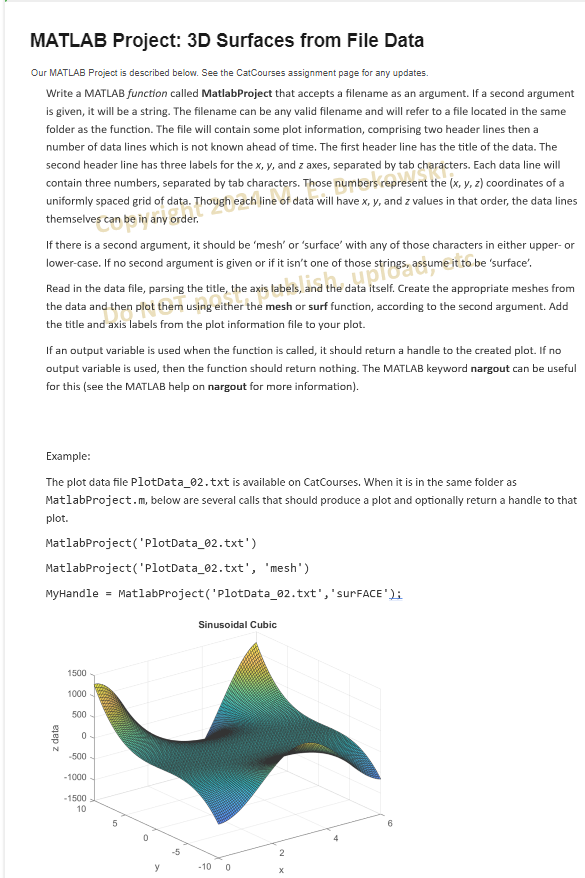
The plot data file PlotDatatxt is available on CatCourses. When it is in the same folder as MatlabProject.m below are several calls that should produce a plot and optionally return a handle to that plot.
MatlabProjectPlotDatatxt
MatlabProjectPlotDatatxt 'mesh'
MyHandle MatlabProjectPlotDatatxt 'surFACE':
Sinusnidal Cuhic
Step by Step Solution
There are 3 Steps involved in it
1 Expert Approved Answer
Step: 1 Unlock

Question Has Been Solved by an Expert!
Get step-by-step solutions from verified subject matter experts
Step: 2 Unlock
Step: 3 Unlock
 Study Help