







Question: matlab question Step 1: Create 4 text files in notepad, namely: datl.txt dat2.txt, dat3.txt and dat4.txt. Each file will contain a 1 x 4 vector.
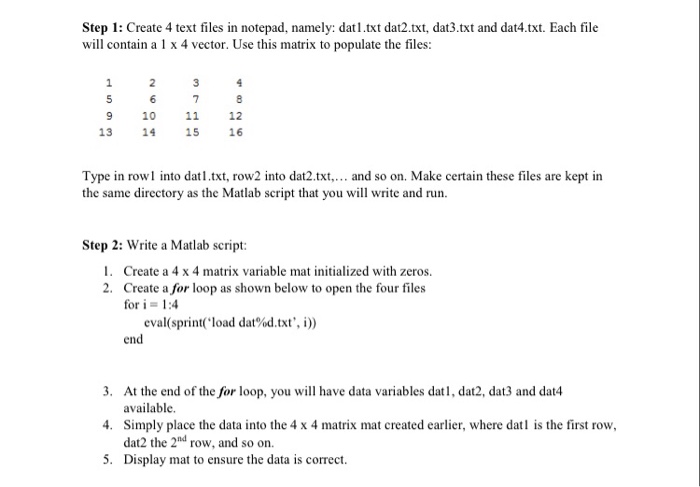
Step 1: Create 4 text files in notepad, namely: datl.txt dat2.txt, dat3.txt and dat4.txt. Each file will contain a 1 x 4 vector. Use this matrix to populate the files: 2 3 7 9 10 11 12 13 14 1516 Type in rowl into datl.txt, row2 into dat2.txt.. and so on. Make certain these files are kept in the same directory as the Matlab script that you will write and run. Step 2: Write a Matlab script: 1. 2. Create a 4 x 4 matrix variable mat initialized with zeros. Create a for loop as shown below to open the four files for i = 1:4 eval( sprint(' load dat%d.txt', i )) end 3. 4. Simply place the data into the 4 x 4 matrix mat created earlier, where dat is the first row, 5. Display mat to ensure the data is correct At the end of the for loop, you will have data variables datl, dat2, dat3 and dat4 available. dat2 the 2nd row, and so on
Step by Step Solution
There are 3 Steps involved in it

Get step-by-step solutions from verified subject matter experts
 Study Help