







Question: Matlab Suduko Please provide code to copy and paste. And provide screenshot of before and after showing the code works Section 6.4 Examples Example 6.8
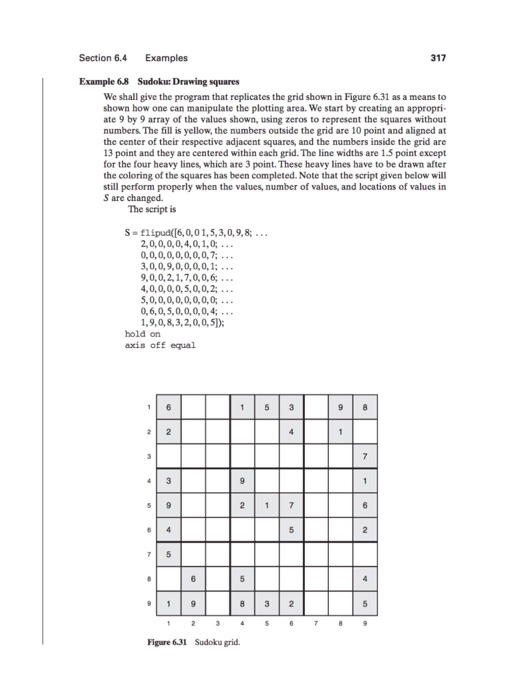
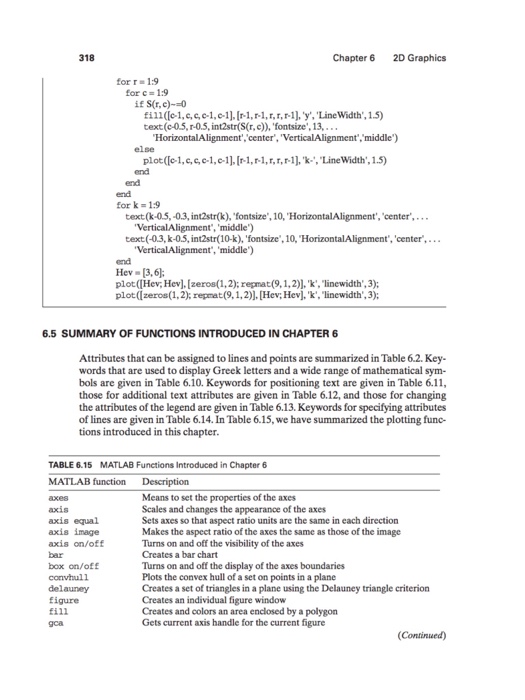
Section 6.4 Examples Example 6.8 Sudoku: Drawing squares We shall give the program that replicates the grid shown in Fiure 6.31 as a means to shown how one can manipulate the plotting area. We start by creating an appropri- ate 9 by 9 array of the values shown, using zeros to represent the squares without numbers. The fill is yellow, the numbers outside the grid are 10 point and aligned at the center of their respective adjacent squares, and the numbers inside the grid are 13 point and they are centered within each grid. The line widths are 1.5 point except for the four heavy lines, which are 3 point. These heavy lines have to be drawn after the coloring of the squares has been completed. Note that the script given below will still perform properly when the values, number of values, and locations of values in S are changed. The seript is S- flipud([6,0,01,5,3,0,9,8... 2,0,0,0,0,4,0,1,0 0,0,0,0,0,0,0,0,7; 3,0,0,9,0,0,0,0,1;. 9,0,0,2,1,7,0,0,6. 4,0,0,0,0,5,0,0,2; 5,0,0,0,0,0,0,0,0 0,6,0,5,0,0,0,0,4; 1,9,0,8,3,2,0,0,5 hold on axis off equal Figure 6.31 Sudoku grid. Section 6.4 Examples Example 6.8 Sudoku: Drawing squares We shall give the program that replicates the grid shown in Fiure 6.31 as a means to shown how one can manipulate the plotting area. We start by creating an appropri- ate 9 by 9 array of the values shown, using zeros to represent the squares without numbers. The fill is yellow, the numbers outside the grid are 10 point and aligned at the center of their respective adjacent squares, and the numbers inside the grid are 13 point and they are centered within each grid. The line widths are 1.5 point except for the four heavy lines, which are 3 point. These heavy lines have to be drawn after the coloring of the squares has been completed. Note that the script given below will still perform properly when the values, number of values, and locations of values in S are changed. The seript is S- flipud([6,0,01,5,3,0,9,8... 2,0,0,0,0,4,0,1,0 0,0,0,0,0,0,0,0,7; 3,0,0,9,0,0,0,0,1;. 9,0,0,2,1,7,0,0,6. 4,0,0,0,0,5,0,0,2; 5,0,0,0,0,0,0,0,0 0,6,0,5,0,0,0,0,4; 1,9,0,8,3,2,0,0,5 hold on axis off equal Figure 6.31 Sudoku grid
Step by Step Solution
There are 3 Steps involved in it

Get step-by-step solutions from verified subject matter experts
 Study Help