







Question: Matlab. This is the full question. Follow the steps below to write and execute a function called TempCheck that evaluates an input body temperature and
Matlab. This is the full question. 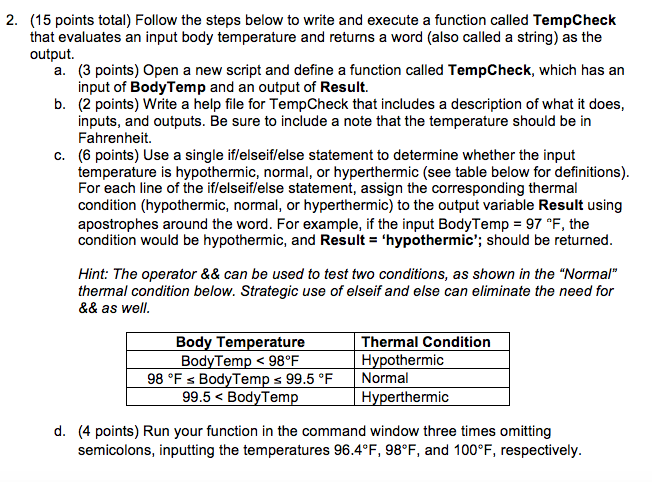
Follow the steps below to write and execute a function called TempCheck that evaluates an input body temperature and returns a word (also called a string) as the output. Open a new script and define a function called Temp Check, which has an input of Bedtime and an output of Result. Write a help file for Temp Check that includes a description of what it does, inputs, and outputs. Be sure to include a note that the temperature should be in Fahrenheit. Use a single if/elseif/else statement to determine whether the input temperature is hypothermic, normal, or hyperthermia (see table below for definitions). For each line of the if/elseif/else statement, assign the corresponding thermal condition (hypothermic, normal, or hyperthermia) to the output variable Result using apostrophes around the word. For example, if the input Body Temp = 97 degree F, the condition would be hypothermic, and Result = 'hypothermic'; should be returned. the operator && can be used to test two conditions, as shown in the "Normal" thermal condition below. Strategic use of else if and else can eliminate the need for && as well. Run your function in the command window three times omitting semicolons, inputting the temperatures 96.4 Degree F, 98 Degree F, and 100 Degree F, respectively
Step by Step Solution
There are 3 Steps involved in it

Get step-by-step solutions from verified subject matter experts
 Study Help