







Question: Matlab.Use matlabs qfunc... What is the code? 1-7) Using MATLAB's qfunc function, with =1, calculate P(Z-0(X=0), P(Z=0X-1), P(7-1 X=0), and 1-8) Using MATLAB's qfunc function,
Matlab.Use matlabs qfunc... What is the code?
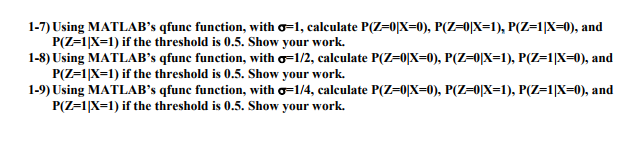
1-7) Using MATLAB's qfunc function, with =1, calculate P(Z-0(X=0), P(Z=0X-1), P(7-1 X=0), and 1-8) Using MATLAB's qfunc function, with 12, calculate P(Z-0X-0), P(7-01x-1), P(z-1X-0), and 1-9) Using MATLAB's qfunc function, with 14, calculate P(Z 0X-0), P(Z-01x-1), P(7-1(X=0), and P(Z-IN-1 ) if the threshold is 0.5. Show your work. P(Z=1|X=1 ) if the threshold is 0.5. Show your work. P(z 1X-1) if the threshold is 0.5. Show your work. 1-7) Using MATLAB's qfunc function, with =1, calculate P(Z-0(X=0), P(Z=0X-1), P(7-1 X=0), and 1-8) Using MATLAB's qfunc function, with 12, calculate P(Z-0X-0), P(7-01x-1), P(z-1X-0), and 1-9) Using MATLAB's qfunc function, with 14, calculate P(Z 0X-0), P(Z-01x-1), P(7-1(X=0), and P(Z-IN-1 ) if the threshold is 0.5. Show your work. P(Z=1|X=1 ) if the threshold is 0.5. Show your work. P(z 1X-1) if the threshold is 0.5. Show your work
Step by Step Solution
There are 3 Steps involved in it

Get step-by-step solutions from verified subject matter experts
 Study Help