







Question: Matrix Manipulation The assignment In this assignment you will take the Matrix addition and subtraction code and modify it to utilize the following: 1. Looping
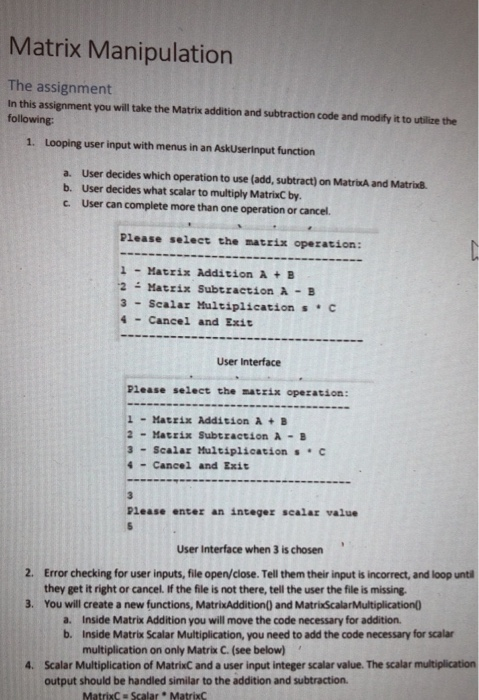
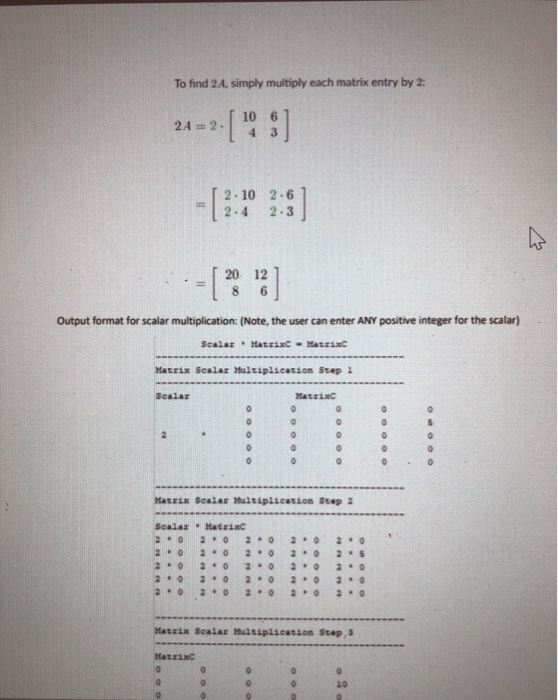
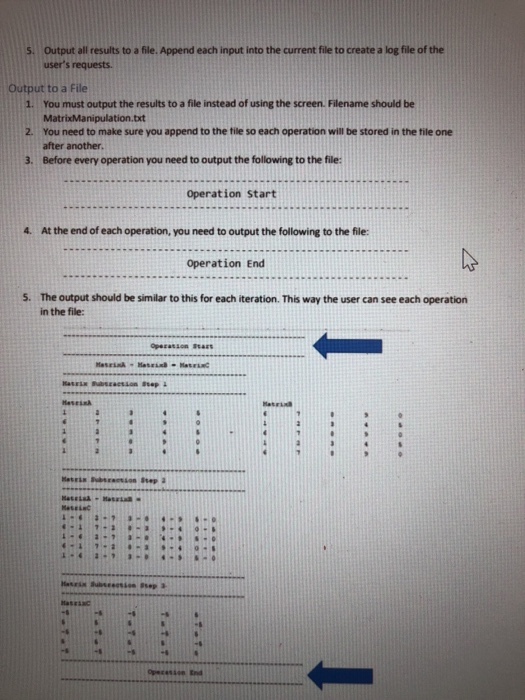
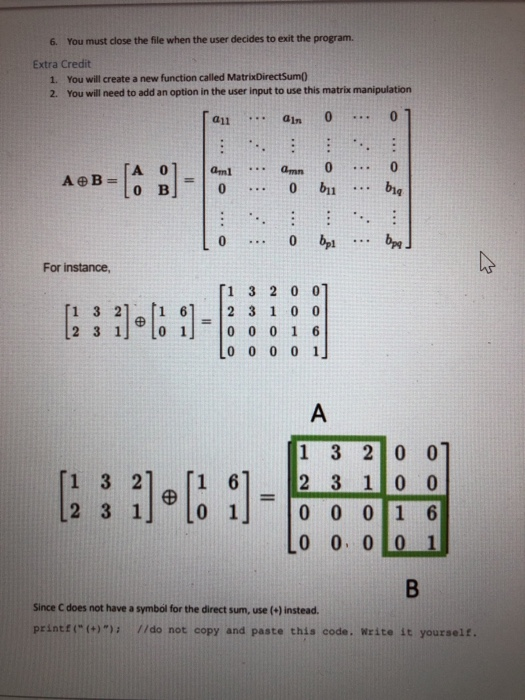
Matrix Manipulation The assignment In this assignment you will take the Matrix addition and subtraction code and modify it to utilize the following: 1. Looping user input with menus in an AskUserinput function a. User decides which operation to use (add, subtract) on MatrixA and MatribB b. User decides what scalar to multiply MatrixC by. c. User can complete more than one operation or cancel. Please select the matrix operation: 1 Matrix Addition A B '2 .: Matrix Subtraction A-B 3 Scalar Multiplicationc 4 -Cancel and Exit User Interface Please select the matzix opezation 1-Matrix Addition A B 2 -Matrix Subtraction A-B 3-scalar Multiplication s . C 4-Cancel and Exit Please enter an integer scalar value User Interface when 3 is chosen 2. Error checking for user inputs, file open/close. Tell them their input is incorrect, and loop until they get it right or cancel if the file is not there, tell the user the file is missing. You will create a new functions, MatrixAddition) and MatrixScalarMultiplication(0 3. Inside Matrix Addition you will move the code necessary for addition. Inside Matrix Scalar Multiplication, you need to add the code necessary for scalar multiplication on only Matrix C. (see below) a. b. Scalar Multiplication of MatrixC and a user input integer scalar value. The scalar multiplication output should be handled similar to the addition and subtraction 4. MatrixC Scalar MatrixC To find 2A, simply multiply each matrix entry by 2: 10 91 2.4 = 2.1 4 3 2.10 2.6 2.4 2.3 =[8 12] Output format for scalar multiplication: (Note, the user can enter ANY positive integer for the scalar) Matrix Scalar Maltiplication Step l Scalar HatrixC Matzix Scalar Muleiplicastion Step 2 ScalarMatziaC 2 o 02 022. 20 2 0 2 0 2 0 2 2. 2.0 2.0 2.0 2.0 Matzix Scalar Huleiplicasion Step MatrixC 10 tput all results to a file. Append each input into the current file to create a log file of the user's requests. Output to a File You must output the results to a file instead of using the screen. Filename should be MatrixManipulation.bt You need to make sure you append to the file so each operation will be stored in the tile one after another. Before every operation you need to output the following to the 1. 2. 3. Operation Start 4. At the end of each operation, you need to output the following to the file: Operation End The output should be similar to this for each iteration. This way the user can see each operation in the file s. Matrl 6. You must close the file when the user decides to exit the program Extra Credit 1. 2. You will create a new function called MatrixDirectSumO You will need to add an option in the user input to use this matrix manipulation a11an 0 A 0 A B-10 B ...0 bnbe 0...0 b1 For instance 1 3 2 0 01 [1 3 2leti 61:12 3 1 0 0 2 3 1] lo 1] 0 0 0 16 L0 0 0 0 1 1 3 2 0 0 3 1 0 0 L2 3 1 o 1 0 0 0 1 6 1 3 21[1 61 2 0 0, 0 0 1 Since C does not have a symbol for the direct sum, use (+) insteacd printt()) //do not copy and paste this code. Write it yourself. Matrix Manipulation The assignment In this assignment you will take the Matrix addition and subtraction code and modify it to utilize the following: 1. Looping user input with menus in an AskUserinput function a. User decides which operation to use (add, subtract) on MatrixA and MatribB b. User decides what scalar to multiply MatrixC by. c. User can complete more than one operation or cancel. Please select the matrix operation: 1 Matrix Addition A B '2 .: Matrix Subtraction A-B 3 Scalar Multiplicationc 4 -Cancel and Exit User Interface Please select the matzix opezation 1-Matrix Addition A B 2 -Matrix Subtraction A-B 3-scalar Multiplication s . C 4-Cancel and Exit Please enter an integer scalar value User Interface when 3 is chosen 2. Error checking for user inputs, file open/close. Tell them their input is incorrect, and loop until they get it right or cancel if the file is not there, tell the user the file is missing. You will create a new functions, MatrixAddition) and MatrixScalarMultiplication(0 3. Inside Matrix Addition you will move the code necessary for addition. Inside Matrix Scalar Multiplication, you need to add the code necessary for scalar multiplication on only Matrix C. (see below) a. b. Scalar Multiplication of MatrixC and a user input integer scalar value. The scalar multiplication output should be handled similar to the addition and subtraction 4. MatrixC Scalar MatrixC To find 2A, simply multiply each matrix entry by 2: 10 91 2.4 = 2.1 4 3 2.10 2.6 2.4 2.3 =[8 12] Output format for scalar multiplication: (Note, the user can enter ANY positive integer for the scalar) Matrix Scalar Maltiplication Step l Scalar HatrixC Matzix Scalar Muleiplicastion Step 2 ScalarMatziaC 2 o 02 022. 20 2 0 2 0 2 0 2 2. 2.0 2.0 2.0 2.0 Matzix Scalar Huleiplicasion Step MatrixC 10 tput all results to a file. Append each input into the current file to create a log file of the user's requests. Output to a File You must output the results to a file instead of using the screen. Filename should be MatrixManipulation.bt You need to make sure you append to the file so each operation will be stored in the tile one after another. Before every operation you need to output the following to the 1. 2. 3. Operation Start 4. At the end of each operation, you need to output the following to the file: Operation End The output should be similar to this for each iteration. This way the user can see each operation in the file s. Matrl 6. You must close the file when the user decides to exit the program Extra Credit 1. 2. You will create a new function called MatrixDirectSumO You will need to add an option in the user input to use this matrix manipulation a11an 0 A 0 A B-10 B ...0 bnbe 0...0 b1 For instance 1 3 2 0 01 [1 3 2leti 61:12 3 1 0 0 2 3 1] lo 1] 0 0 0 16 L0 0 0 0 1 1 3 2 0 0 3 1 0 0 L2 3 1 o 1 0 0 0 1 6 1 3 21[1 61 2 0 0, 0 0 1 Since C does not have a symbol for the direct sum, use (+) insteacd printt()) //do not copy and paste this code. Write it yourself
Step by Step Solution
There are 3 Steps involved in it

Get step-by-step solutions from verified subject matter experts
 Study Help