







Question: Matrix.py code def isRectangle(l): num_cols = len(l[0]) for row in l: if len(row) != num_cols: return False return True def isNumericalHelper(numbers): for number in numbers:
![Matrix.py code def isRectangle(l): num_cols = len(l[0]) for row in l:](https://dsd5zvtm8ll6.cloudfront.net/si.experts.images/questions/2024/09/66f3e40e85120_66166f3e40dea44e.jpg)
Matrix.py code
def isRectangle(l): num_cols = len(l[0]) for row in l: if len(row) != num_cols: return False return True
def isNumericalHelper(numbers): for number in numbers: if not number.isdigit(): return False return True
def isNumerical(l): for row in l: if not isNumericalHelper(row): return False return True
def isMatrix(l): return isNumerical(l) and isRectangle(l)
def printMatrix(l): delimeter = " " if isMatrix(l): for row in l: print("| " + delimeter.join(row) + " |") else: print("[ ]") def loadMatrix(filename): matrix = []
input_file = open(filename, "r") for line in input_file: line = line.strip() line_as_list = line.split(",") matrix.append(line_as_list)
input_file.close() return matrix
Can i get help with this python assignment please?
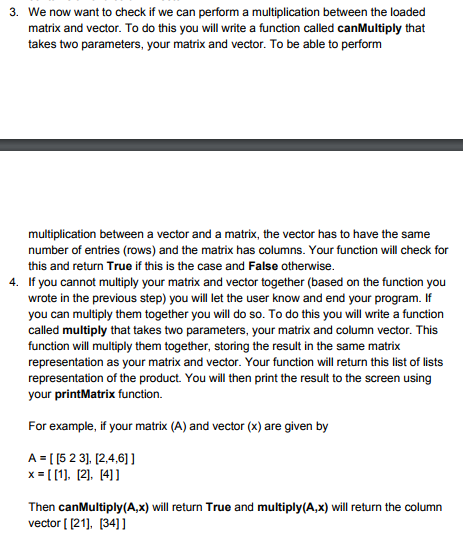
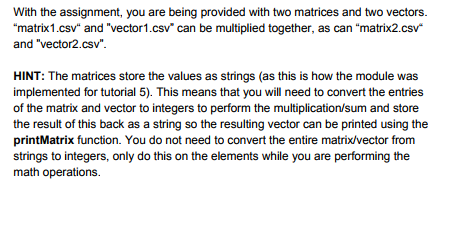
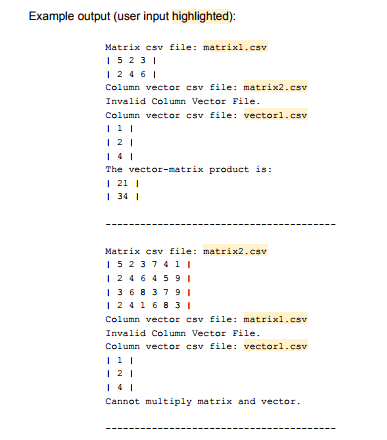
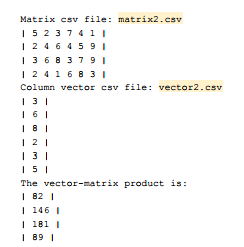
In this problem, you will implement a function that performs matrix-vector multiplication. If you are unfamiliar with this operation, or need a reminder, please see trix In this question we are going to build off of the code you wrote in tutorial 5. In this tutorial you wrote code to load a matrix from a csv file, check that it is a matrix (by checking if it contains only numbers and checking if it is rectangular), among other things. We are going to add some functionality to this code that will allow us to load a vector from a file, check if it contains only numbers, check if we can perform a multiplication between a loaded matrix and vector and then actually perform that multiplication. When performing matrix-vector multiplication, the vector in question is what is called a column vector, so this is how it will be stored in a file. The vector files will be csv files that contain one entry per line and the number of lines in the file determine how big the vector is going to be. In other words, a column vector is simply a matrix with one column. You are being supplied with a matrix.py module. You are going to import this code into a new python code file you are going to write to solve this problem (called question3.py). You are not allowed to change any of the functions in the supplied module and must use therm as is. After importing the supplied module, your program will do the following things 1. Prompt the user for the filename of a matrix csv file. You will load this matrix from file (using the loadMatrix function in the matrix module) and check that it is a matrix (using the isMatrix function in the matrix module). If it is a valid matrix, print it to the screen (using the printMatrix function in the matrix module). If it is not, prompt the user for another matrix csv file. Continue to do this until the user provides a file that contains a valid matrix. Prompt the user for the filename of a vector csv file. As we have already mentioned, a column vector is simply matrix with one column. So we can use our loadMatrix and is Matrix functions to load and ensure that the data is numerical and rectangular. You will then need to write a new function called isColumnVector that takes your loaded vector and check to make sure each row only has one element in it (ie. it is a column vector). This function will return a boolean: True if the loaded vector is actually a column vector and False otherwise. If the file selected by the user contained a valid column vector, print it to the screen (using the printMatrix function). If it is not, prompt the user for another vector csv file. Continue to do this until the user provides a file that contains a valid column vector 2
Step by Step Solution
There are 3 Steps involved in it

Get step-by-step solutions from verified subject matter experts
 Study Help