







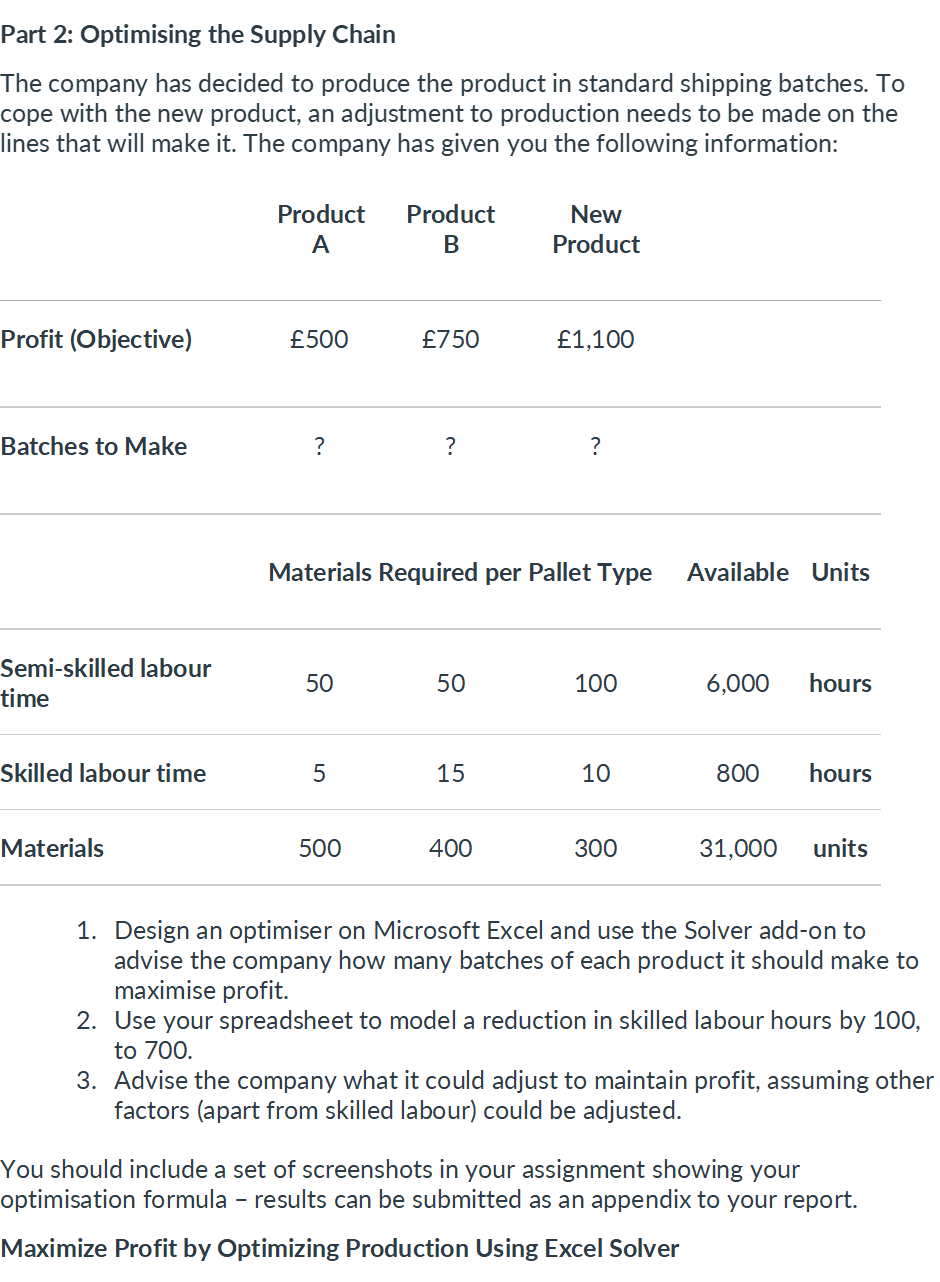
Question: Maximize Profit by Optimizing Production Using Excel Solver Product Product New A B Product Profit (Objective) 500.00 750.00 1,100.00 Batches to Make ? ? ?
Maximize Profit by Optimizing Production Using Excel Solver
| Product | Product | New | |||||
| A | B | Product | |||||
| Profit (Objective) | 500.00 | 750.00 | 1,100.00 | ||||
| Batches to Make | ? | ? | ? | ||||
| Materials Required per Pallet Type | Available | Units | |||||
| Semi-skilled labour time | 50 | 50 | 100 | 6000 | hours | ||
| Skilled Labour time | 5 | 15 | 10 | 800 | hours | ||
| Materials | 500 | 400 | 300 | 31,000 | units | ||
- Design an optimiser on Microsoft Excel and use the Solver add-on to advise the company how many batches of each product it should make to maximise profit.
- Use your spreadsheet to model a reduction in skilled labour hours by 100, to 700.
- Advise the company what it could adjust to maintain profit, assuming other factors (apart from skilled labour) could be adjusted.
You should showing your optimisation formula - Maximize Profit by Optimizing Production Using Excel Solver
Part 2: Optimising the Supply Chain The company has decided to produce the product in standard shipping batches. To cope with the new product, an adjustment to production needs to be made on the lines that will make it. The company has given you the following information: 1. Design an optimiser on Microsoft Excel and use the Solver add-on to advise the company how many batches of each product it should make to maximise profit. 2. Use your spreadsheet to model a reduction in skilled labour hours by 100 , to 700 . 3. Advise the company what it could adjust to maintain profit, assuming other factors (apart from skilled labour) could be adjusted. You should include a set of screenshots in your assignment showing your optimisation formula - results can be submitted as an appendix to your report
Step by Step Solution
There are 3 Steps involved in it

Get step-by-step solutions from verified subject matter experts
 Study Help