







Question: May someone help me this please! Excel 5 Information Computerized Accounting (ACCT-2230-LN01) 2020FA 8312020 Excel #5 Information Financial Planning Exercise - Payment (PMT) Functions Exercise
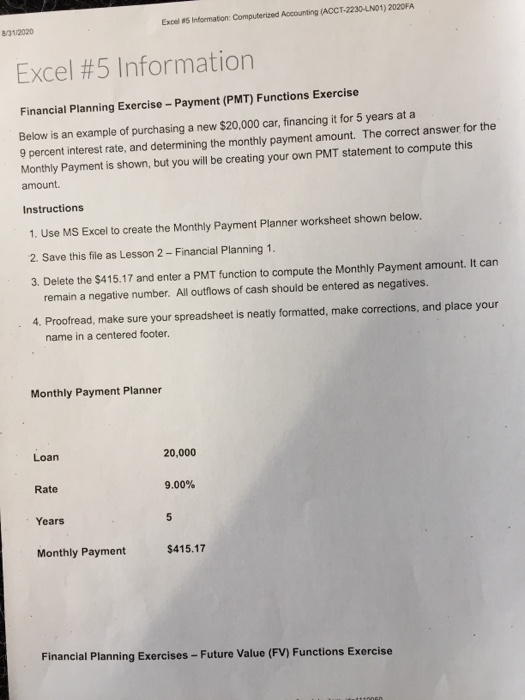
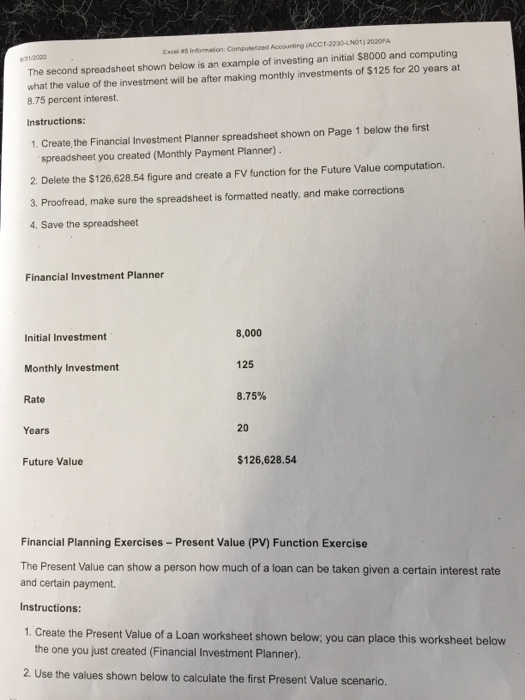
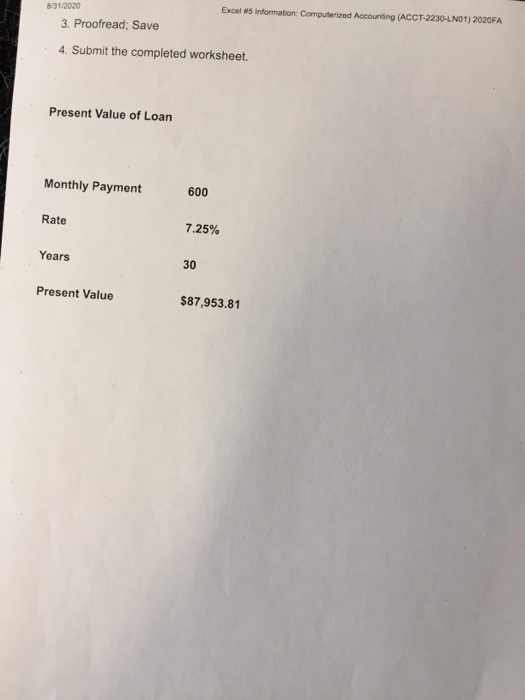
Excel 5 Information Computerized Accounting (ACCT-2230-LN01) 2020FA 8312020 Excel #5 Information Financial Planning Exercise - Payment (PMT) Functions Exercise Below is an example of purchasing a new $20,000 car, financing it for 5 years at a 9 percent interest rate, and determining the monthly payment amount. The correct answer for the Monthly Payment is shown, but you will be creating your own PMT statement to compute this amount. Instructions 1. Use MS Excel to create the Monthly Payment Planner worksheet shown below. 2. Save this file as Lesson 2 - Financial Planning 1. 3. Delete the $415.17 and enter a PMT function to compute the Monthly Payment amount. It can remain a negative number. All outflows of cash should be entered as negatives. 4. Proofread, make sure your spreadsheet is neatly formatted, make corrections, and place your name in a centered footer. Monthly Payment Planner Loan 20,000 Rate 9.00% Years 5 Monthly Payment $415.17 Financial Planning Exercises - Future Value (FV) Functions Exercise NEN 3000 Els information: Computer Accounting (ACCT-2230-N01) 2020FA The second spreadsheet shown below is an example of investing an initial $8000 and computing what the value of the investment will be after making monthly investments of $125 for 20 years at 8.75 percent interest Instructions: 1. Create the Financial Investment Planner spreadsheet shown on Page 1 below the first spreadsheet you created (Monthly Payment Planner). 2. Delete the $126,628.54 figure and create a FV function for the Future Value computation. 3. Proofread, make sure the spreadsheet is formatted neatly, and make corrections 4. Save the spreadsheet Financial Investment Planner Initial Investment 8,000 125 Monthly Investment Rate 8.75% Years 20 Future Value $126,628.54 Financial Planning Exercises - Present Value (PV) Function Exercise The Present Value can show a person how much of a loan can be taken given a certain interest rate and certain payment Instructions: 1. Create the Present Value of a Loan worksheet shown below, you can place this worksheet below the one you just created (Financial Investment Planner). 2. Use the values shown below to calculate the first Present Value scenario. 8/31/2020 3. Proofread; Save Excel 5 Information: Computerized Accounting (ACCT-2230-LN01) 2020FA 4. Submit the completed worksheet. Present Value of Loan Monthly Payment 600 Rate 7.25% Years 30 Present Value $87,953.81
Step by Step Solution
There are 3 Steps involved in it

Get step-by-step solutions from verified subject matter experts
 Study Help