







Question: Media: Microsoft Project file Problem: Plan an office move using Microsoft Project. An office suite contains 24 offices, numbered 11-16, 21-26, 31-36, and 41-46. See
Media: Microsoft Project file
Problem: Plan an office move using Microsoft Project.
An office suite contains 24 offices, numbered 11-16, 21-26, 31-36, and 41-46. See the Before and After diagrams. There are 21 employees occupying the offices as shown in the Before diagram.
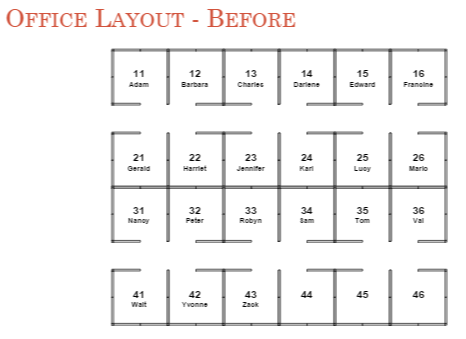
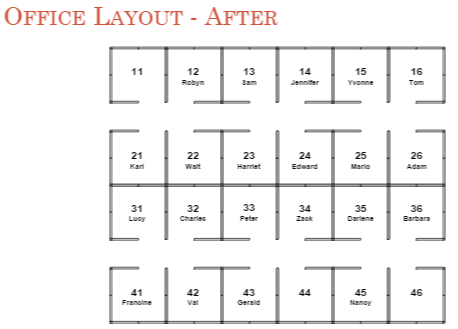
Due to a reorganization, all employees will be moving to new offices as shown in the After diagram. To save money, each employee will move his own belongings from his existing office to his new office. The IT group needs to move each employees computer and phone, and employees need to move at the same time as their computer and phone.
There are 3 IT engineers involved in the move. One of the IT engineers only works on Mondays, Wednesdays, and Fridays. An IT engineer can only work on one move at a time. To minimize disruption and confusion, an employee can only move into an office when it has been completely vacated beforehand. (That is, an employee cant move into an office while someone else is simultaneously moving out of it.)
Each employee and IT engineer helping him will take a half day (4 hours out of 8 = 0.5 days) to move, except the following employees who will require one full day to move (and require a full day of an IT engineer): Edward, Francine, Jennifer, Peter, and Sam. To make the moves convenient for these employees, each employees move cannot start on one day and end on another (spanning a day).
Moves can only happen on normal workdays, excluding weekends and holidays. The office moves will start on May 25. May 30 is a holiday (Memorial Day) and no moves will occur.Using Microsoft Project, develop a move plan to complete the move as quickly as possible while minimizing the number of times each employee has to move (some employees may have to move more than once to complete the move as quickly as possible). The plan should be completed by June 2 at 5:00 PM (the Baseline Date)
The homework will be worth 100 points and will be graded according to the following criteria and rules.
? If your plan is invalid, you will automatically lose 25 points. A plan will be considered invalid if any resources are overloaded, if someone is moved into an occupied office, if someone ends up in the wrong office, etc. These types of problems will be called Fatal Errors. The penalty for an invalid move is high, so be sure that your move is valid before trying to optimize the date. ? Plans that are not optimized to match or beat the Baseline Date will lose points per every half day late. [Thus, only valid moves that meet or beat the Baseline Date can get the full 100 points.] ? Plans must have 3 resources to represent the IT engineers. Plans must NOT include any other resources.
? Plans must NOT use customized resource calendars.
? Plans that use anything except Finish-Start predecessors will be considered invalid. This includes milestones (zero-length tasks) and summary tasks. ? All tasks must be automatically scheduled, including milestones and summary tasks. Hint: you can change options to make automatic scheduling the default mode for all new tasks. ? All constraints or anything that fixes the start date of a task loses points. ? Missing predecessors or unnecessary predecessors lose points. ? Lags must NOT be used. ? Leveling must NOT be used. ? Complicated or confusing plans may lose points. ? All move tasks must include the starting office and the ending office in the tasks name. For example, Quincy moves from office 11 to 15 or Q11 to 15. Each persons name conveniently has a unique first initial.
Hints: ? Read all of the directions very carefully. One of the biggest sources of errors is not following the directions. ? You should avoid using punctuation, including parentheses, in your task name to help make your graded homework easier to understand. ? Each IT engineer can help two people move in a day if both only require a half day. If a person requires a full day to move, it will require an IT engineer for the whole day. Be sure not to overload your IT engineers. There are ways in MS Project to discover if your resources are overloaded.
? You can create half-day tasks by changing the duration to 0.5 days. The default working day is 8:00 AM to 5:00 PM, with two shifts (8:00 AM to 12:00 noon and 1:00 PM to 5:00 PM). Dont change these hours.
? While you must not submit a plan with resources other than for the IT engineers, it may be helpful to define other resources while working out the solution (just remember to delete them before submitting your homework).
? The single most common fatal error is attempting to move someone into an already occupied office (or into an office currently being emptied). ? Tasks may have two or more predecessors. If for any reason task B requires task A to be completed before it starts, then task A must be a direct or indirect predecessor of task B. This includes resource dependencies. ? You may want or need to insert one or more pad tasks to force a full-day move to not span from one day to the next, or to force a task to avoid certain days. ? Its easiest to set up your schedule using the Gantt chart, but you can sometimes see patterns or dependencies better in the Network Diagram
Step by Step Solution
There are 3 Steps involved in it

Get step-by-step solutions from verified subject matter experts
 Study Help