





Question: MEM 2211: INTRODUCTION TO MANUFACTURING SYSTEMS Problem Sheer #1: Graphical Solutions, Excel Solutions, Sensitivity Analysis L. S. Thakur Graphical Solution und 2 graphically te the
MEM 2211: INTRODUCTION TO MANUFACTURING SYSTEMS
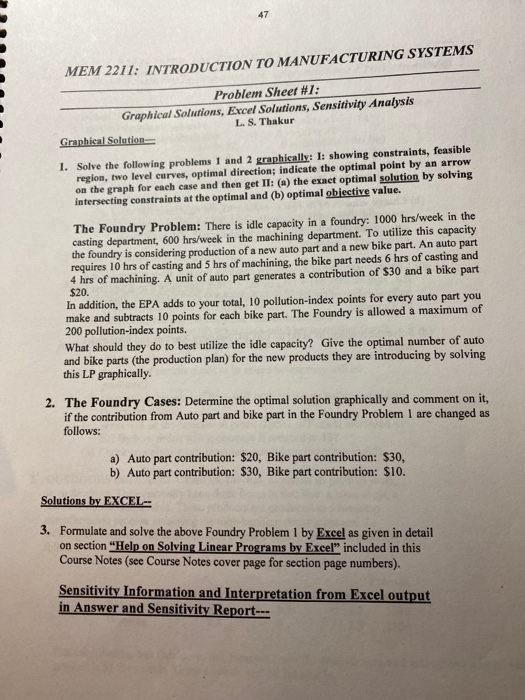
MEM 2211: INTRODUCTION TO MANUFACTURING SYSTEMS Problem Sheer #1: Graphical Solutions, Excel Solutions, Sensitivity Analysis L. S. Thakur Graphical Solution und 2 graphically te the optimal solution by so curves, optimalen set II: (@ al objective way 1. Solve the following problems 1 and 2 graphically: I: showing constraints, feasible region, two level curves, optimal direction: indicate the optimal point by an arrow on the graph for each case and then get II: (a) the exact optimal solution by solving intersecting constraints at the optimal and (b) optimal objective value. The Foundry Problem: There is idle capacity in a foundry: 1000 hrs/week in the casting department, 600 hrs/week in the machining department. To utilize this capacity the foundry is considering production of a new auto part and a new bike part. An auto part requires 10 hrs of casting and 5 hrs of machining, the bike part needs 6 hrs of casting and 4 hrs of machining. A unit of auto part generates a contribution of $30 and a bike part $20. In addition, the EPA adds to your total, 10 pollution-index points for every auto part you make and subtracts 10 points for each bike part. The Foundry is allowed a maximum of 200 pollution-index points. What should they do to best utilize the idle capacity? Give the optimal number of auto and bike parts (the production plan) for the new products they are introducing by solving this LP graphically. 2. The Foundry Cases: Determine the optimal solution graphically and comment on it, if the contribution from Auto part and bike part in the Foundry Problem 1 are changed as follows: a) Auto part contribution: $20, Bike part contribution: $30, b) Auto part contribution: $30, Bike part contribution: $10. Solutions by EXCEL-- 3. Formulate and solve the above Foundry Problem 1 by Excel as given in detail on section "Help on Solving Linear Programs by Excel" included in this Course Notes (see Course Notes cover page for section page numbers). Sensitivity Information and Interpretation from Excel output in Answer and Sensitivity Report

Step by Step Solution

There are 3 Steps involved in it

1 Expert Approved Answer
Step: 1 Unlock blur-text-image

Question Has Been Solved by an Expert!

Get step-by-step solutions from verified subject matter experts

Step: 2 Unlock
Step: 3 Unlock

Students Have Also Explored These Related General Management Questions!