







Question: ---------------------------------------------------------------------------------------------------------------------------------------------------------------------------------------- menu1.cpp: #ifdef __APPLE_CC__ #include #else #include #endif //#include GLsizei winWidth = 400, winHeight = 400; // Initial Display-window size. GLfloat red = 1.0, green
----------------------------------------------------------------------------------------------------------------------------------------------------------------------------------------
menu1.cpp:
#ifdef __APPLE_CC__ #include#else #include #endif //#include GLsizei winWidth = 400, winHeight = 400; // Initial Display-window size. GLfloat red = 1.0, green = 1.0, blue = 1.0; // Initial triangle color: white. GLenum fillMode = GL_SMOOTH; // Initial polygon fill: color interpolation void init(void) { glClearColor(0.6, 0.6, 0.6, 1.0); // Set display-window color to gray. glMatrixMode(GL_PROJECTION); gluOrtho2D(0.0, 300.0, 0.0, 300.0); } void fillOption(GLint selectedOption) { switch (selectedOption) { case 1: fillMode = GL_FLAT; break; // Flat surface rendering. case 2: fillMode = GL_SMOOTH; break; // Gouraud rendering. } glutPostRedisplay(); } void displayTriangle(void) { glClear(GL_COLOR_BUFFER_BIT); glShadeModel(fillMode); // Set fill method for triangle. glColor3f(red, green, blue); // Set color for first two vertices. glBegin(GL_TRIANGLES); glVertex2i(280, 20); glVertex2i(160, 280); glColor3f(red, 0.0, 0.0); // Set color of last vertex to red. glVertex2i(20, 100); glEnd(); glFlush(); } void reshapeFcn(GLint newWidth, GLint newHeight) { glViewport(0, 0, newWidth, newHeight); glMatrixMode(GL_PROJECTION); glLoadIdentity(); gluOrtho2D(0.0, GLfloat(newWidth), 0.0, GLfloat(newHeight)); displayTriangle(); glFlush(); } int main(int argc, char **argv) { glutInit(&argc, argv); glutInitDisplayMode(GLUT_SINGLE | GLUT_RGB); glutInitWindowPosition(200, 200); glutInitWindowSize(winWidth, winHeight); glutCreateWindow("Menu Example"); init(); glutDisplayFunc(displayTriangle); glutCreateMenu(fillOption); // Create pop-up menu. glutAddMenuEntry("Solid-Color Fill", 1); glutAddMenuEntry("Color-Interpolation Fill", 2); /* Select a menu option using the right mouse button. */ glutAttachMenu(GLUT_RIGHT_BUTTON); glutReshapeFunc(reshapeFcn); glutMainLoop(); }
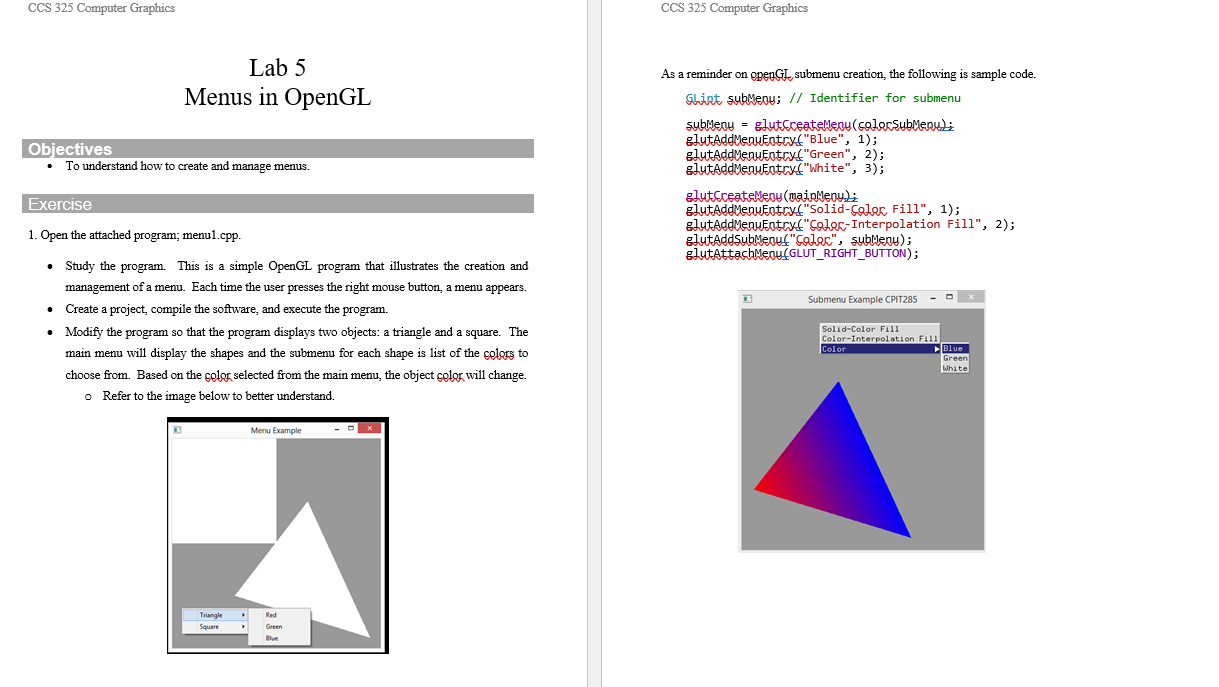
Lab 5 As a reminder on openGL, submenu creation, the following is sample code. Menus in OpenGL Gliat subMenos; // Identifier for submenu Objectives subMenu = glutCoatelenu (solorSubMenu); glutAddMenuentry. "Blue", 1); - To understand how to create and manage menus. glutAddMenuEntscy." "Green", 2); Exercise glutAddMenuentry! "White", 3); 1. Open the attached program; menu1.cpp. glutCceatemen (mainMey); glutAddMenuEntry("Solid-Coler, Fill", 1); glutAddMenuEntry("Golor- Interpolation Fill", 2); glutAddSubMeouf "Golor", subMenu); - Study the program. This is a simple OpenGL program that illustrates the creation and glutAttachMeou(GLUT_RIGHT_BUTTON); management of a menu. Each time the user presses the right mouse button, a menu appears. - Create a project, compile the software, and execute the program. - Modify the program so that the program displays two objects: a triangle and a square. The main menu will display the shapes and the submenu for each shape is list of the celors to choose from. Based on the celor selected from the main menu, the object selor will change. - Refer to the image below to better understand
Step by Step Solution
There are 3 Steps involved in it

Get step-by-step solutions from verified subject matter experts
 Study Help