Question: Merge & Center $ - % -9 Conditional Format Cell Formatting as Table Styles Format TextBox 3 Xf V V w AA 3 D M
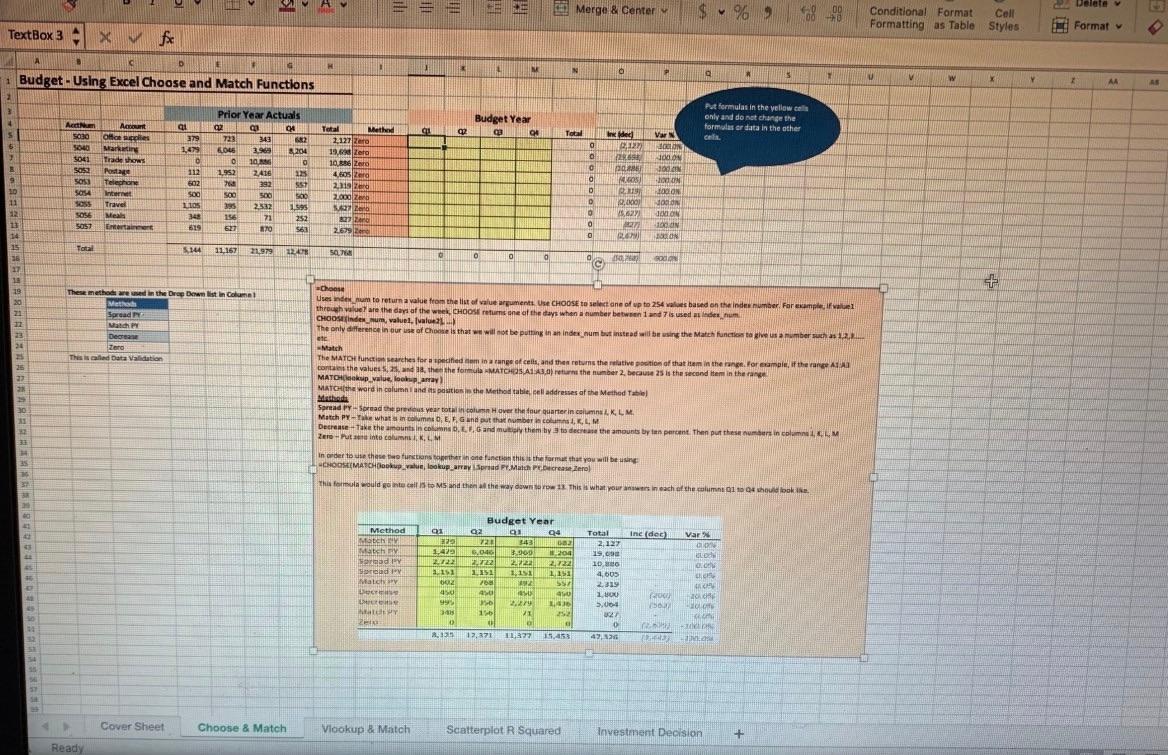
Merge & Center $ - % -9 Conditional Format Cell Formatting as Table Styles Format TextBox 3 Xf V V w AA 3 D M 10 M N a S T 1 Budget - Using Excel Choose and Match Functions 2 SOM Put formulas in the yellow cells 3 Prior Year Actuals Budget Year only and do not change the 4 Aet A ai 2 04 Total Methew formules or data in the other gi 2 Q 5 04 Total 5030 Otoscles brided Vars 379 723 343 2 2,127 Zero C. 500 5 Marketing o 12 1,479 3.900 OLE LON 8204 19.69 Zero 9041 PERS JUN Tradehow 50 LO 10 0 10.362 Sosa o Postage 112 JOIN 1.952 ZALE 133 4.605 Zero 9 0 MOS) 5051 Telephone IN 602 700 292 557 2.a zend D 10 19 ON S04 Inter soo 500 500 5.00 zoo Z 11 D Travel LOS 2,000 2532 395 JOON 1995 Wat 0 SO Mea MON 348 136 71 252 277 ZAPO 11 5057 Entertain 619 O 627 100 UN 170 563 22679 14 0 BOON 15 To SHA 11.167 21.979 120 50 16 0 0 0 0 g 00 17 272 19 Choose 19 These method we used in the Drug Distin Column 20 Method Usesinden um to return a value from the list of value argument. Use CHOOSE to select one of up to 254 valves based on the index number. For example fall through we are the days of the week. CHOOSE returns one of the days when a number between 1 und 7 is used them 1 Spread CHOOSIndex_num, valuel. 12 Match PM The only difference in our use of Chels that we will not be putting in an index_num but instead will be using the Match function talvesammber such as 12. 3 Decrease 20 Zero Natch 25 Thesis led Data Validation The MATO Function searches for a phed in aran of , , orts the values and mining cells and there is the relative potom of that item in the range for rapief the range ATAT 25 con the values, and then the formula MATCHS A1:A3) trn the number 2, because 25 is the second item in the 27 MATO value, loomad 21 MATCH(the word in column and its position in the Method tatil addresses at the Method Table Minthede 30 Spread P. Spread the rear totalt Hover the four Quarter in columns LK L M Match Pre what com... Gan put the number com, KLM 11 in D, E, G Decrease Take the amounts incoln. Land mut them by to decrease the amounts by a percent. Then put these numbers in Column CLM Zero Putinto con KLM 33 cs using in order to these two functions to the fonction this is the form that you will be CHOOSMATCHuwe, lookup_array Sprad Pr. Match Please Zero This formula would go into call to MS and then the way down to 1 This is what your in each of the columns 1 1 4 should look Ine des El Method MENS Mech Sored Sard HT Mais LE Var CON DAN . Budget Year 02 Q4 72 343 08 5.046 20 -200 1722 222 2.722 1151 1,1 1.151 76 2 5 40 0 2.27 10 VI 252 01 229 142all 2.122 13 002 45 995 341 . 135 Total 2,127 19, 10, 4,005 2.31 1 BU 3,00 21 GO Vio TOWY 2 17.371 11:37 1.453 4 . Cover Sheet Choose & Match Vlookup & Match Scatterplot R Squared Investment Decision + Ready Merge & Center $ - % -9 Conditional Format Cell Formatting as Table Styles Format TextBox 3 Xf V V w AA 3 D M 10 M N a S T 1 Budget - Using Excel Choose and Match Functions 2 SOM Put formulas in the yellow cells 3 Prior Year Actuals Budget Year only and do not change the 4 Aet A ai 2 04 Total Methew formules or data in the other gi 2 Q 5 04 Total 5030 Otoscles brided Vars 379 723 343 2 2,127 Zero C. 500 5 Marketing o 12 1,479 3.900 OLE LON 8204 19.69 Zero 9041 PERS JUN Tradehow 50 LO 10 0 10.362 Sosa o Postage 112 JOIN 1.952 ZALE 133 4.605 Zero 9 0 MOS) 5051 Telephone IN 602 700 292 557 2.a zend D 10 19 ON S04 Inter soo 500 500 5.00 zoo Z 11 D Travel LOS 2,000 2532 395 JOON 1995 Wat 0 SO Mea MON 348 136 71 252 277 ZAPO 11 5057 Entertain 619 O 627 100 UN 170 563 22679 14 0 BOON 15 To SHA 11.167 21.979 120 50 16 0 0 0 0 g 00 17 272 19 Choose 19 These method we used in the Drug Distin Column 20 Method Usesinden um to return a value from the list of value argument. Use CHOOSE to select one of up to 254 valves based on the index number. For example fall through we are the days of the week. CHOOSE returns one of the days when a number between 1 und 7 is used them 1 Spread CHOOSIndex_num, valuel. 12 Match PM The only difference in our use of Chels that we will not be putting in an index_num but instead will be using the Match function talvesammber such as 12. 3 Decrease 20 Zero Natch 25 Thesis led Data Validation The MATO Function searches for a phed in aran of , , orts the values and mining cells and there is the relative potom of that item in the range for rapief the range ATAT 25 con the values, and then the formula MATCHS A1:A3) trn the number 2, because 25 is the second item in the 27 MATO value, loomad 21 MATCH(the word in column and its position in the Method tatil addresses at the Method Table Minthede 30 Spread P. Spread the rear totalt Hover the four Quarter in columns LK L M Match Pre what com... Gan put the number com, KLM 11 in D, E, G Decrease Take the amounts incoln. Land mut them by to decrease the amounts by a percent. Then put these numbers in Column CLM Zero Putinto con KLM 33 cs using in order to these two functions to the fonction this is the form that you will be CHOOSMATCHuwe, lookup_array Sprad Pr. Match Please Zero This formula would go into call to MS and then the way down to 1 This is what your in each of the columns 1 1 4 should look Ine des El Method MENS Mech Sored Sard HT Mais LE Var CON DAN . Budget Year 02 Q4 72 343 08 5.046 20 -200 1722 222 2.722 1151 1,1 1.151 76 2 5 40 0 2.27 10 VI 252 01 229 142all 2.122 13 002 45 995 341 . 135 Total 2,127 19, 10, 4,005 2.31 1 BU 3,00 21 GO Vio TOWY 2 17.371 11:37 1.453 4 . Cover Sheet Choose & Match Vlookup & Match Scatterplot R Squared Investment Decision + Ready









 Study Help