







Question: Mesture Analysus View Options Measure Mark Data Point C . It . 1 Mas Min NextMax NertMen a ) Using your mouse pointer, place the
Mesture
Analysus
View
Options
Measure
Mark Data Point
CIt
Mas
Min
NextMax
NertMen
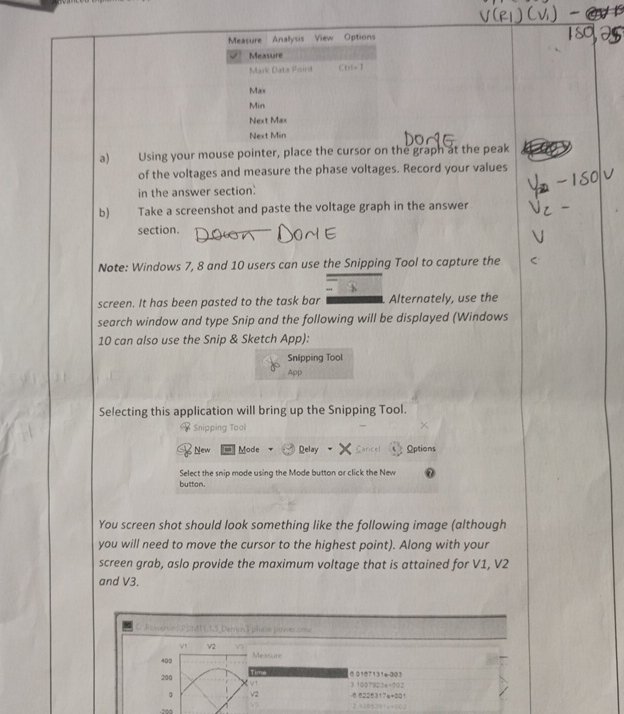
a Using your mouse pointer, place the cursor on the graph at the peak of the voltages and measure the phase voltages. Record your values in the answer section.
b Take a screenshot and paste the voltage graph in the answer section.
Note: Windows and users can use the Snipping Tool to capture the screen. It has been pasted to the task bar Alternately, use the search window and type Snip and the following will be displayed Windows can also use the Snip & Sketch App:
Snipping Tool
App
Selecting this application will bring up the Snipping Tool.
You screen shot should look something like the following image although you will need to move the cursor to the highest point Along with your screen grab, aslo provide the maximum voltage that is attained for V V and V
Select the snip mode using the Mode button or click the New button.
Step by Step Solution
There are 3 Steps involved in it
1 Expert Approved Answer
Step: 1 Unlock

Question Has Been Solved by an Expert!
Get step-by-step solutions from verified subject matter experts
Step: 2 Unlock
Step: 3 Unlock
 Study Help