







Question: Method Description Teacher(String teacherName, String subject, double salary) Initialize the values of all the instance variables appropriately with the values passed. Create a tester class.
Method Description
Teacher(String teacherName, String subject, double salary)
Initialize the values of all the instance variables appropriately with the values passed.
Create a tester class. Create 4 objects of Teacher class. Create an array of type Teacher store the created objects and display the details of the teachers.
Please edit my code (Done in java):
package demo;
public abstract class TeacherInformation {
//Member variable
private String firstName;
//Constructor
public TeacherInformation(String newFirstName, String newLastName) {
firstName = newFirstName;
}
//Getters and Setters
public void setFirstName(String name) {
firstName = name;
}
public String getFirstName() {
return firstName;
}
//Display the values of the instance variables
public abstract void displayDetails();
}
//Teacher class inherits from Teacher Information Class
public class SubjectSalary Extends TeacherInformation {
//instance variables
private String subjectName;
private double salary;
//Constructor
public Teacher(String newFirstName, String newSubjectName, double newSalary) {
//Invoke the super class constructor
super(newFirstName);
subjectName = newSubjectName;
salary = newSalary;
}
//Override displayDetails
public void displayDetails() {
System.out.println("FirstName: " + getFirstName() +", Subject: " + subjectName + ", Salary: " + salary);
}
}
public class TeacherTester {
public static void main(String[] args) {
//Create objects of Teacher class
TeacherTester t1 = new TeacherTester("Alex", "Java Fundamentals", 1200L);
TeacherTester t2 = new TeacherTester("John", "RDBMS", 800L);
TeacherTester t3 = new TeacherTester("Sam", "Networking", 900L);
TeacherTester t4 = new TeacherTester("Maria", "Python", 900L);
//Invoke displayDetails for each of the objects
System.out.println(" Printing Teacher(t1) details ");
t1.displayDetails();
System.out.println(" Printing Teacher(t2) details ");
t2.displayDetails();
System.out.println(" Printing Teacher(t3) details ");
t3.displayDetails();
System.out.println(" Printing Teacher(t4) details ");
t4.displayDetails();
}
}
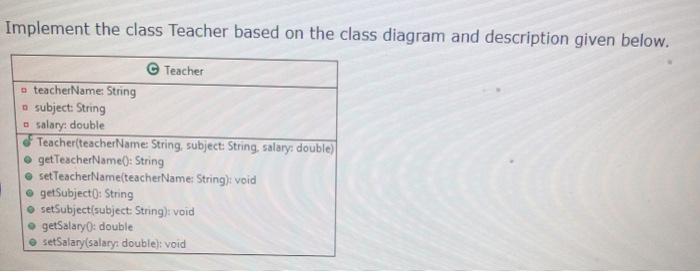
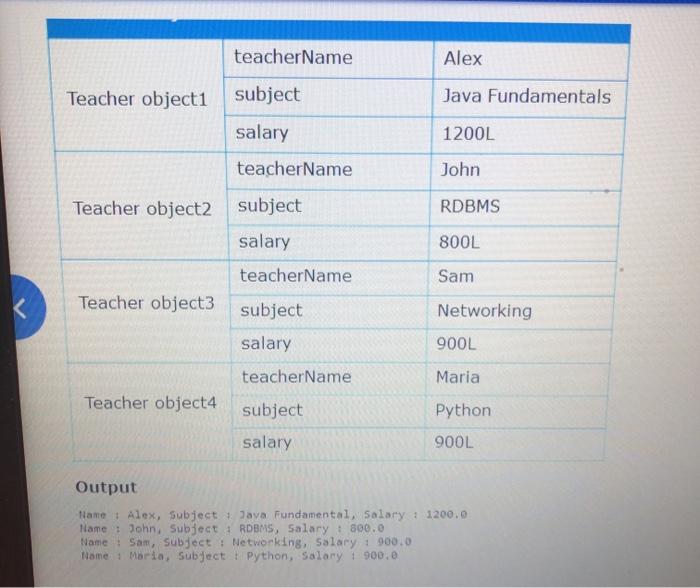
Implement the class Teacher based on the class diagram and description given below. Teacher teacherName: String subject: String - Salary: double Teacher(teacherName: String, subject: String, salary: double) getTeacherName(): String set TeacherName(teacherName: String): void getSubject(): String set Subject subject: String): void getSalary: double setSalary(salary: double): void teacherName Alex Teacher object1 subject Java Fundamentals 1200L salary teacherName John Teacher object2 RDBMS subject salary 800L teacherName Sam Teacher object3 Networking subject salary 900L teacherName Maria Teacher object4 subject Python salary 900L Output tame : Alex, subject Java Fundamental, Salary: 1200.0 llame : John, Subject : RDBMS, Salary: 800.0 Name : Sam, Subject : Networking, Salary: 900.0 NomeMaria, Subject : Python, Salary 1 900.0
Step by Step Solution
There are 3 Steps involved in it

Get step-by-step solutions from verified subject matter experts
 Study Help