







Question: Methodspublic String toString() returns this object as a String, i.e., make each attribute a String, concatenate all strings and return as one String. toString() is
Methodspublic String toString()
returns this object as a String, i.e., make each attribute a String, concatenate all strings and return as one String.
toString() is a special method, you will learn more about it in the next lessons
it needs to be public
it needs to have @override notation (on the line above the method itself). Netbeans will suggest you do it.
regarding state, the toString method will have a similar functionality as App had in the first lab.
if the state attribute is "PA", display the object's attribute name plus the message "is from Pennsylvania"
if the state attribute is not "PA", display the object's attribute name plus the message "is from out-of-state"
In short, the toString() method returns all the data from each object as a String
public void initials( )this method
gets firstName and lastName
extract the initials of each one of them
adds a "." period to each of them
and uses "System.out.println" to display them as one String
public void initials( int option)
this method overloads public void initials( ). This means, it has the same name, but a different number of parameters.
if the value of "option" is 1 gets firstName
extract its initials
adds a "." period to the extracted initial
adds the lastName to this String
and uses "System.out.println" to display the String
for instance, Joe Paterno would lead to the following display: J. Paterno
if the value of "option" is 2
adds firsName to a String
gets lastName
extract its initials
adds a "." period to the extracted initial
adds it to the String
and uses "System.out.println" to display the String
for instance, Joe Paterno would lead to the following display: Joe P.
The App class
Create 2 Person objects called p1 and p2.
p1 data:
firstName - Jillian lastName - Jennings hometown - Montclair state - NJ
p2 data:
firstName - Keaton lastName - Ellis hometown - State College state - PA
Then use System.out to display the data from the 2 objects:
System.out.println(p1.toString()); System.out.println(p2.toString());
Display a separator like System.out.println("=================="); Then call the initials( ) method from each object: p1.initials(); p2.initials();
Display a separator like System.out.println("==================");
Then call the initials( ) method from each object using parameters: p1.initials(1); p2.initials(2);0
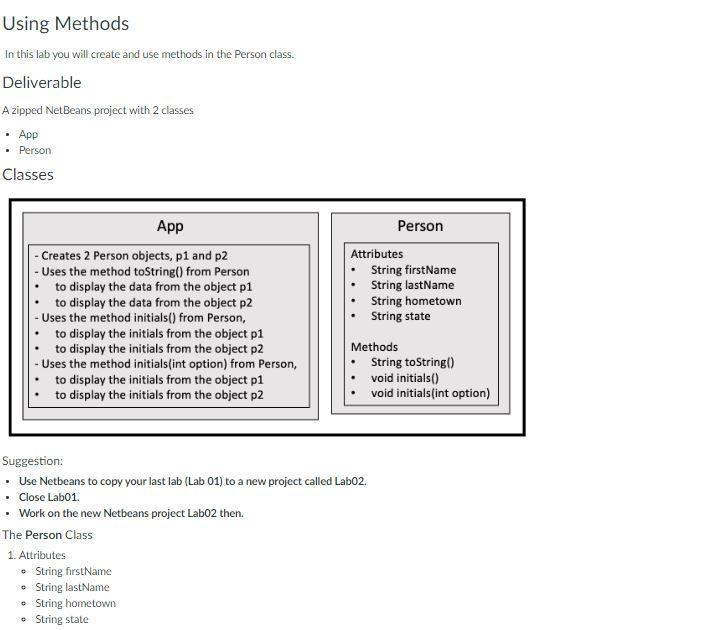
Using Methods In this lab you will create and use methods in the Person class. Deliverable A zipped NetBeans project with 2 classes - App - Person Classes App - Creates 2 Person objects, p1 and p2 - Uses the method toString() from Person - to display the data from the object p1 - to display the data from the object p2 - Uses the method initials() from Person, - to display the initials from the object p1 - to display the initials from the object p2 - Uses the method initials(int option) from Person, - to display the initials from the object p1 - to display the initials from the object p2 Suggestion: - Use Netbeans to copy your last lab (Lab 01) to a new project called Lab02. - Close Lab01. - Work on the new Netbeans project Lab02 then. The Person Class 1. Attributes - String firstName - String lastName - String hometown. PcrsonffirstNane-Jillian, IastNaec-Jchnings, honctown-Montclair, statc-out:of-state PersonffirstNane-Xeaton, lastNanc-Ellis, horetown-5tate College, state-Pennsylvania\} 3.1. K.E. 3. Jcnnings K.saton E
Step by Step Solution
There are 3 Steps involved in it

Get step-by-step solutions from verified subject matter experts
 Study Help