







Question: MGIS 2320-25 Write a console application to total a set of numbers indicated and provided by a user, using a while loop or a do...while
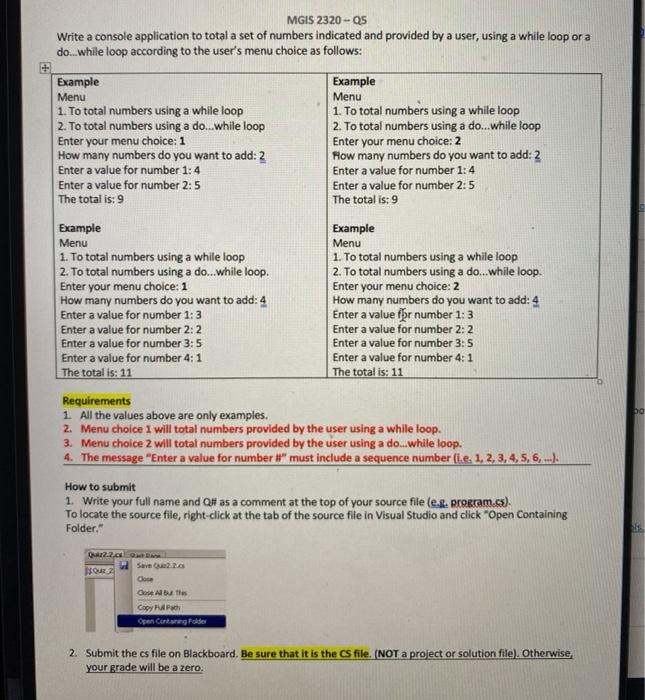
MGIS 2320-25 Write a console application to total a set of numbers indicated and provided by a user, using a while loop or a do...while loop according to the user's menu choice as follows: Example Menu 1. To total numbers using a while loop 2. To total numbers using a do...while loop Enter your menu choice: 1 How many numbers do you want to add: 2 Enter a value for number 1:4 Enter a value for number 2:5 The total is: 9 Example Menu 1. To total numbers using a while loop 2. To total numbers using a do...while loop Enter your menu choice: 2 How many numbers do you want to add: 2 Enter a value for number 1: 4 Enter a value for number 2:5 The total is: 9 Example Menu 1. To total numbers using a while loop 2. To total numbers using a do...while loop. Enter your menu choice: 1 How many numbers do you want to add: 4 Enter a value for number 1:3 Enter a value for number 2:2 Enter a value for number 3:5 Enter a value for number 4:1 The total is: 11 Example Menu 1. To total numbers using a while loop 2. To total numbers using a do...while loop. Enter your menu choice: 2 How many numbers do you want to add: 4 Enter a value fr number 1:3 Enter a value for number 2:2 Enter a value for number 3:5 Enter a value for number 4:1 The total is: 11 50 Requirements 1. All the values above are only examples. 2. Menu choice I will total numbers provided by the user using a while loop. 3. Menu choice 2 will total numbers provided by the user using a do...while loop. 4. The message "Enter a value for number #" must include a sequence number (i.e. 1, 2, 3, 4, 5, 6, ...) How to submit 1. Write your full name and Q# as a comment at the top of your source file (el program.cs). To locate the source file, right-click at the tab of the source file in Visual Studio and click "Open Containing Folder 2.2.0 sous Save 220 Cose se but the Copy Open Containe Polder 2. Submit the cs file on Blackboard. Be sure that it is the CS file. (NOT a project or solution file). Otherwise, your grade will be a zero
Step by Step Solution
There are 3 Steps involved in it

Get step-by-step solutions from verified subject matter experts
 Study Help