





Question: Microsoft Excel 2019 I need help with this problem, please. Please walk me through the steps on how to complete it. A B C D
Microsoft Excel 2019

I need help with this problem, please. Please walk me through the steps on how to complete it.

Microsoft Excel 2019 I need help with this
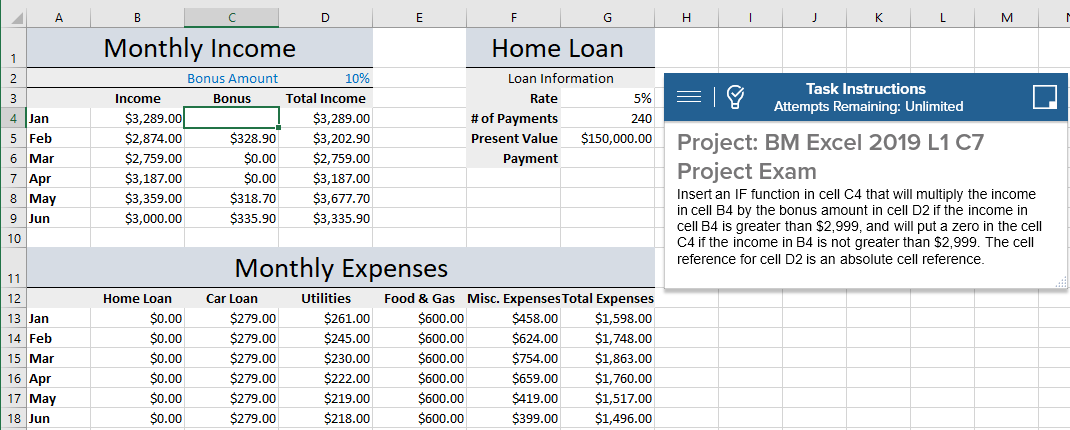
A B C D E F G H J K L M Monthly Income Home Loan IN Bonus Amount 10% Loan Information Task Instructions Income Bonus Total Income Rate 5% = Attempts Remaining: Unlimited 4 Jan $3,289.00 $3,289.00 # of Payments 240 5 Feb $2,874.00 $328.90 $3,202.90 Present Value $150,000.00 Project: BM Excel 2019 L1 C7 6 Mar $2,759.00 $0.00 $2,759.00 Payment 7 Apr $3,187.00 $0.00 $3,187.00 Project Exam 8 May $3,359.00 $318.70 $3,677.70 Insert an IF function in cell C4 that will multiply the income 9 Jun $3,000.00 $335.90 $3,335.90 in cell B4 by the bonus amount in cell D2 if the income in cell B4 is greater than $2,999, and will put a zero in the cell 10 C4 if the income in B4 is not greater than $2,999. The cell Monthly Expenses reference for cell D2 is an absolute cell reference. 11 12 Home Loan Car Loan Utilities Food & Gas Misc. Expenses Total Expenses 13 Jan $0.00 $279.00 $261.00 $600.00 $458.00 $1,598.00 14 Feb $0.00 $279.00 $245.00 $600.00 $624.00 $1,748.00 15 Mar $0.00 $279.00 $230.00 $600.00 $754.00 $1,863.00 16 Apr $0.00 $279.00 $222.00 $600.00 $659.00 $1, 760.00 17 May $0.00 $279.00 $219.00 $600.00 $419.00 $1,517.00 18 Jun $0.00 $279.00 $218.00 $600.00 $399.00 $1,496.00

Step by Step Solution

There are 3 Steps involved in it

1 Expert Approved Answer
Step: 1 Unlock blur-text-image

Question Has Been Solved by an Expert!

Get step-by-step solutions from verified subject matter experts

Step: 2 Unlock
Step: 3 Unlock

Students Have Also Explored These Related Finance Questions!