







Question: Microsoft Excel Assignment Follow the instructions below to complete the following assignment using Microsoft Excel. The assignment instructions include references to figures and tables
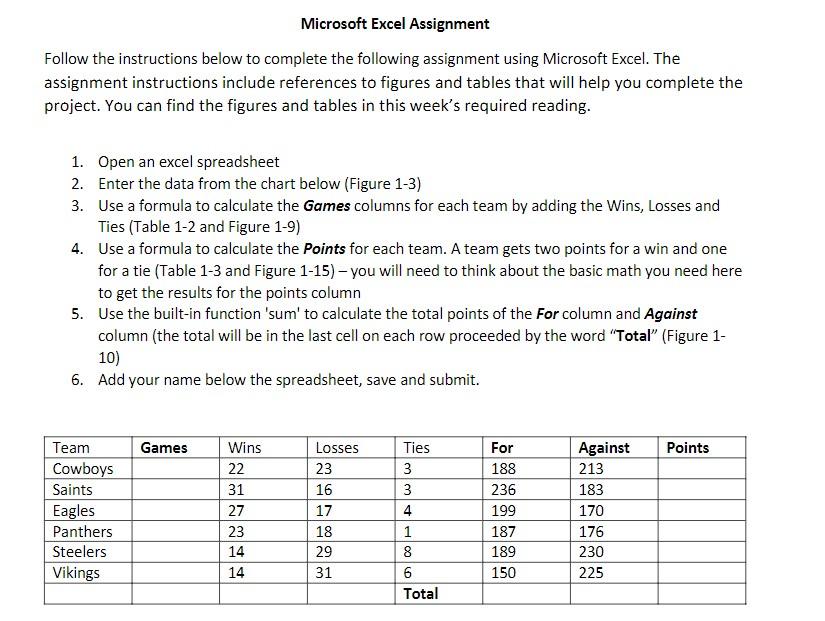
Microsoft Excel Assignment Follow the instructions below to complete the following assignment using Microsoft Excel. The assignment instructions include references to figures and tables that will help you complete the project. You can find the figures and tables in this week's required reading. 1. Open an excel spreadsheet 2. Enter the data from the chart below (Figure 1-3) 3. Use a formula to calculate the Games columns for each team by adding the Wins, Losses and Ties (Table 1-2 and Figure 1-9) 4. Use a formula to calculate the Points for each team. A team gets two points for a win and one for a tie (Table 1-3 and Figure 1-15) - you will need to think about the basic math you need here to get the results for the points column 5. Use the built-in function 'sum' to calculate the total points of the For column and Against column (the total will be in the last cell on each row proceeded by the word "Total" (Figure 1- 10) 6. Add your name below the spreadsheet, save and submit. Team Cowboys Games Wins Losses Ties For Against Points 22 23 3 188 213 Saints 31 16 3 236 183 Eagles 27 17 4 199 170 Panthers 23 18 1 187 176 Steelers 14 29 8 189 230 Vikings 14 31 6 150 225 Total
Step by Step Solution
There are 3 Steps involved in it

Get step-by-step solutions from verified subject matter experts
 Study Help