







Question: MIcrosoft SQl server. Answer correctly - dont spam Share screenshot Customer Table: CREATE TABLE CUSTOMER ( CID int PRIMARY KEY, ENAME varchar (30) not null,
MIcrosoft SQl server.
Answer correctly - dont spam
Share screenshot
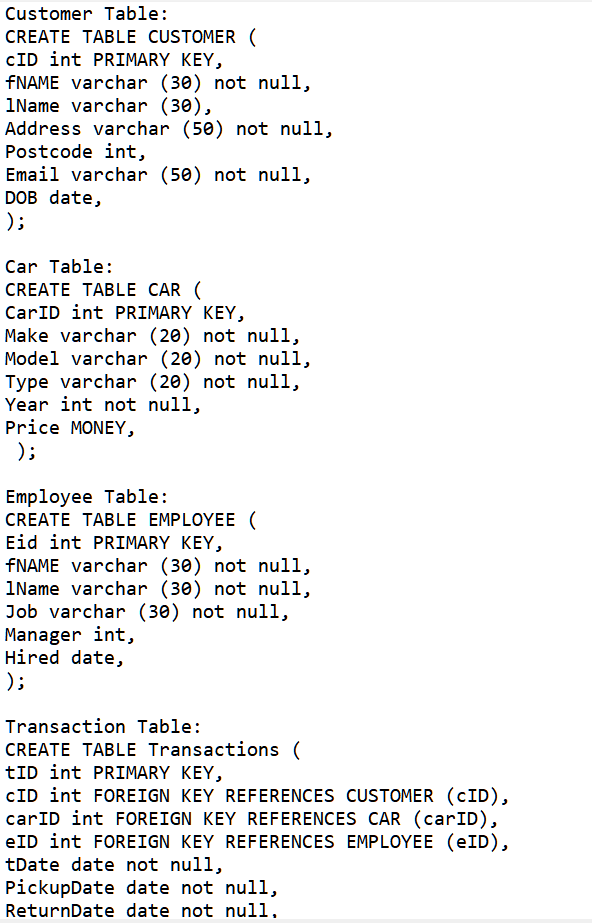
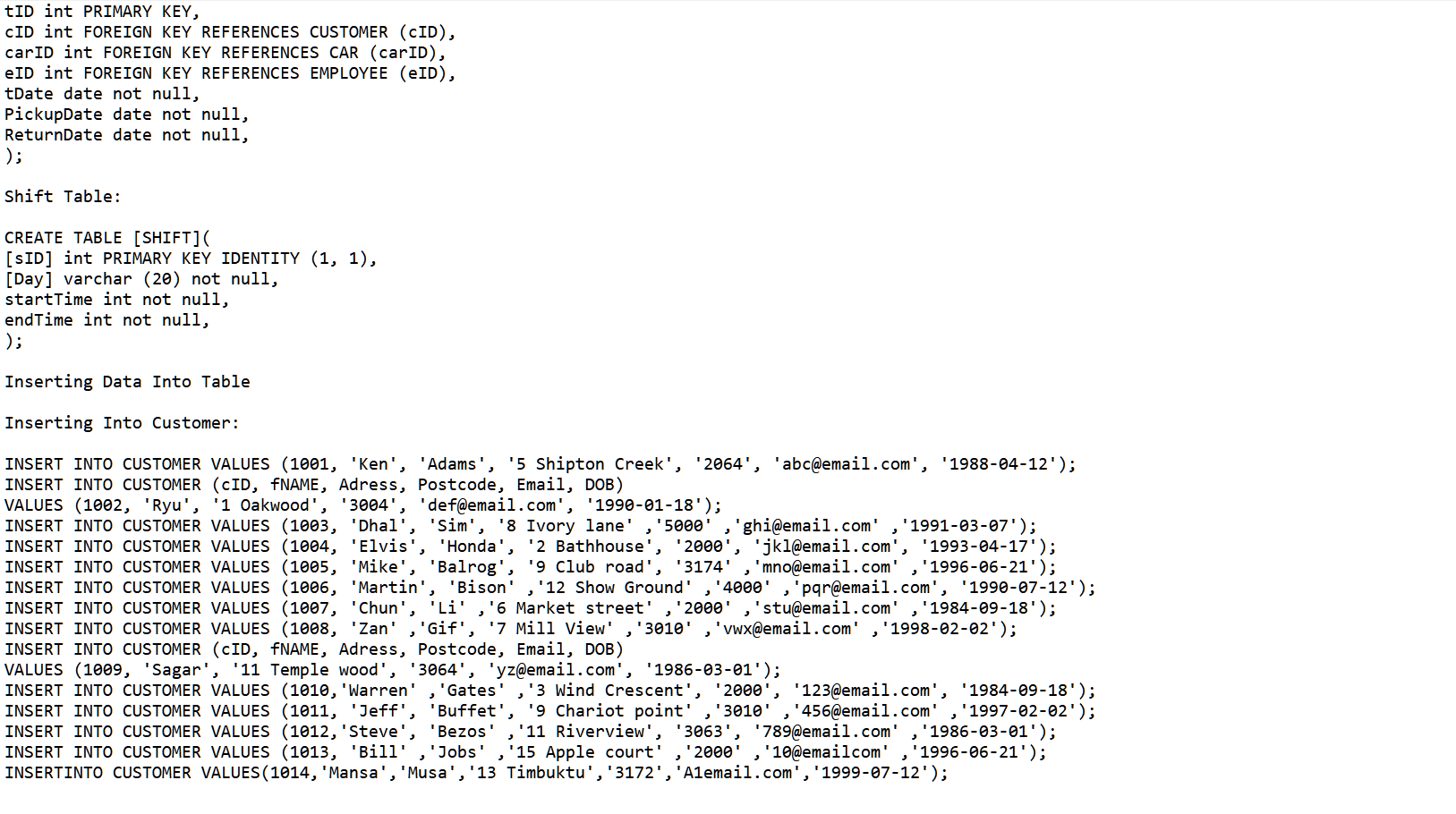
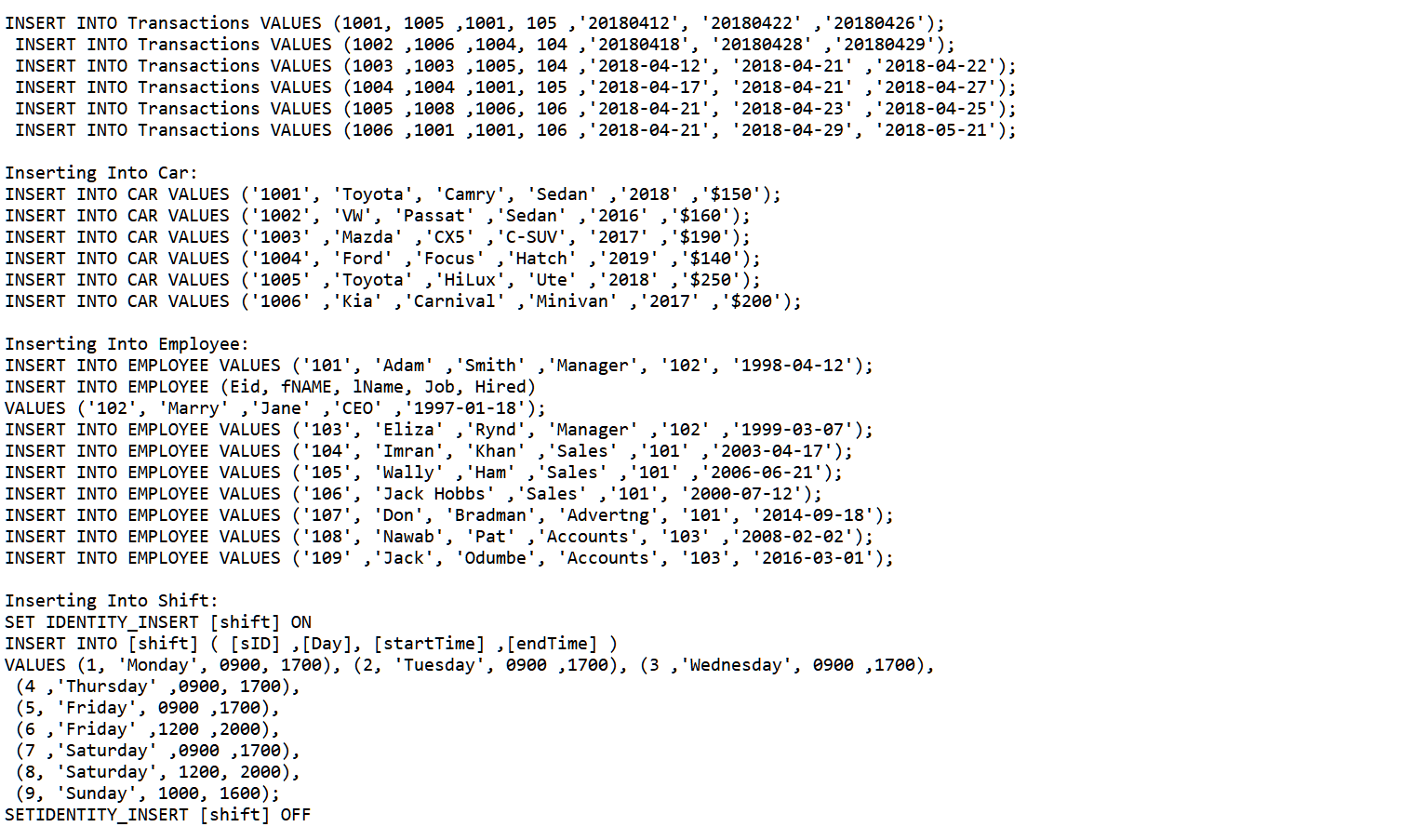
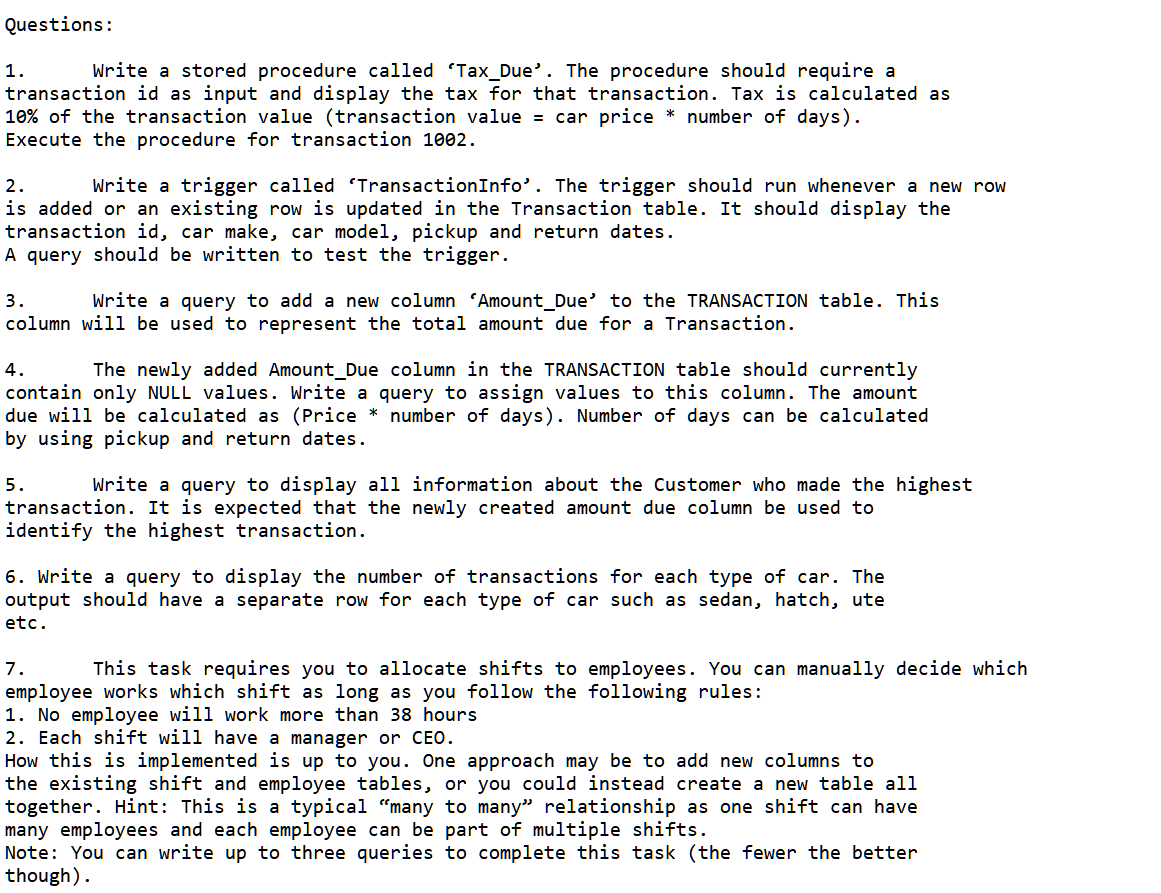
Customer Table: CREATE TABLE CUSTOMER ( CID int PRIMARY KEY, ENAME varchar (30) not null, Name varchar (30), Address varchar (50) not null, Postcode int, Email varchar (50) not null, DOB date, ); Car Table: CREATE TABLE CAR ( CarID int PRIMARY KEY, Make varchar (20) not null, Model varchar (20) not null, Type varchar (20) not null, Year int not null, Price MONEY, ); Employee Table: CREATE TABLE EMPLOYEE ( Eid int PRIMARY KEY, FNAME varchar (30) not null, Name varchar (30) not null, Job varchar (30) not null, Manager int, Hired date, ); Transaction Table: CREATE TABLE Transactions ( tID int PRIMARY KEY, CID int FOREIGN KEY REFERENCES CUSTOMER (CID), carID int FOREIGN KEY REFERENCES CAR (carID), eID int FOREIGN KEY REFERENCES EMPLOYEE (CID), tDate date not null, PickupDate date not null, ReturnDate date not null, tID int PRIMARY KEY, CID int FOREIGN KEY REFERENCES CUSTOMER (CID), carID int FOREIGN KEY REFERENCES CAR (carID), eID int FOREIGN KEY REFERENCES EMPLOYEE (CID), tDate date not null, Pickupdate date not null, ReturnDate date not null, ); Shift Table: CREATE TABLE (SHIFT]( [SID] int PRIMARY KEY IDENTITY (1, 1), [Day] varchar (20) not null, startTime int not null, endTime int not null, ); Inserting Data Into Table Inserting Into Customer: INSERT INTO CUSTOMER VALUES (1001, 'Ken', 'Adams', '5 Shipton Creek', 2064', 'abc@email.com', '1988-04-12'); INSERT INTO CUSTOMER (CID, FNAME, Adress, Postcode, Email, DOB) VALUES (1002, 'Ryu', '1 Oakwood', '3004', 'def@email.com', '1990-01-18'); INSERT INTO CUSTOMER VALUES (1003, 'Dhal', 'Sim', '8 Ivory lane' '5000' ghi@email.com , '1991-03-07'); INSERT INTO CUSTOMER VALUES (1004, 'Elvis', 'Honda', '2 Bathhouse', 2000', 'jki@email.com', '1993-04-17'); INSERT INTO CUSTOMER VALUES (1005, 'Mike', 'Balrog', '9 Club road', '3174' 'mno@email.com' , '1996-06-21'); INSERT INTO CUSTOMER VALUES (1006, 'Martin', 'Bison' , '12 Show Ground 4000', 'pqr@email.com', '1990-07-12'); INSERT INTO CUSTOMER VALUES (1007, 'Chun', 'li' ,'6 Market street' 2000', 'stu@email.com' , '1984-09-18'); INSERT INTO CUSTOMER VALUES (1008, 'Zan' , 'Gif', '7 Mill View' '3010' , 'vwx@email.com' , '1998-02-02'); INSERT INTO CUSTOMER (CID, ENAME, Adress, Postcode, Email, DOB) VALUES (1009, 'Sagar', '11 Temple wood', '3064', 'yz@email.com', '1986-03-01'); INSERT INTO CUSTOMER VALUES (1010, 'Warren' 'Gates' '3 Wind Crescent', '2000', '123@email.com', '1984-09-18'); INSERT INTO CUSTOMER VALUES (1011, 'Jeff', 'Buffet', '9 Chariot point','3010 '456@email.com' , '1997-02-02'); INSERT INTO CUSTOMER VALUES (1012, 'Steve', 'Bezos' '11 Riverview', '3063', '789@email.com '1986-03-01'); INSERT INTO CUSTOMER VALUES (1013, 'Bill' , 'Jobs' , '15 Apple court' , '2000' '10@emailcom' , '1996-06-21'); INSERTINTO CUSTOMER VALUES(1014, 'Mansa', 'Musa', '13 Timbuktu', '3172', 'Alemail.com', '1999-07-12'); 2 INSERT INTO Transactions VALUES (1001, 1005 , 1001, 105, '20180412', 20180422' '20180426'); INSERT INTO Transactions VALUES (1002 , 1006 , 1004, 104 "20180418' '20180428' ,'20180429'); INSERT INTO Transactions VALUES (1003 ,1003 , 1005, 104 '2018-04-12', '2018-04-21' '2018-04-22'); INSERT INTO Transactions VALUES (1004 , 1004 , 1001, 105 '2018-04-17', '2018-04-21' '2018-04-27'); INSERT INTO Transactions VALUES (1005 , 1008 ,1006, 106 '2018-04-21', '2018-04-23 '2018-04-25'); INSERT INTO Transactions VALUES (1006 ,1001 , 1001, 106 '2018-04-21', '2018-04-29', '2018-05-21'); TEET 2 Inserting Into Car: INSERT INTO CAR VALUES ('1001', 'Toyota', 'Camry', 'Sedan' '2018' '$150'); INSERT INTO CAR VALUES ('1002', 'WW', 'Passat' 'Sedan' 2016' $160'); INSERT INTO CAR VALUES ('1003' 'Mazda' 'CX5' 'C-SUV' 2017' $190'); INSERT INTO CAR VALUES ('1004', 'Ford' 'Focus' 'Hatch' 2019 $140'); INSERT INTO CAR VALUES ('1005', 'Toyota' , 'Hilux', 'Ute' '2018' $250'); INSERT INTO CAR VALUES ('1006', 'Kia' ,'Carnival' "Minivan', '2017' , '$200'); 2 2 3 2 Inserting Into Employee: INSERT INTO EMPLOYEE VALUES ('101', 'Adam' 'Smith' 'Manager', '102', '1998-04-12'); INSERT INTO EMPLOYEE (Eid, FNAME, IName, Job, Hired) VALUES ('102', 'Marry' 'Jane' 'CEO' '1997-01-18'); INSERT INTO EMPLOYEE VALUES ('103', 'Eliza' , 'Rynd', 'Manager' , '102', '1999-03-07'); INSERT INTO EMPLOYEE VALUES ('104' 'Imran', 'Khan' 'Sales' '101' 2003-04-17'); INSERT INTO EMPLOYEE VALUES ('105' , 'Wally' Ham' 'Sales' '101' 2006-06-21'); INSERT INTO EMPLOYEE VALUES ('106'. 'Jack Hobbs' 'Sales' 101' '2000-07-12'); INSERT INTO EMPLOYEE VALUES ('107', 'Don', 'Bradman', 'Advertng', '101', '2014-09-18'); INSERT INTO EMPLOYEE VALUES ('108', 'Nawab', 'Pat' , 'Accounts '103' ,' 2008-02-02'); INSERT INTO EMPLOYEE VALUES ('109 'Jack', 'Odumbe', 'Accounts', '103', '2016-03-01'); 2 Inserting Into Shift: SET IDENTITY_INSERT [shift] ON INSERT INTO (shift] ( [ID] , [Day], [startTime] , [endTime] ) VALUES (1, 'Monday', 0900, 1700), (2, 'Tuesday', 0900 , 1700), (3, 'Wednesday', 0900 , 1700), (4 , 'Thursday' , 0900, 1700), (5, 'Friday', 0900 , 1700), (6 , 'Friday' ,1200 ,2000), (7 , 'Saturday' , 0900 , 1700), (8, 'Saturday', 1200, 2000), (9, 'Sunday', 1000, 1600); SETIDENTITY_INSERT (shift] OFF Questions: 1. Write a stored procedure called 'Tax_Due'. The procedure should require a transaction id as input and display the tax for that transaction. Tax is calculated as 10% of the transaction value (transaction value = car price * number of days). Execute the procedure for transaction 1002. 2. Write a trigger called 'TransactionInfo'. The trigger should run whenever a new row is added or an existing row is updated in the Transaction table. It should display the transaction id, car make, car model, pickup and return dates. A query should be written to test the trigger. 3. Write a query to add a new column Amount_Due to the TRANSACTION table. This column will be used to represent the total amount due for a Transaction. 4. The newly added Amount_Due column in the TRANSACTION table should currently contain only NULL values. Write a query to assign values to this column. The amount due will be calculated as (Price * number of days). Number of days can be calculated by using pickup and return dates. 5. Write a query to display all information about the Customer who made the highest transaction. It is expected that the newly created amount due column be used to identify the highest transaction. 6. Write a query to display the number of transactions for each type of car. The output should have a separate row for each type of car such as sedan, hatch, ute etc. 7. This task requires you to allocate shifts to employees. You can manually decide which employee works which shift as long as you follow the following rules: 1. No employee will work more than 38 hours 2. Each shift will have a manager or CEO. How this is implemented is up to you. One approach may be to add new columns to the existing shift and employee tables, or you could instead create a new table all together. Hint: This is a typical "many to many relationship as one shift can have many employees and each employee can be part of multiple shifts. Note: You can write up to three queries to complete this task (the fewer the better though)
Step by Step Solution
There are 3 Steps involved in it

Get step-by-step solutions from verified subject matter experts
 Study Help