Question: MICROSOFT SQL Server Management Studio 2018 I have a question for #4. Also, where exactly do I insert the data? Contoso would like for you

MICROSOFT SQL Server Management Studio 2018

I have a question for #4.

Also, where exactly do I insert the data?

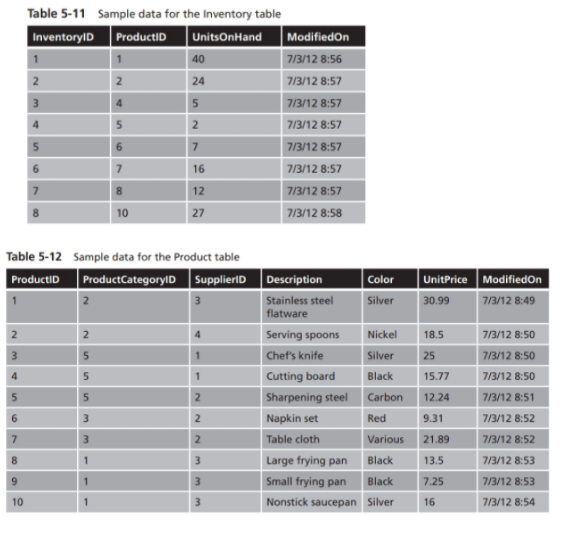
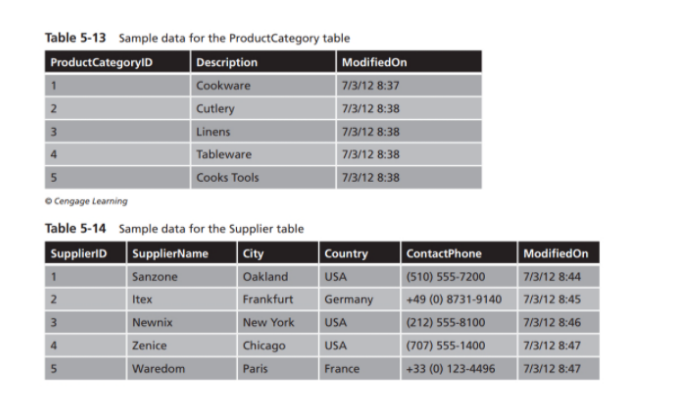
Contoso would like for you to implement a database that will track products, product categories, suppliers, and current product inventory for a cookware supply store. You have been given a database specification that includes table requirements and sample data for the test environment. The design calls for four tables to be created: Inventory, Product, ProductCategory, and Supplier. Tables 5-5 through 5-10 contain the column names, data types, constraints, and keys that must be implemented for each table. Tables 5-11 through 5-14 contain the sample data that you will need to insert into each table for testing. Use Query Editor throughout this exercise, and document each step by taking a screen shot of the Query Editor window after executing the SQL command to show that it completed successfully.

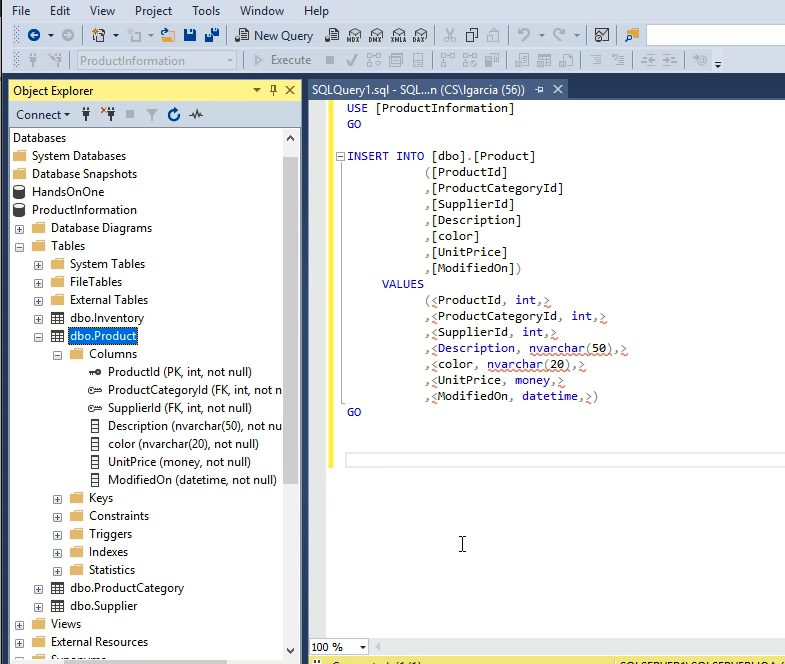
QUESTION: 4. Use the INSERT statement to add the sample rows to the tables. Use the column default for the ModifiedOn column.

This is what I have.
MICROSOFT SQL Server Management Studio 2018 I have a question for #4.

These are the tables with the data.
Also, where exactly do I insert the data? Contoso would like for

you to implement a database that will track products, product categories, suppliers,

File Edit View Project Tools Window Help New Query Execute 4299-6 NDX' XNLA DAY P2 DHX P Productinformation + - HA Object Explorer - IX SQL Query1.sql - SQL...n (CS\lgarcia (56)) + X Connect USE [Product Information] GO Databases System Databases INSERT INTO [dbo].[Product] Database Snapshots ([ProductId] HandsOnOne [ProductCategoryId] Productinformation [SupplierId] Database Diagrams [Description] [color] Tables [UnitPrice] System Tables [Modifiedon]) FileTables VALUES External Tables ( ) * Supplierld (FK, int, not null) Description (nvarchar(50), not nu color (nvarchar(20), not null) UnitPrice (money, not null) Modified On (datetime, not null) Keys Constraints Triggers I Indexes Statistics dbo.ProductCategory dbo.Supplier Views External Resources GO + + + 100 % Table 5-11 Sample data for the Inventory table InventoryID ProductID UnitsonHand Modifiedon 40 7/3/12 8:56 24 7/3/12 8:57 5 7/3/12 8:57 2 7/3/12 8:57 7 7/3/12 8:57 16 7/3/12 8:57 7/3/12 8:57 27 7/3/12 8:58 5 6 7 8 12 10 UnitPrice Modifiedon 30.99 7/3/12 8:49 2 N 2 18.5 w N 7/3/12 8:50 7/3/12 8:50 25 Table 5-12 Sample data for the Product table Productio Product CategoryID Supplier Description Color Stainless steel Silver flatware Serving spoons Nickel Chef's knife Silver Cutting board Black Sharpening steel Carbon Napkin set Red Table cloth Various Large frying pan Black Small frying pan Black 10 Nonstick saucepan Silver unun 5 15.77 7/3/12 8:50 12.24 7/3/12 8:51 7/3/12 8:52 9.31 21.89 7/3/12 8:52 13.5 7/3/12 8:53 9 7.25 7/3/12 8:53 mm 1 3 16 7/3/12 8:54 Table 5-13 Sample data for the Product Category table Product CategoryID Description Modifiedon Cookware 7/3/12 8:37 Cutlery 7/3/12 8:38 Linens 7/3/12 8:38 Tableware 7/3/12 8:38 5 Cooks Tools 7/3/12 8:38 Cengage Learning Table 5-14 Sample data for the Supplier table Supplier SupplierName City Country ContactPhone Modifiedon Sanzone Oakland USA (510) 555-7200 7/3/12 8:44 Itex Frankfurt Germany +49 (0) 8731-9140 7/3/12 8:45 Newnix New York USA (212) 555-8100 7/3/12 8:46 Zenice Chicago USA (707) 555-1400 7/3/12 8:47 Waredom Paris France +33 (0) 123-4496 7/3/12 8:47 N 5

Step by Step Solution

There are 3 Steps involved in it

1 Expert Approved Answer
Step: 1 Unlock blur-text-image
Question Has Been Solved by an Expert!

Get step-by-step solutions from verified subject matter experts

Step: 2 Unlock
Step: 3 Unlock

Students Have Also Explored These Related Databases Questions!