







Question: Microsoft Visual basic 2010 Review: Students Create a Students application that maintains Students an array of student information using an appropriate data type for the
Microsoft Visual basic 2010
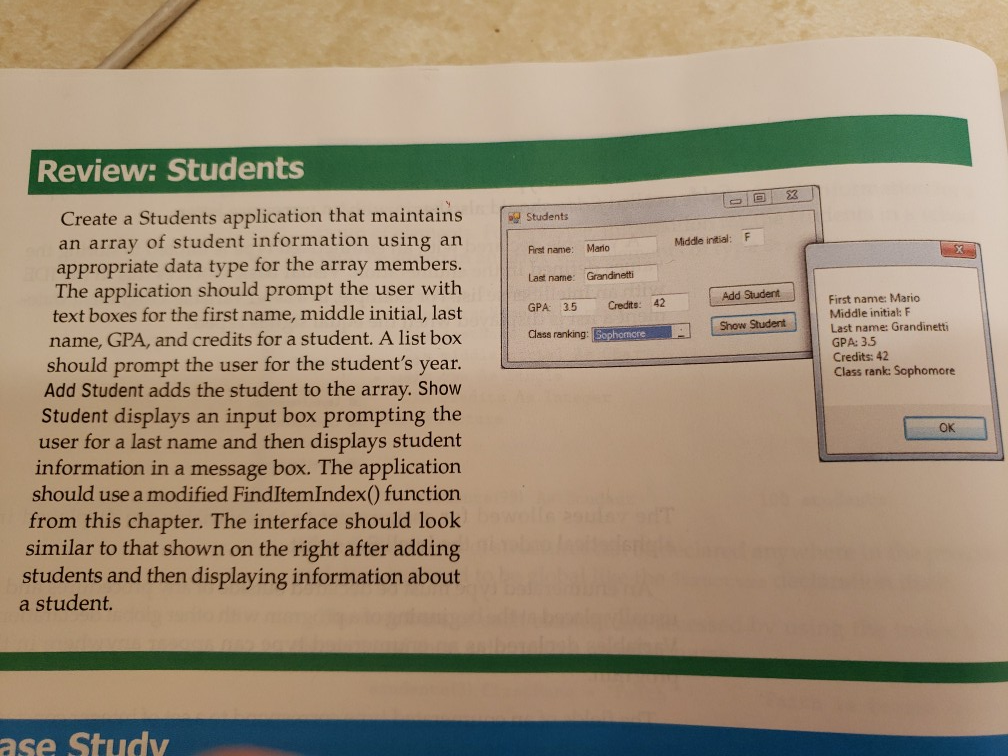
Review: Students Create a Students application that maintains Students an array of student information using an appropriate data type for the array members. The application should prompt the user with text boxes for the first name, middle initial, last name, GPA, and credits for a student. A list box should prompt the user for the student's year. Add Student adds the student to the array. Show Student displays an input box prompting the user for a last name and then displays student information in a message box. The application should use a modified FindItemIndex) function from this chapter. The interface should look similar to that shown on the right after adding students and then displaying information about Middle intial:F First name: Mario Last name: Grandinetti GPA: 3.5 Class ranking Add Student e: Mario Credts: 42 Middle initial: F Last name: Grandinetti GPA: 35 Credits: 42 Class rank: Sophomore Gota ert/11 Show Student OK a student. ase Study
Step by Step Solution
There are 3 Steps involved in it

Get step-by-step solutions from verified subject matter experts
 Study Help