







Question: Case Programming Assignments 3 BODY MASS INDEX (BMI) CALCULATOR WITH CDC CHART Design a Windows Classic Desktop application and write the code that will
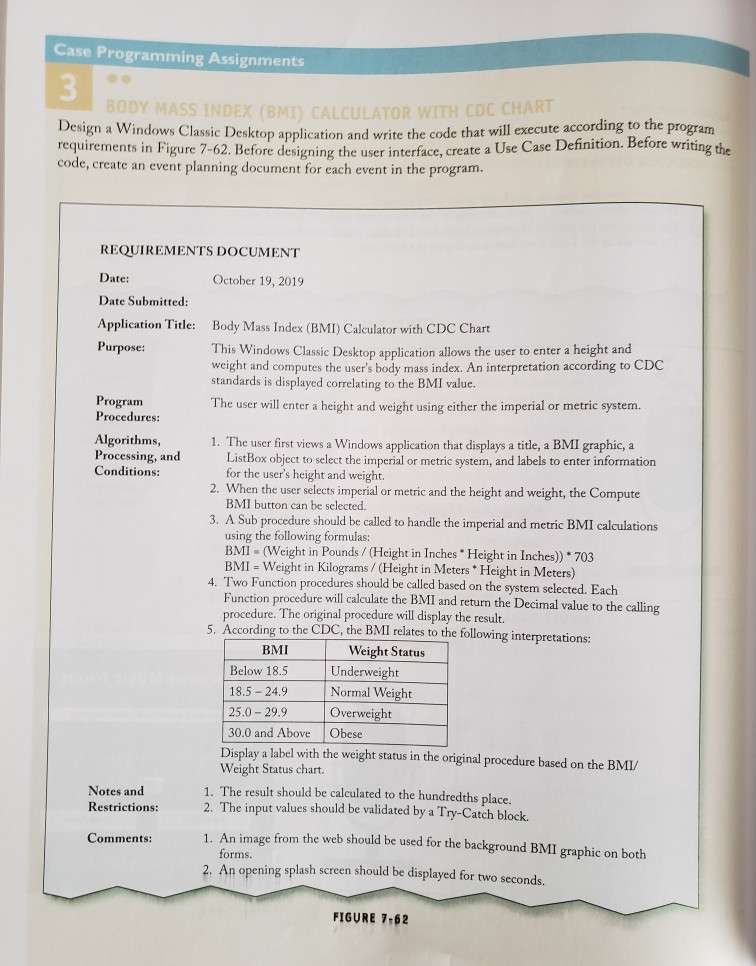
Case Programming Assignments 3 BODY MASS INDEX (BMI) CALCULATOR WITH CDC CHART Design a Windows Classic Desktop application and write the code that will execute according to the program requirements in Figure 7-62. Before designing the user interface, create a Use Case Definition. Before writing the code, create an event planning document for each event in the program. REQUIREMENTS DOCUMENT Date: Date Submitted: October 19, 2019 Application Title: Body Mass Index (BMI) Calculator with CDC Chart Purpose: Program Procedures: Algorithms, Processing, and Conditions: Notes and Restrictions: Comments: This Windows Classic Desktop application allows the user to enter a height and weight and computes the user's body mass index. An interpretation according to CDC standards is displayed correlating to the BMI value. The user will enter a height and weight using either the imperial or metric system. 1. The user first views a Windows application that displays a title, a BMI graphic, a ListBox object to select the imperial or metric system, and labels to enter information for the user's height and weight. 2. When the user selects imperial or metric and the height and weight, the Compute BMI button can be selected. 3. A Sub procedure should be called to handle the imperial and metric BMI calculations using the following formulas: BMI (Weight in Pounds / (Height in Inches Height in Inches)) *703 BMI Weight in Kilograms/ (Height in Meters Height in Meters) 4. Two Function procedures should be called based on the system selected. Each Function procedure will calculate the BMI and return the Decimal value to the calling procedure. The original procedure will display the result. 5. According to the CDC, the BMI relates to the following interpretations: BMI Below 18.5 18.5-24.9 25.0-29.9 30.0 and Above Weight Status Underweight Normal Weight Overweight Obese Display a label with the weight status in the original procedure based on the BMI/ Weight Status chart. 1. The result should be calculated to the hundredths place. 2. The input values should be validated by a Try-Catch block. 1. An image from the web should be used for the background BMI graphic on both forms. 2. An opening splash screen should be displayed for two seconds. FIGURE 7-62
Step by Step Solution
There are 3 Steps involved in it
To create a BMI calculator with CDC chart in Microsoft Visual Basic 2017 follow these steps Step 1 Create a Use Case Definition Title Calculate BMI an... View full answer

Get step-by-step solutions from verified subject matter experts
 Study Help