







Question: MiniProject Table Processing - Part1 An Excel spreadsheet contains course enrollment data. The data is given in Excel and in a format that requires preprocessing
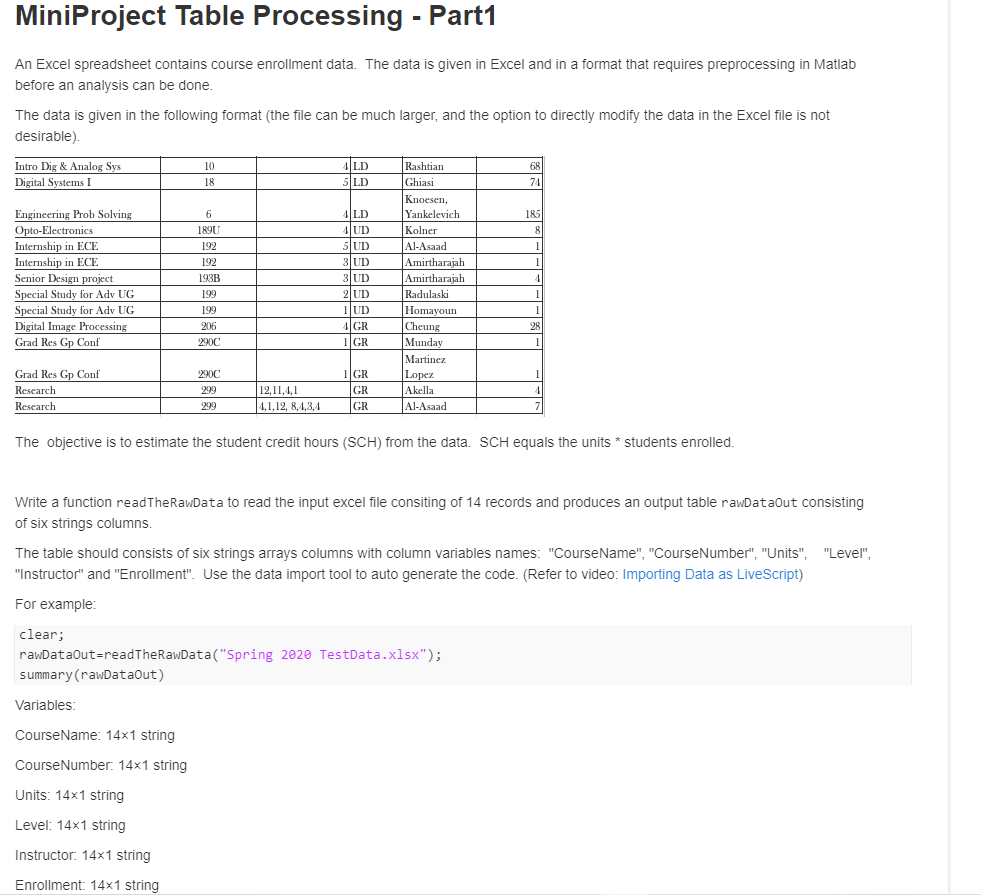
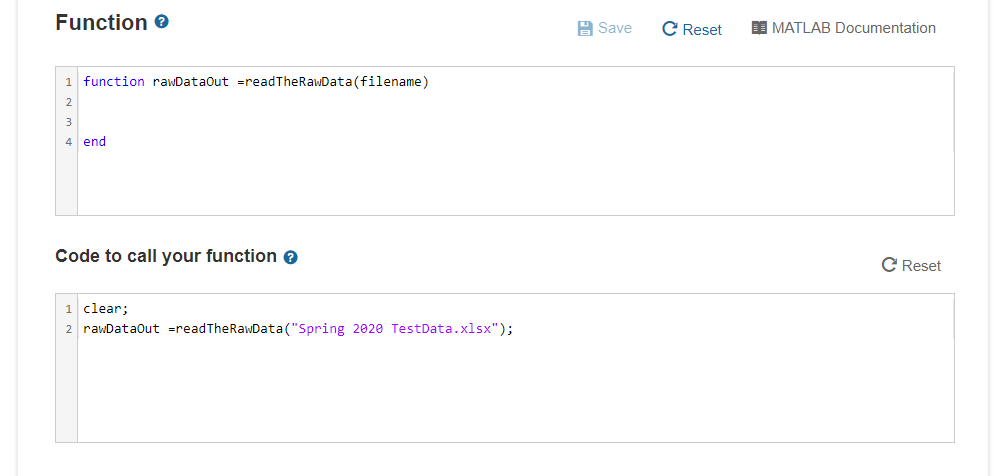
MiniProject Table Processing - Part1 An Excel spreadsheet contains course enrollment data. The data is given in Excel and in a format that requires preprocessing in Matlab before an analysis can be done. The data is given in the following format (the file can be much larger, and the option to directly modify the data in the Excel file is not desirable) 68 Intro Dig & Analog Sys Digital Systems I 10 18 LD 5 LD 74 6 185 1890 8 192 192 1 1 Engineering Prob Solving Opto-Electronics pro Internship in ECE are Internship in ECE Senior Design project Special Study for Adv UG Special Study for Adv UG Digital Image Processing Grad Res Gp Conf 4|LD AUD 5 UD BUD 3 UD 2 UD 1 UD 4 GR 1 GR 193B 199 199 206 2000 1 Rashtian Ghiasi Knoesen, Yankelevich t. Kolner Al-Asaad Amirtharajah fan Amirtharajah Radulaski Homayoun f Cheung Pcs Munday Martinez Lopez Akella Al-Asaad 1 28 1 Grad Res Gp Conf Research Research 290C 299 1 GR GR GR 12,11.4.1 4,1,12, 8,4,3,4 4 299 The objective is to estimate the student credit hours (SCH) from the data. SCH equals the units * students enrolled. Write a function readTheRawData to read the input excel file consiting of 14 records and produces an output table rawDataOut consisting of six strings columns. The table should consists of six strings arrays columns with column variables names: "CourseName", "CourseNumber", "Units", "Level", "Instructor" and "Enrollment". Use the data import tool to auto generate the code. (Refer to video: Importing Data as LiveScript) For example: clear; rawDataOut=readTheRawData("Spring 2020 TestData.xlsx"); summary(rawDataOut) Variables: CourseName: 14x1 string Course Number: 14x1 string Units: 14x1 string Level: 14x1 string Instructor: 14x1 string Enrollment: 14x1 string Function Save C Reset LOMATLAB Documentation 1 function rawDataOut =readTheRawData(filename) 2 3 4 end Code to call your function C Reset 1 clear; 2 rawDataOut =readTheRawData("Spring 2020 TestData.xlsx")
Step by Step Solution
There are 3 Steps involved in it

Get step-by-step solutions from verified subject matter experts
 Study Help