







Question: MIS310 EXCEL Individual Project Spring Garden Inventory Due Date: April 13, 2020 NAME Instructions: Open the file Spring Garden Inventory.xlsx from Canvas. Save it
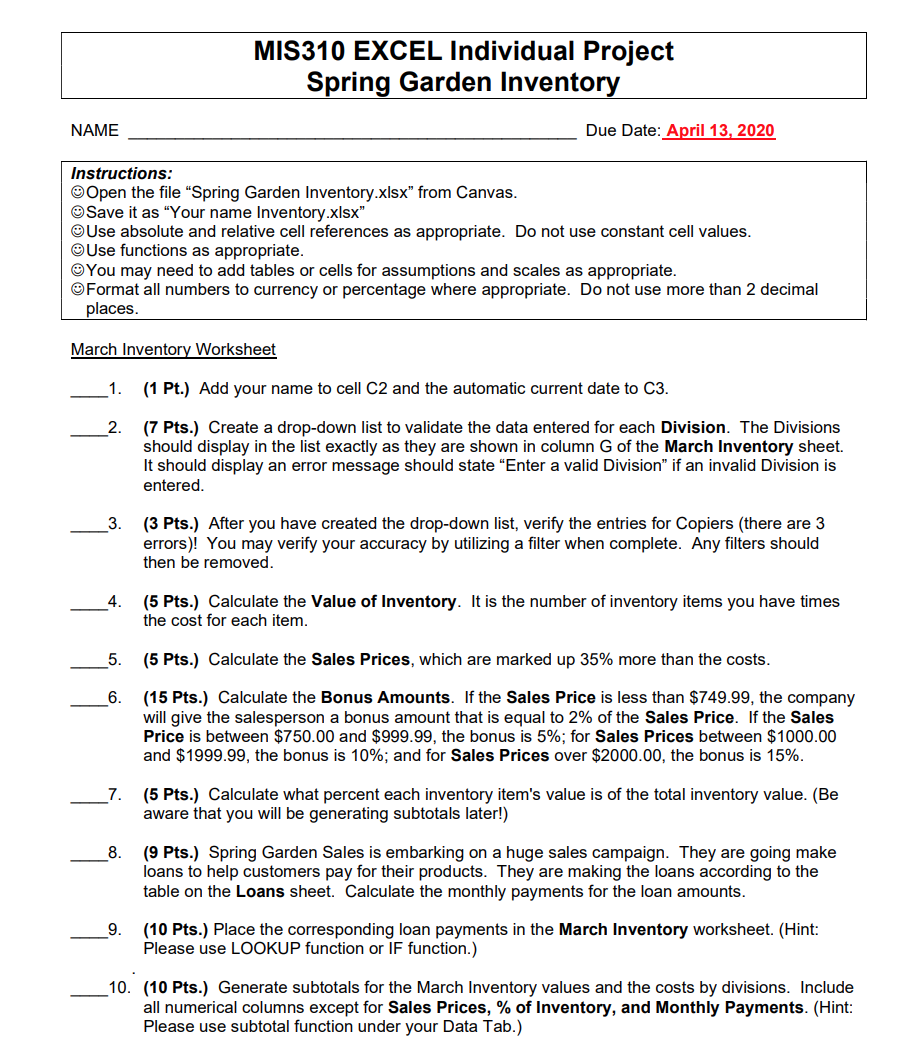
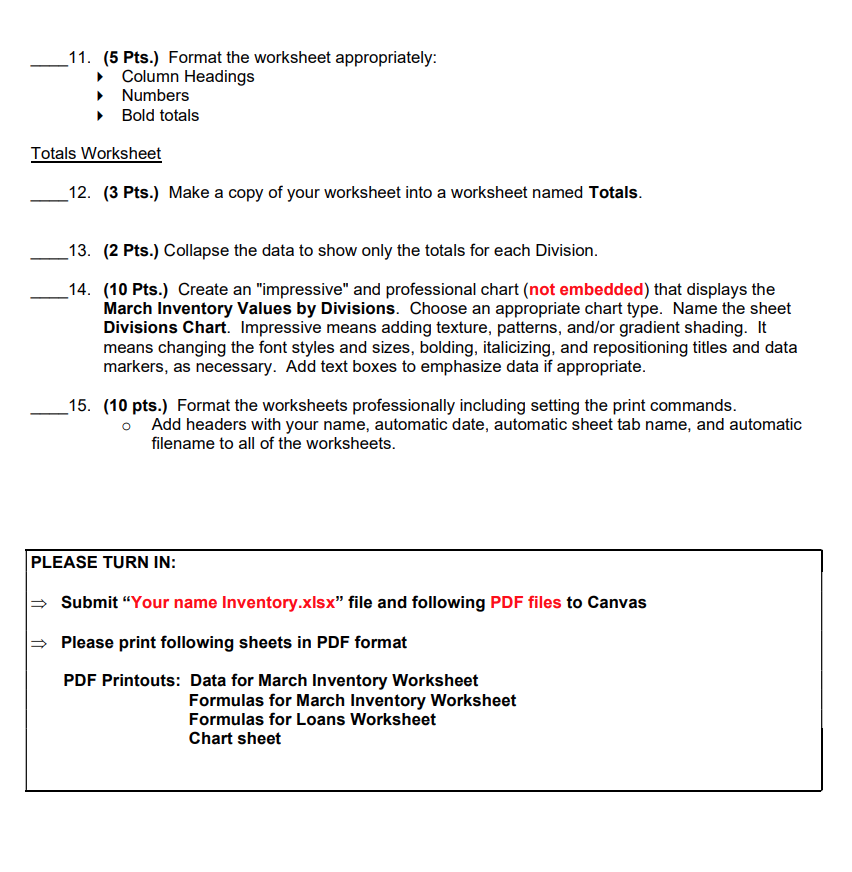
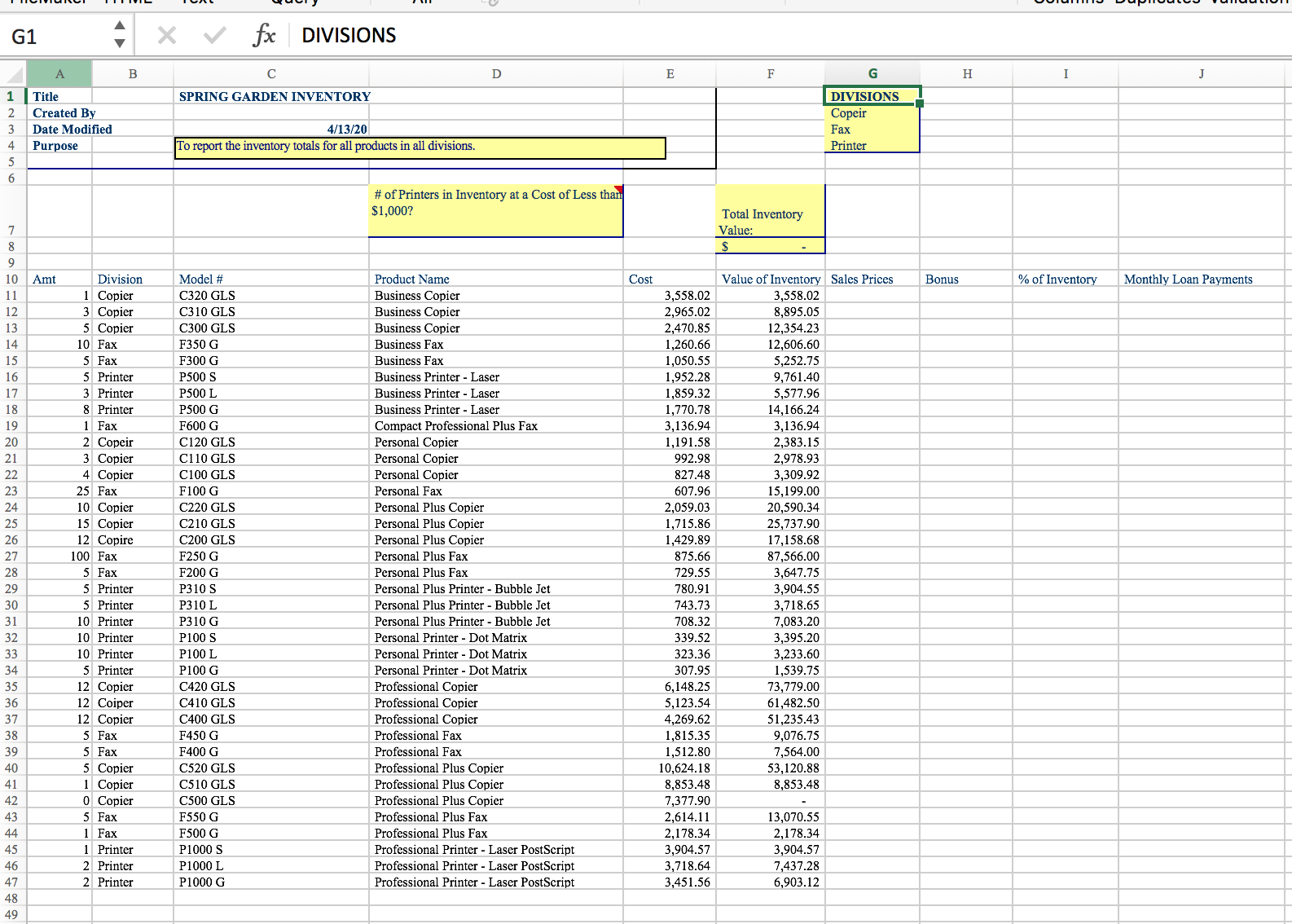
MIS310 EXCEL Individual Project Spring Garden Inventory Due Date: April 13, 2020 NAME Instructions: Open the file "Spring Garden Inventory.xlsx" from Canvas. Save it as "Your name Inventory.xlsx" Use absolute and relative cell references as appropriate. Do not use constant cell values. Use functions as appropriate. You may need to add tables or cells for assumptions and scales as appropriate. Format all numbers to currency or percentage where appropriate. Do not use more than 2 decimal places. March Inventory Worksheet 1. (1 Pt.) Add your name to cell C2 and the automatic current date to C3. 2. (7 Pts.) Create a drop-down list to validate the data entered for each Division. The Divisions should display in the list exactly as they are shown in column G of the March Inventory sheet. It should display an error message should state "Enter a valid Division" if an invalid Division is entered. 3. (3 Pts.) After you have created the drop-down list, verify the entries for Copiers (there are 3 errors)! You may verify your accuracy by utilizing a filter when complete. Any filters should then be removed. 4. (5 Pts.) Calculate the Value of Inventory. It is the number of inventory items you have times the cost for each item. 5. (5 Pts.) Calculate the Sales Prices, which are marked up 35% more than the costs. 6. (15 Pts.) Calculate the Bonus Amounts. If the Sales Price is less than $749.99, the company will give the salesperson a bonus amount that is equal to 2% of the Sales Price. If the Sales Price is between $750.00 and $999.99, the bonus is 5%; for Sales Prices between $1000.00 and $1999.99, the bonus is 10%; and for Sales Prices over $2000.00, the bonus is 15%. 199 199 7. (5 Pts.) Calculate what percent each inventory item's value is of the total inventory value. (Be aware that you will be generating subtotals later!) 8. (9 Pts.) Spring Garden Sales is embarking on a huge sales campaign. They are going make loans to help customers pay for their products. They are making the loans according to the table on the Loans sheet. Calculate the monthly payments for the loan amounts. 9. (10 Pts.) Place the corresponding loan payments in the March Inventory worksheet. (Hint: Please use LOOKUP function or IF function.) 10. (10 Pts.) Generate subtotals for the March Inventory values and the costs by divisions. Include all numerical columns except for Sales Prices, % of Inventory, and Monthly Payments. (Hint: Please use subtotal function under your Data Tab.) 11. (5 Pts.) Format the worksheet appropriately: Column Headings Numbers Bold totals Totals Worksheet 12. (3 Pts.) Make a copy of your worksheet into a worksheet named Totals. 13. (2 Pts.) Collapse the data to show only the totals for each Division. 14. (10 Pts.) Create an "impressive" and professional chart (not embedded) that displays the March Inventory Values by Divisions. Choose an appropriate chart type. Name the sheet Divisions Chart. Impressive means adding texture, patterns, and/or gradient shading. It means changing the font styles and sizes, bolding, italicizing, and repositioning titles and data markers, as necessary. Add text boxes to emphasize data if appropriate. 15. (10 pts.) Format the worksheets professionally including setting the print commands. Add headers with your name, automatic date, automatic sheet tab name, and automatic filename to all of the worksheets. PLEASE TURN IN: Submit "Your name Inventory.xlsx" file and following PDF files to Canvas Please print following sheets in PDF format PDF Printouts: Data for March Inventory Worksheet Formulas for March Inventory Worksheet Formulas for Loans Worksheet Chart sheet G1 1 Title 2 Created By 3 4 Date Modified Purpose +56 7895 B fx DIVISIONS C SPRING GARDEN INVENTORY 4/13/20 To report the inventory totals for all products in all divisions. D E F # of Printers in Inventory at a Cost of Less than $1,000? Total Inventory Value: G H I J DIVISIONS Copeir Fax Printer Bonus % of Inventory Monthly Loan Payments 10 Amt Division Model # Product Name Cost Value of Inventory Sales Prices 11 1 Copier C320 GLS Business Copier 3,558.02 3,558.02 12 3 Copier C310 GLS Business Copier 2,965.02 8,895.05 13 5 Copier C300 GLS 14 10 Fax F350 G 15 5 Fax F300 G 16 5 Printer P500 S Business Copier Business Fax Business Fax Business Printer - Laser 2,470.85 12,354.23 1,260.66 12,606.60 1,050.55 5,252.75 1,952.28 9,761.40 17 3 Printer P500 L Business Printer - Laser 1,859.32 5,577.96 18 8 Printer P500 G Business Printer - Laser 1,770.78 14,166.24 19 1 Fax F600 G Compact Professional Plus Fax 3,136.94 3,136.94 20 2 Copeir C120 GLS Personal Copier 1,191.58 2,383.15 21 3 Copier C110 GLS Personal Copier 992.98 2,978.93 22 4 Copier C100 GLS Personal Copier 827.48 3,309.92 23 25 Fax F100 G Personal Fax 607.96 15,199.00 24 10 Copier C220 GLS Personal Plus Copier 2,059.03 20,590.34 25 15 Copier C210 GLS Personal Plus Copier 1,715.86 25,737.90 26 12 Copire C200 GLS Personal Plus Copier 1,429.89 17,158.68 27 100 Fax F250 G Personal Plus Fax 875.66 87,566.00 28 5 Fax F200 G Personal Plus Fax 729.55 3,647.75 29 5 Printer P310 S Personal Plus Printer - Bubble Jet 780.91 3,904.55 30 5 Printer P310 L Personal Plus Printer - Bubble Jet 743.73 3,718.65 31 10 Printer P310 G Personal Plus Printer - Bubble Jet 708.32 7,083.20 32 10 Printer P100 S 33 10 Printer P100 L 34 5 Printer P100 G 35 12 Copier C420 GLS 36 12 Coiper C410 GLS 37 12 Copier C400 GLS 38 5 Fax F450 G 39 5 Fax F400 G 40 5 Copier C520 GLS 41 1 Copier C510 GLS 42 0 Copier C500 GLS 43 5 Fax F550 G Personal Printer - Dot Matrix Personal Printer - Dot Matrix Personal Printer - Dot Matrix Professional Copier Professional Copier Professional Copier Professional Fax Professional Fax Professional Plus Copier Professional Plus Copier Professional Plus Copier Professional Plus Fax 339.52 3,395.20 323.36 3,233.60 307.95 1,539.75 6,148.25 73,779.00 5,123.54 61,482.50 4,269.62 51,235.43 1,815.35 9,076.75 1,512.80 7,564.00 10,624.18 53,120.88 8,853.48 8,853.48 7,377.90 2,614.11 13,070.55 44 1 Fax F500 G Professional Plus Fax 2,178.34 2,178.34 45 1 Printer P1000 S Professional Printer Laser PostScript 3,904.57 3,904.57 46 2 Printer P1000 L Professional Printer - Laser PostScript 3,718.64 7,437.28 47 2 Printer P1000 G Professional Printer - Laser PostScript 3,451.56 6,903.12 48 49
Step by Step Solution
There are 3 Steps involved in it

Get step-by-step solutions from verified subject matter experts
 Study Help