







Question: Mobile Computing Infrastructure Project: In this project, we are going to create a Notes / Memo app with SQLite as Database storage. We will use
Mobile Computing Infrastructure
Project: In this project, we are going to create a Notes / Memo app with SQLite as Database storage. We will use as well in this project shared preferences objects and the external/internal storage The application will have the following screen: (using java)
1. A login screen with user name and password authentication.
o The login screen should contain two buttons, a login button and a register button if no user exists.
o The registration info should be saved within a shared preferences files and when saved, the application will only display the login button on the login screen next time the application is launched.
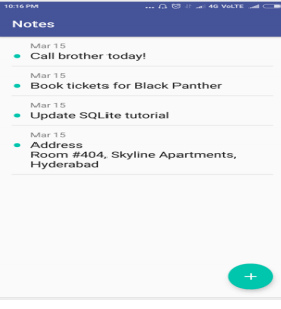
.2. One the user is logged in; the application will display a list of existing notes similar to the screen shown in the screen below displaying the title and the date of the note:
o In this screen, you will as well create an add button, that will allow you to create a new note.
o A new note should have a date, a title, and the content text.
o if the user clicks on a note, he will then be redirected to another screen allowing him to read the notes content.
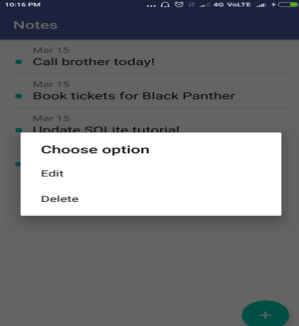
3. When the users press and holds a note, he should be presented with two options:
o Delete will allow him to delete an existing note
o Edit, will allow him to edit an existing note
o The display should be something similar to the below screen shot:
4. The last part of this project consist of exporting the notes into a csv file, for this purpose, you will add an export button to your application. (You can create a settings screen for ex and add the button in it)
o When the export button is pressed, it will convert the data from the database into a csv file that will be saved on the users device (internal or external storage)
5. Bonus points:
o Add a feature that allows the user to import notes from another device by using a provided csv file generated from the export button.
o This feature will insert into the database the information retrieved from a csv file chosen by the user.
10:16 PM 40 VOLTE Notes Mar 15 Call brother today! Mar 15 Book tickets for Black Panther Mar 15 Update SQLite tutorial Mar 15 Address Room #404, Skyline Apartments, Hyderabad 10:16 PM 4G VoLTE Notes Mar 15 - Call brother today! Mar 15 Book tickets for Black Panther Mar 15 Lindate solite tutorial Choose option Edit Delete
Step by Step Solution
There are 3 Steps involved in it

Get step-by-step solutions from verified subject matter experts
 Study Help