







Question: Mobile Web-Based Application Development ------------------------------------------------------ Choose the best option ------------------------------------ Questions 1 HTML h3 id = header > Quiz Header /h3> Quiz Questions section >
Mobile Web-Based Application Development
------------------------------------------------------
Choose the best option
------------------------------------
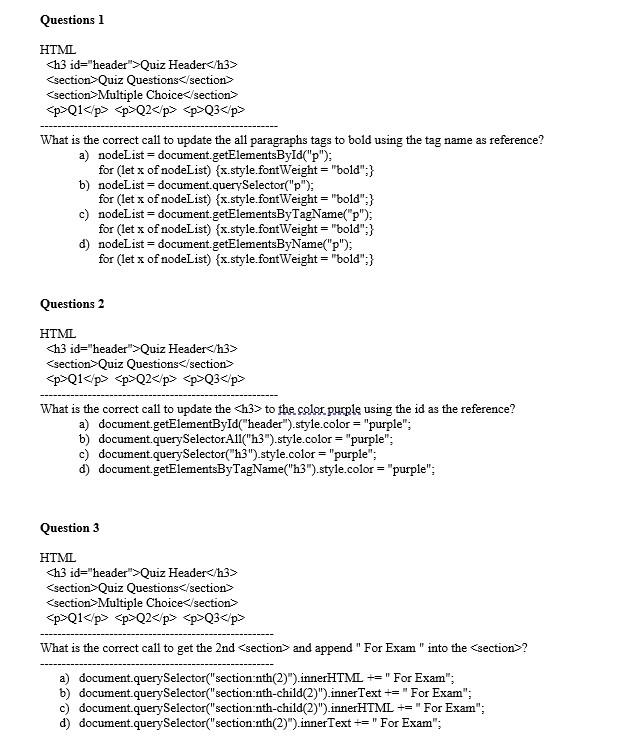
Questions 1 HTML h3 id = "header" > Quiz Header /h3> Quiz Questions section > Multiple Choice section> p>Q1
p>Q2Q3
What is the correct call to update the all paragraphs tags to bold using the tag name as reference? a) nodeList = document.getElementsById("p"); for (let x of nodeList) {x.style.font Weight = "bold"; } b) nodeList = document.querySelector ("p"); for (let x of nodeList) x.style.font Weight = "bold"; } c) nodeList = document.getElementsByTagName ("p "); for (let x of nodeList) x.style.fontWeight = "bold"; } d) nodeList = document. getElementsByName ("p"); for (let x of nodeList) {x.style.font Weight = "bold"; } Questions 2 HTML h 3 id = "header" > Quiz Header h 3> p>Q1
Step by Step Solution
There are 3 Steps involved in it

Get step-by-step solutions from verified subject matter experts
 Study Help