







Question: MODIFY THE ANDROID STUDIO CODES BELOW AND FOLLOW THE INSTRUCTIONS Instructions: This time, your bible application contains the change language functionaliy (see the attached resources).
MODIFY THE ANDROID STUDIO CODES BELOW AND FOLLOW THE INSTRUCTIONS
Instructions:
This time, your bible application contains the change language functionaliy (see the attached resources).
The English radio button is the default language (selected).
When the user clicks the Tagalog radio button, the verse contents in the display will change to tagalog language automatically.
Use the assigned bible story to do your activity.
Note:
DO WHATEVER YOU WANT JUST FOLLOW BASE ON THE GUIDE BELOW
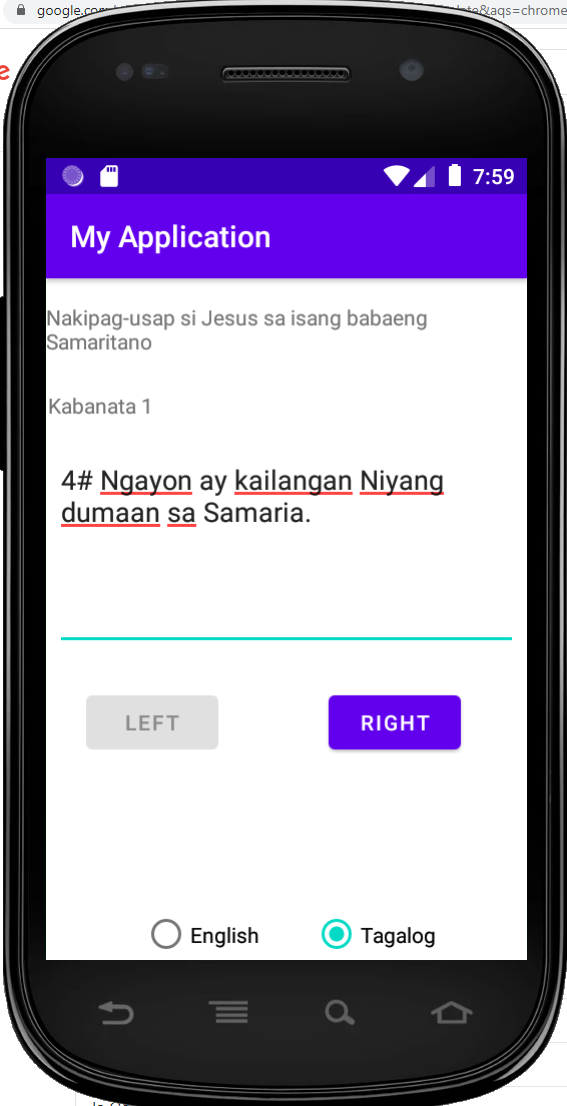
MainActivity.java:
import androidx.appcompat.app.AppCompatActivity; import android.os.Bundle; import android.view.View; import android.widget.Button; import android.widget.TextView; import java.util.ListIterator; import java.util.Vector; public class MainActivity extends AppCompatActivity { private TextView title,TextView; private Button previous,next; @Override protected void onCreate(Bundle savedInstanceState) { super.onCreate(savedInstanceState); setContentView(R.layout.activity_main); Button prev = (Button) findViewById(R.id.previous); Button next = (Button) findViewById(R.id.next); TextView verse = (TextView) findViewById(R.id.verse); Vector verses = new Vector(); verses.add("#1 English verse 1"); verses.add("#2 English verse 2"); verses.add("#3 English verse 3"); ListIterator list = verses.listIterator(); for(String btn: verses) { next.setOnClickListener(new View.OnClickListener() { @Override public void onClick(View v) { String temp = list.next().toString(); verse.setText(temp); if(list.hasNext() == false) { next.setEnabled(false); list.previous(); }else next.setEnabled(true); if(next.isEnabled()==false) prev.setEnabled(true); if(list.hasPrevious()) prev.setEnabled(true); } }); prev.setOnClickListener(new View.OnClickListener() { @Override public void onClick(View v) { String temp = list.previous().toString(); verse.setText(temp); if(list.hasPrevious() == false) { prev.setEnabled(false); list.next(); }else prev.setEnabled(true); if(prev.isEnabled() == false) next.setEnabled(true); if(list.hasNext()) next.setEnabled(true); } }); } } }activity_main.xml:
.google.com L&aqs=chrome 7:59 My Application Nakipag-usap si Jesus sa isang babaeng Samaritano Kabanata 1 4# Ngayon ay kailangan Niyang dumaan sa Samaria. LEFT RIGHT English Tagalog U E .google.com L&aqs=chrome 7:59 My Application Nakipag-usap si Jesus sa isang babaeng Samaritano Kabanata 1 4# Ngayon ay kailangan Niyang dumaan sa Samaria. LEFT RIGHT English Tagalog U E
Step by Step Solution
There are 3 Steps involved in it

Get step-by-step solutions from verified subject matter experts
 Study Help