





Question: Modify the CharacterInfo class shown in the code editor so that the tested character is retrieved from the user input. InputCharacterInfo.java > ... import java.

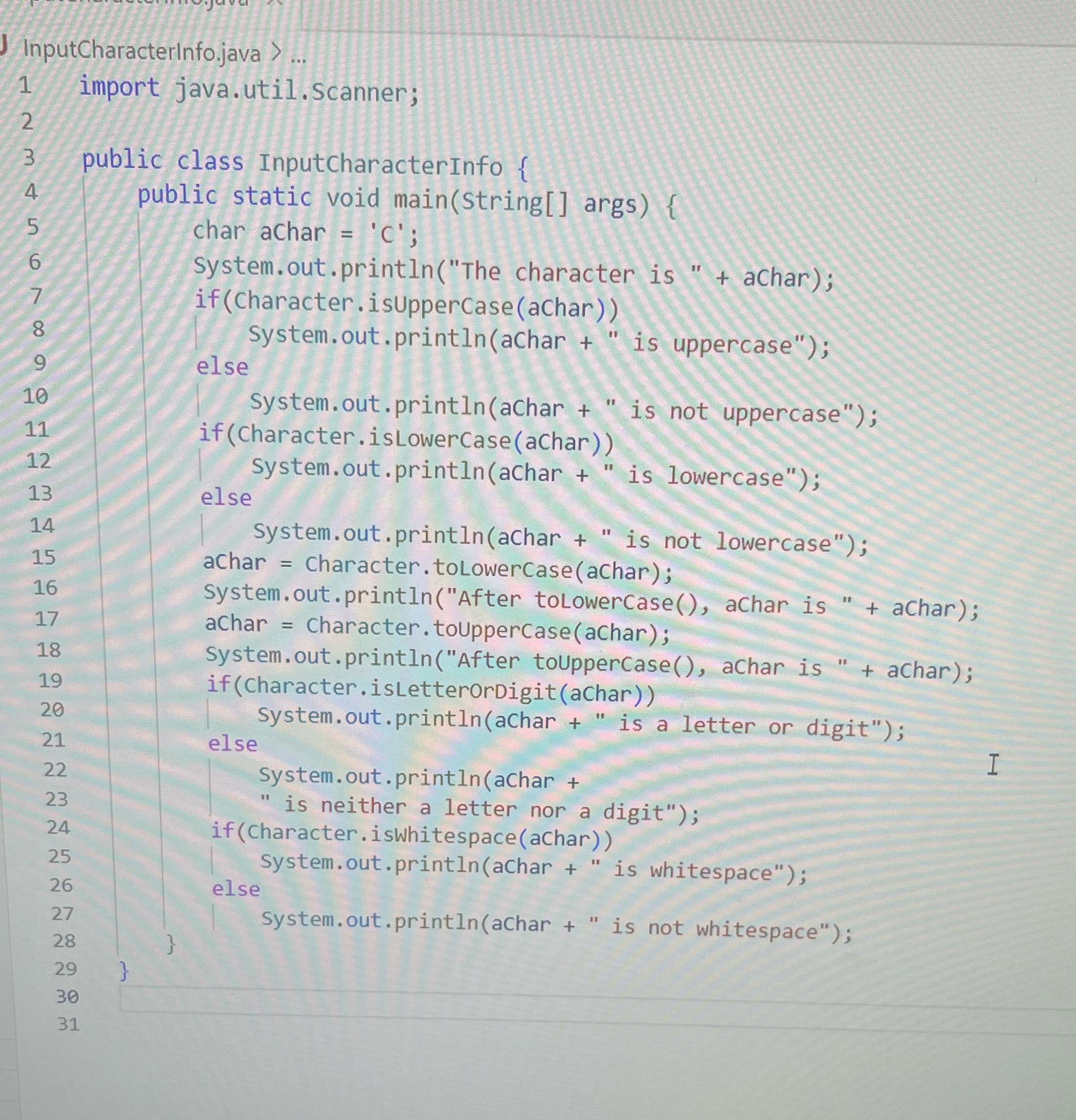
Modify the CharacterInfo class shown in the code editor so that the tested character is retrieved from the user input.
Modify the CharacterInfo class shown in the code
InputCharacterInfo.java > ... import java. util . Scanner; N public class InputCharacterInfo { public static void main(String[ ] args) { char aChar = 'c'; System. out . printIn("The character is " + achar); if (Character . isUpperCase(achar) ) 8 System. out . printIn(achar + " is uppercase") ; 9 else 10 System. out . printIn(aChar + " is not uppercase"); 11 if (Character . isLowerCase(aChar)) 12 System. out . printIn(aChar + " is lowercase") ; 13 else 14 System. out . printIn(aChar + " is not lowercase"); 15 aChar = Character . toLowerCase (aChar) ; 16 System. out . printIn("After toLowerCase( ), aChar is " + achar); 17 aChar = Character . toUpperCase(aChar) ; 18 System. out . printIn("After toUpperCase(), achar is " + achar); 19 if (Character . isLetterOrDigit(achar)) 20 System. out . printIn(aChar + " is a letter or digit"); 21 else H 22 System. out . printIn(achar + 23 " is neither a letter nor a digit") ; 24 if (Character . iswhitespace(achar) ) 25 System . out . printIn(aChar + " is whitespace") ; 26 else 27 system. out . printIn(aChar + " is not whitespace") ; 28 29 30 31

Step by Step Solution

There are 3 Steps involved in it

1 Expert Approved Answer
Step: 1 Unlock blur-text-image

Question Has Been Solved by an Expert!

Get step-by-step solutions from verified subject matter experts

Step: 2 Unlock
Step: 3 Unlock

Students Have Also Explored These Related Programming Questions!