







Question: Modify the process.php file to do all of the following: Do complete input checking which means: trim the input of leading and trailing white
/* * ********************************************* * STEP 1: INPUT: Do NOT process, just get the data. * Do not delete this comment, * ********************************************** */
if (!empty($_POST['text1']) && !empty($_POST['text2'])) { // extract the data from the global $_POST (if it exists) into local variables. // NEVER work with $_POST directly, get away from it as fast as possible. $text1 = $_POST['text1']; $text2 = $_POST['text2']; } else { $text1 = ""; $text2 = ""; }
/* * ****************************************************** * STEP 2: VALIDATION: Always clean your input first!!!! * Do NOT process, only CLEAN and VALIDATE. * Do not delete this comment. * ****************************************************** */
// clean up the variables (a little) by removing leading and trailing white space // follow the instructions in the assignment for further cleaning steps $text1 = trim($text1); $text2 = trim($text2);
if (!empty($text1) && !empty($text2)) {
/* * ************************************************************************* * STEP 3 and 4: PROCESSING and OUTPUT: Notice this code only executes * if you have valid data from steps 1 and 2. Your code must always have * a saftey feature similar to this. * Do not delete this comment. * ************************************************************************ */
// the following code shows how you can access parts of the $_POST array echo "you entered: \"" . $text1 . "\" for text box 1 "; $length = strlen($text1);
if ($length > 0) { echo "the length of your first input is: " . $length . " "; } echo " ";
echo "you entered: \"" . $text2 . "\" for text box 1 "; $length = strlen($text2);
if ($length > 0) { echo "the length of your second input is: " . $length . " "; } echo " "; echo 'try again '; } else { echo "you did not enter anything one or both text boxes. "; echo 'try again '; }
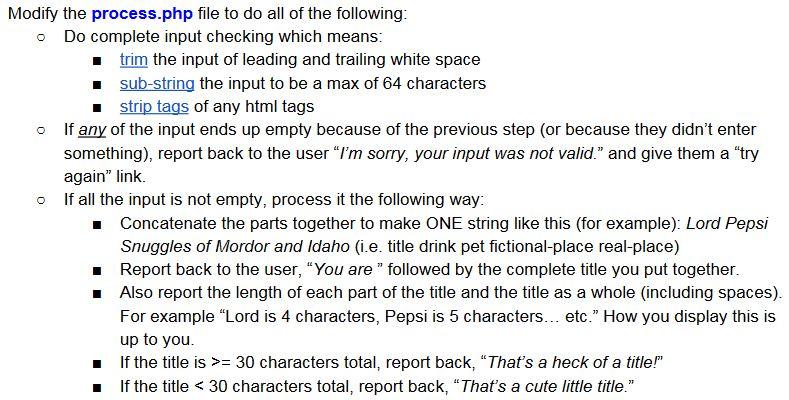
Modify the process.php file to do all of the following: o Do complete input checking which means: trim the input of leading and trailing white space sub-string the input to be a max of 64 characters I strip tags of any html tags If any of the input ends up empty because of the previous step (or because they didn't enter something), report back to the user I'm sorry, your input was not valid." and give them a "try again" link. o If all the input is not empty, process it the following way: Concatenate the parts together to make ONE string like this (for example): Lord Pepsi Snuggles of Mordor and Idaho (i.e. title drink pet fictional-place real-place) Report back to the user, "You are " followed by the complete title you put together. Also report the length of each part of the title and the title as a whole (including spaces). For example Lord is 4 characters, Pepsi is 5 characters... etc." How you display this is up to you. If the title is >= 30 characters total, report back, That's a heck of a title!" If the title = 30 characters total, report back, That's a heck of a title!" If the title
Modify the process.php file to do all of the following: Do complete input checking which means: trim the input of leading and trailing white space sub-string the input to be a max of 64 characters strip tags of any html tags If any of the input ends up empty because of the previous step (or because they didn't enter something), report back to the user "I'm sorry, your input was not valid." and give them a "try again" link. If all the input is not empty, process it the following way: Concatenate the parts together to make ONE string like this (for example): Lord Pepsi Snuggles of Mordor and Idaho (i.e. title drink pet fictional-place real-place) Report back to the user, "You are" followed by the complete title you put together. Also report the length of each part of the title and the title as a whole (including spaces). For example "Lord is 4 characters, Pepsi is 5 characters... etc." How you display this is up to you. If the title is >= 30 characters total, report back, "That's a heck of a title!" If the title < 30 characters total, report back, "That's a cute little title."
Step by Step Solution
There are 3 Steps involved in it

Get step-by-step solutions from verified subject matter experts
 Study Help