







Question: Modify the Student class (student.py) from Chapter 10 by adding a mutator method that records a grade for the student. Heres the specification of the
Modify the Student class (student.py) from Chapter 10 by adding a mutator method that records a grade for the student. Heres the specification of the new method:
addGrade(self, gradePoint, credits)
gradePoint is a float that represents a grade (e.g., A = 4.0, A- = 3.7, B+ = 3.3, etc.)
credits is a float indicating the number of credit hours for the class
Modify the student object by adding this grade information
Use the GradePoint.py program to test your Student class. The output of the program should look as follows:
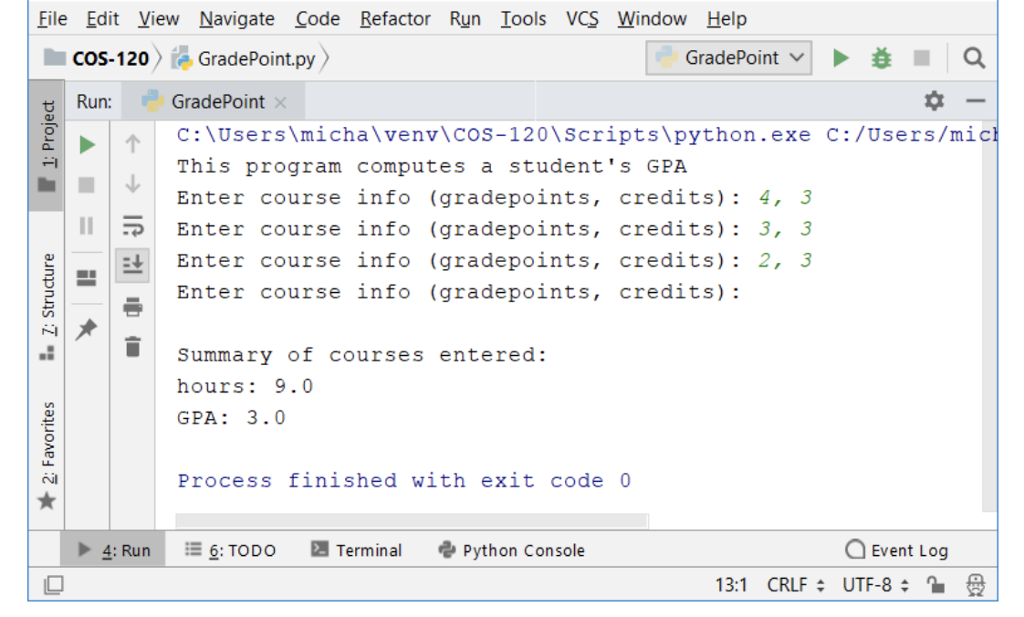
GRADEPOINT.PY-
def main(): print("This program computes a student's GPA") student = Student("No Name", 0, 0)
infoStr = input("Enter course info (gradepoints, credits): ") while infoStr != "": data = infoStr.split(",") gp, credits = float(data[0]), float(data[1]) student.addGrade(gp, credits) infoStr = input("Enter course info (gradepoints, credits): ")
print(" Summary of courses entered:") print("hours:", student.getHours()) print("GPA:", student.gpa())
main()
STUDENT.PY-
class Student: def __init__(self, name, hours, qpoints): self.name = name self.hours = float(hours) self.qpoints = float(qpoints)
def getName(self): return self.name
def getHours(self): return self.hours
def getQPoints(self): return self.qpoints
def gpa(self): return self.qpoints/self.hours
File Edit View Navigate Code Refactor Run Iools VCS Window Help GradePoint.py GradePoint c:\Users\micha\venv\Cos-120\Scripts\python.exe c:/Users/mic This program computes a student's GPA Enter course info (gradepoints, credits): 4, 3 COS-120 Run: Enter course info (gradepoints, credits): 3, 3 Enter course info (gradepoints, credits): 2, 3 Enter course info (gradepoints, credits): Summary of courses entered: hours: 9.0 GPA: 3.0 Process finished with exit code 0 -6: TODO Terminal e, python console Event Log 4: Run 131 CRLF: UTF-8
Step by Step Solution
There are 3 Steps involved in it

Get step-by-step solutions from verified subject matter experts
 Study Help