







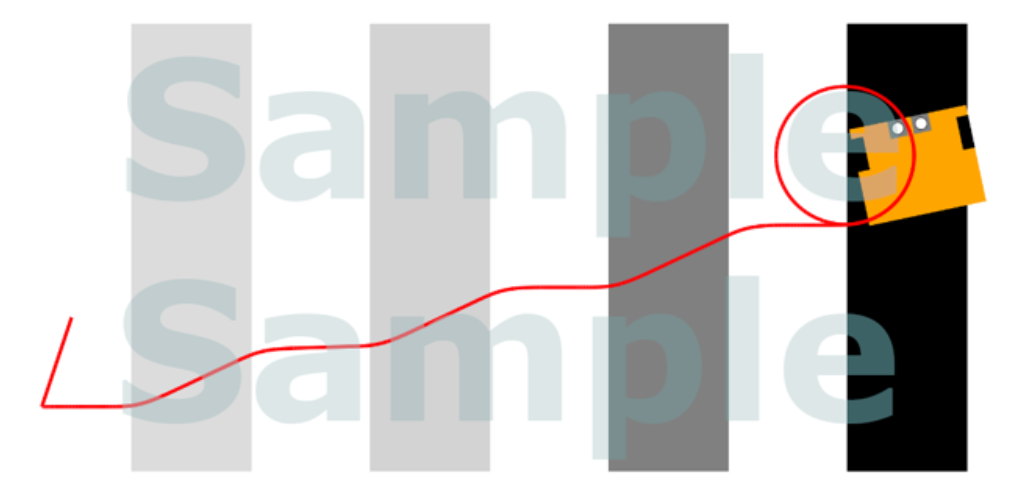
Question: Modify this code so the pattern is drawn as on picture in Robolab Jupyte Notebook: % % sim _ magic _ preloaded - Cp -
Modify this code so the pattern is drawn as on picture in Robolab Jupyte Notebook:
simmagicpreloaded Cp b Greybands x y a
STEERING
TURNROTATIONS
TURNSPEED
STRAIGHTSPEEDPC SpeedPercent
STRAIGHTROTATIONS
import time
# Function to move the robot forward until a change in background color is detected
def moveforwarduntilcolorchange:
while previousvalue :
currentvalue colorLeft.reflectedlightintensitypc
if previousvalue and currentvalue :
break
# Move the robot forward
tankdrive.onSpeedPercent SpeedPercent
time.sleep # Small delay to avoid busywaiting
# Function to turn the robot by a specified amount in a specified direction
while previousvalue :
currentvalue colorLeft.reflectedlightintensitypc
if sensor val :
tankturn.onforrotationsSTEERING
SpeedPercentTURNSPEED
TURNROTATIONS # Placeholder for actual turn method
elif direction :
tankdrive.onforrotationsSpeedPercent SpeedPercent
# Placeholder for actual turn method
time.sleep
# Main program
while previousvalue :
currentvalue colorLeft.reflectedlightintensitypc # Move forward until a color change is detected
if sensorval : # Assuming a method to detect the black line
tankdrive.onforrotationsSpeedPercent SpeedPercent # Draw a circle and end the program
break
tankturn.onforrotations SpeedPercent
#Forwards
tankdrive.onforrotationsSpeedPercent SpeedPercent
# Alternate the direction of turn after each color change
# Adjust direction and amount as needed
previousvalue currentvalue
Step by Step Solution
There are 3 Steps involved in it
1 Expert Approved Answer
Step: 1 Unlock

Question Has Been Solved by an Expert!
Get step-by-step solutions from verified subject matter experts
Step: 2 Unlock
Step: 3 Unlock
 Study Help