







Question: Modify this programe in Python import turtle tess = turtle.Turtle() myWin = turtle.Screen() #The graphics window commands = input(Please enter a command string: ) for
Modify this programe in Python
import turtle
tess = turtle.Turtle() myWin = turtle.Screen() #The graphics window commands = input("Please enter a command string: ")
for ch in commands: #perform action indicated by the character if ch == 'F': #move forward tess.forward(50) elif ch == 'L': #turn left tess.left(90) elif ch == 'R': #turn right tess.right(90) elif ch == '^': #lift pen tess.penup() elif ch == 'v': #lower pen tess.pendown() else: #for any other character, print an error message print("Error: do not know the command:", c)
print("See graphics window for your image") myWin.exitonclick() #Close the window when clicked
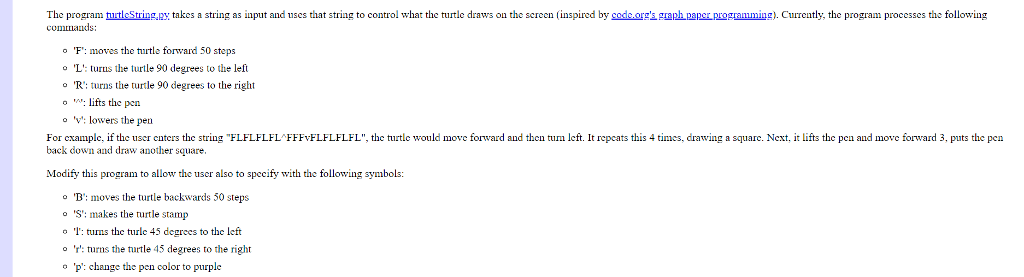
The program turtleString,py takes a string as input and uses that string to control what the turtle draws on the screen inspired by sodeorg'sgraph paper programming). Currently, the program processes the following commands o 'F': moves the turtle forward 50 steps o 'L': turus the u90 degrees to the left "R": turns the turtle 90 degrees to the right o : lifts the pen "v": lowers the pen For example, if the user enters the string "FLFLFLFL FFFvFLFLFLFL", the turtle would move forward and then turn left. It repcats this 4 times, drawing a square. Next, it lifts the pen and move forward 3, puts the pen back down and draw another square. Modify this program to allow the user also to specify with the following symbols o B': moves the turtle backwards 50 steps 'S': makes the turtle stamp o l tus the turle 45 degrees to the left 'r': turns the title 45 degrees to the right p: change the pen color to purple
Step by Step Solution
There are 3 Steps involved in it

Get step-by-step solutions from verified subject matter experts
 Study Help