







Question: Modify your Mail Delivery Service Python application from the previous assignment and add an event handler to the Process button to display a pop -
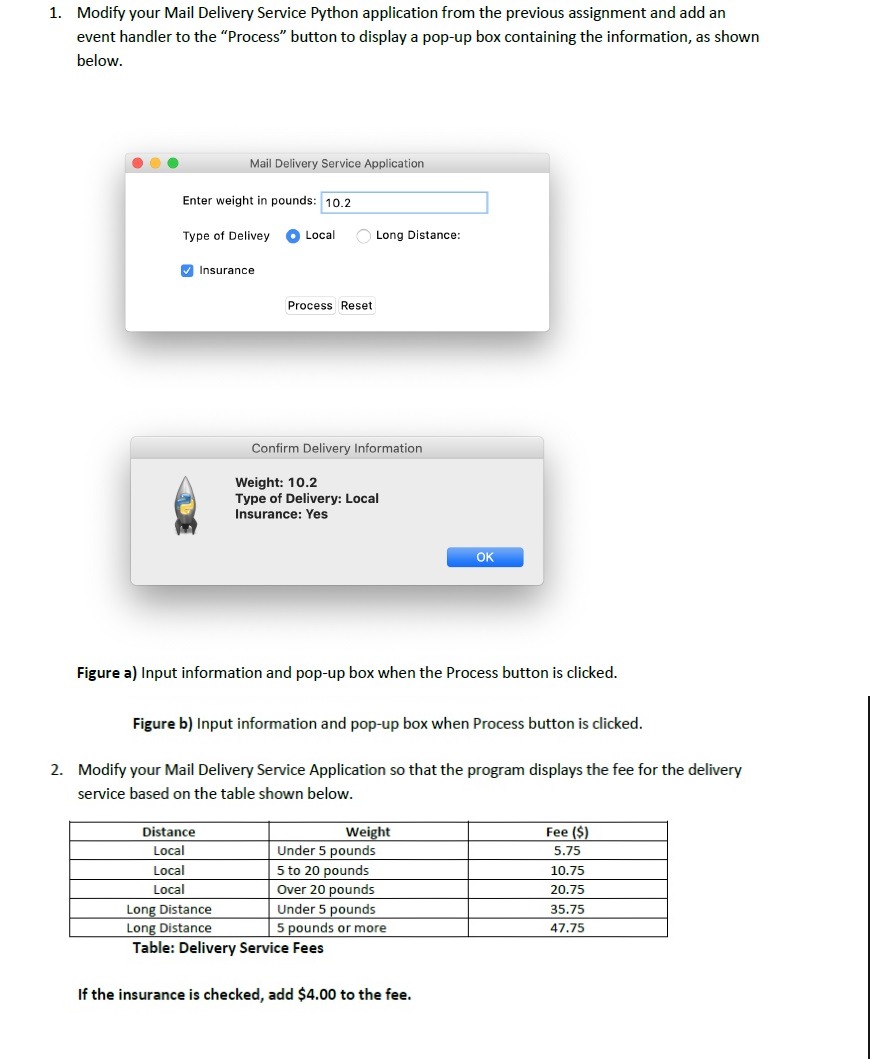
Modify your Mail Delivery Service Python application from the previous assignment and add an
event handler to the "Process" button to display a popup box containing the information, as shown
below.
Mail Delivery Service Application
Enter weight in pounds:
Type of Delivey
Local
Long Distance:
Insurance
Weight:
Type of Delivery: Local
Insurance: Yes
Figure a Input information and popup box when the Process button is clicked.
Figure b Input information and popup box when Process button is clicked.
Modify your Mail Delivery Service Application so that the program displays the fee for the delivery
service based on the table shown below.
Table: Delivery Service Fees
If the insurance is checked, add $ to the fee.
This is the python code
import tkinter
mainFrame tkinter.Tk
mainFrame.geometryx
mainFrame.titleMail Delivery Service Application"
weightLabel tkinter.Labeltext"Enter weight in pounds:"
weightLabel.placex y
weightEntry tkinter.Entry
weightEntry.placex y
typeofDeliveryLabel tkinter.Labeltext"Type of Delivery"
typeofDeliveryLabel.placex y
localDelivery tkinter.Radiobuttontext"Local"
localDelivery.placex y
longDistance tkinter.Radiobuttontext"Long Distance"
longDistance.placex y
insuranceOption tkinter.Checkbuttontext"Insurance"
insuranceOption.placex y
processButton tkinter.Buttontext"Process"
processButton.placex y
resetButton tkinter.Buttontext"Reset"
resetButton.placex y
Step by Step Solution
There are 3 Steps involved in it
1 Expert Approved Answer
Step: 1 Unlock

Question Has Been Solved by an Expert!
Get step-by-step solutions from verified subject matter experts
Step: 2 Unlock
Step: 3 Unlock
 Study Help